
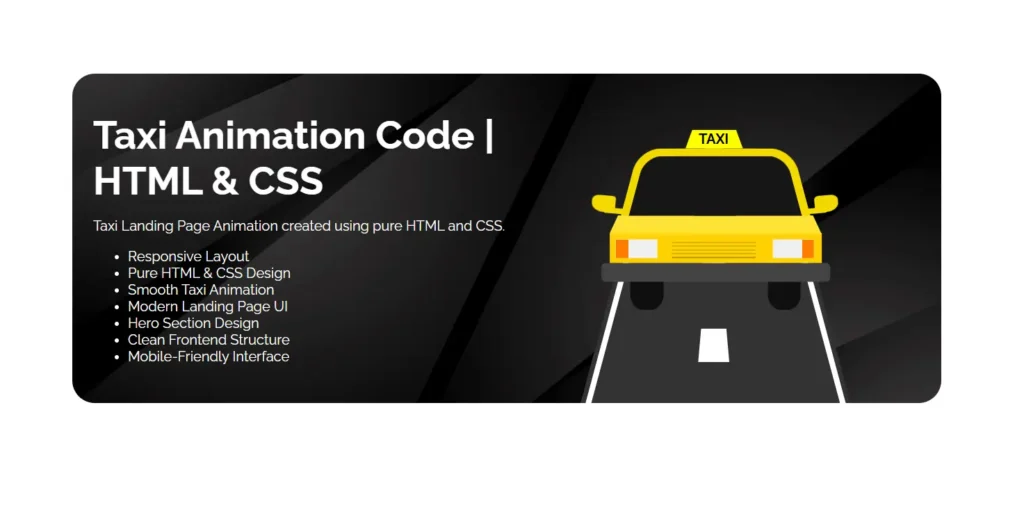
Modern frontend design is no longer just about static layouts. Users now expect smooth animations, engaging UI elements, and responsive experiences that feel interactive from the very first screen. One of the most creative ways developers showcase these skills is through animated landing page projects built using only HTML and CSS.
A Taxi Animation Landing Page is a great example of how simple frontend technologies can create visually impressive user experiences without relying heavily on JavaScript frameworks or external libraries. From animated roads to moving vehicle effects and responsive layouts, this type of project demonstrates both creativity and frontend fundamentals.
According to a Google UX study, users form a design impression of a website in less than 0.05 seconds. Smooth UI animations and modern layouts significantly improve engagement and perceived professionalism. That is why animated landing page templates continue trending among frontend developers, students, portfolio creators, and UI designers.
In this guide, you will explore everything about building and understanding a Taxi Animation in Pure HTML & CSS, including design structure, animation concepts, responsive techniques, SEO benefits, optimization tips, and practical frontend insights beginners often miss.
Why Taxi Animation Projects Are Popular in Frontend Development
Taxi animation projects combine multiple frontend concepts into a single interactive UI design. Instead of showcasing plain text and static elements, developers can demonstrate creativity through motion and layout structure.
These projects are widely used for:
- Frontend portfolio showcases
- HTML & CSS practice projects
- UI design inspiration
- Landing page experiments
- Animation learning
- Responsive website demonstrations
- Beginner coding tutorials
The biggest advantage is that most taxi animation templates can be created entirely using CSS properties like:
transformtransitionkeyframespositionflexboxanimation
This makes the project lightweight and beginner-friendly while still looking modern and professional.
What Is a Taxi Animation Landing Page?
A Taxi Animation Landing Page is a frontend UI design where a taxi vehicle graphic is animated using HTML structure and CSS effects. The animation usually includes:
| Feature | Purpose |
|---|---|
| Moving Road Effect | Creates motion illusion |
| Taxi Vehicle Animation | Adds dynamic visual interaction |
| Responsive Layout | Improves mobile usability |
| Hero Section UI | Enhances first impression |
| CSS Keyframes | Controls smooth animations |
| Modern Typography | Improves readability |
Unlike complex JavaScript-heavy animations, these landing pages focus on optimized CSS animation techniques for better performance and faster loading.
Core Technologies Used in Taxi Animation Projects
HTML5 Structure
HTML creates the foundation of the landing page. It defines:
- Taxi container
- Road layout
- Heading section
- Feature list
- UI components
- Responsive structure
A clean HTML structure helps improve maintainability and SEO friendliness.
Example sections may include:
- Hero Banner
- Animation Wrapper
- Content Box
- Features Area
- CTA Section
CSS3 Animation
CSS handles all visual styling and movement effects.
Important CSS features commonly used include:
CSS Keyframes
Keyframes allow developers to define movement sequences.
Example usage:
- Road moving effect
- Tire rotation
- Floating UI transitions
Transform Properties
Used for:
- Rotation
- Translation
- Scaling
- Perspective effects
Flexbox Layout
Helps align:
- Content sections
- Taxi graphics
- Responsive elements
Media Queries
Ensure mobile responsiveness across:
- Smartphones
- Tablets
- Desktop screens
Key Features of a Modern Taxi Animation UI Design
Responsive Frontend Layout
Modern websites must work smoothly across all devices. Responsive design ensures that the taxi animation adapts properly on smaller screens.
Benefits include:
- Better user experience
- Lower bounce rate
- Improved Google ranking signals
- Mobile usability optimization
Google reports that more than 58% of global website traffic comes from mobile devices. Responsive frontend design is no longer optional for UI projects.
Smooth Animation Experience
Animation quality directly affects how professional the design feels.
A good taxi animation project should include:
- Smooth movement
- Balanced animation speed
- Minimal lag
- Lightweight rendering
- Proper transition timing
Overusing animations can negatively affect performance, so maintaining balance is important.
Lightweight Frontend Performance
One major advantage of pure HTML and CSS projects is performance optimization.
Since no large frameworks are required:
- Loading speed improves
- Rendering becomes smoother
- Hosting becomes easier
- SEO performance improves
This is especially useful for:
- Portfolio websites
- Demo templates
- Landing pages
- Educational projects
Understanding the Taxi Animation Design Structure
Most taxi animation landing pages follow a similar layout architecture.
Hero Section
This is the first visible section users see.
It typically includes:
- Large heading
- Description text
- Feature points
- Taxi illustration
- Animated background
The hero section determines whether users continue exploring the page.
Animated Taxi Component
The taxi illustration can be created using:
- CSS shapes
- SVG graphics
- PNG images
- Layered div elements
Pure CSS illustrations are especially popular because they reduce dependency on external assets.
Road Animation Area
The road effect creates the illusion that the taxi is moving.
Common techniques include:
- Infinite background movement
- Transform translation
- Repeating patterns
- Gradient shadows
This section adds realism to the UI.
Why Pure HTML & CSS Projects Are Valuable for Beginners
Many beginners jump directly into advanced frameworks without mastering frontend fundamentals.
Projects like Taxi Animation help developers understand:
- Positioning systems
- Animation logic
- Responsive design
- Layout management
- Visual hierarchy
- CSS optimization
These skills are essential before learning:
- React
- Vue
- Tailwind
- Next.js
- Advanced UI libraries
SEO Benefits of Animated Landing Page Templates
Many developers overlook the SEO side of frontend UI projects.
A properly optimized HTML & CSS template can support better visibility in search engines.
Faster Loading Speed
Google prioritizes fast-loading pages.
Pure CSS animations generally:
- Reduce script dependency
- Improve Core Web Vitals
- Minimize blocking resources
Better User Engagement
Interactive UI designs increase:
- Session duration
- Scroll depth
- User interaction
These engagement signals indirectly help SEO performance.
Mobile Optimization
Responsive templates improve:
- Mobile usability
- Search visibility
- Accessibility scores
Important CSS Animation Concepts Used in Taxi Projects
Keyframes Animation
Keyframes define animation stages.
Common examples:
- Taxi bounce effect
- Moving road
- Headlight glow
- Floating UI
Infinite Animation Loops
Most taxi animations run continuously using:
animation: moveRoad 2s linear infinite;This creates smooth endless motion.
Layer Positioning
Developers often use:
position: absolute;
position: relative;
to layer:
- Road
- Taxi
- Background shadows
- Text content
Best Practices for Building Taxi Animation UI Designs
Keep Animation Smooth
Avoid:
- Sudden jumps
- Overly fast movement
- Heavy effects
Smooth motion looks more professional.
Optimize for Mobile Devices
Test the template on:
- Small phones
- Tablets
- Large desktops
Responsive consistency improves usability.
Use Clean Code Structure
Organize CSS into sections:
- Layout
- Components
- Animation
- Responsive styles
This improves maintainability.
Avoid Excessive Libraries
Simple projects do not always need:
- Heavy frameworks
- Large animation plugins
- Unnecessary scripts
Minimal design often performs better.
Avoid Excessive Libraries
Simple projects do not always need:
- Heavy frameworks
- Large animation plugins
- Unnecessary scripts
Minimal design often performs better.
Ignoring Responsive Design
Animations that look perfect on desktop may break on mobile devices.
Always test responsiveness.
Using Random Colors
Color consistency matters in UI design.
Taxi-themed projects usually work well with:
- Yellow
- Black
- White
- Dark gray gradients
How Taxi Animation Projects Help Portfolio Websites
Frontend recruiters and clients prefer practical demonstrations over theoretical knowledge.
A taxi animation project showcases:
- CSS skills
- Creative thinking
- UI understanding
- Responsive development
- Animation implementation
This makes it valuable for:
- Portfolio websites
- GitHub showcases
- Coding practice collections
- Frontend case studies
Where These UI Templates Can Be Used
Taxi animation templates can be adapted for multiple industries:
| Industry | Usage |
|---|---|
| Cab Booking Services | Landing Pages |
| Ride Sharing Apps | UI Concepts |
| Transportation Companies | Homepage Design |
| Startup Websites | Hero Animation |
| Portfolio Websites | Animation Showcase |
Where These UI Templates Can Be Used
Taxi animation templates can be adapted for multiple industries:
| Industry | Usage |
|---|---|
| Cab Booking Services | Landing Pages |
| Ride Sharing Apps | UI Concepts |
| Transportation Companies | Homepage Design |
| Startup Websites | Hero Animation |
| Portfolio Websites | Animation Showcase |
Reduce Shadow Overload
Heavy shadows increase rendering cost.
Keep shadows subtle for better performance.
Compress Background Assets
If using background images:
- Optimize file size
- Use modern formats
- Reduce unnecessary resolution
This improves loading speed significantly.
Beginner-Friendly Learning Roadmap
If you want to build projects like this yourself, follow this progression:
- Learn HTML structure basics
- Understand CSS selectors
- Practice Flexbox and Grid
- Learn positioning systems
- Study CSS animations
- Build mini UI components
- Create responsive landing pages
- Optimize performance
This approach creates stronger frontend fundamentals.
Why Minimal Frontend Projects Still Matter in 2026
Modern frontend development often focuses heavily on frameworks and automation tools. However, lightweight HTML and CSS projects continue to remain valuable because they teach core rendering concepts directly.
Many professional frontend developers still use pure CSS animation concepts inside:
- React projects
- Landing page builders
- SaaS websites
- Portfolio templates
- Startup websites
Strong fundamentals improve long-term development skills.
How to Customize a Taxi Animation Template
You can personalize the UI design in several ways:
Change Theme Colors
Experiment with:
- Neon styles
- Dark mode
- Gradient backgrounds
Add Interactive Buttons
Include:
- CTA buttons
- Booking forms
- Navigation menus
Include Additional Effects
Examples:
- Smoke animation
- Headlight glow
- Rain effect
- City skyline background
These additions increase visual appeal.
Final Thoughts
Taxi Animation in Pure HTML & CSS is an excellent frontend project for developers who want to combine responsive design, CSS animation, and modern UI concepts into a single engaging landing page.
The project demonstrates how lightweight frontend technologies can create visually impressive experiences without relying on large frameworks or complicated scripts. Whether you are a beginner learning animation concepts or a frontend designer building a portfolio showcase, taxi animation templates provide both educational value and creative inspiration.
With proper optimization, responsive structure, and clean coding practices, these projects can also support better SEO performance, faster loading speeds, and improved user engagement.
FAQs
How does a Taxi Animation work in HTML and CSS?
Taxi animations are typically created using CSS keyframes, transforms, positioning, and animated background effects. HTML defines the structure while CSS controls the movement and visual styling.
Is JavaScript necessary for Taxi Animation projects?
No. Many taxi animation landing pages are built entirely using HTML and CSS without JavaScript. CSS animations alone can create smooth visual motion effects.
Are Taxi Animation templates responsive?
Most modern taxi animation templates are designed with responsive layouts using Flexbox, Grid, and media queries so they work across mobile and desktop devices.
Can beginners build Taxi Animation projects?
Yes. Taxi animation projects are beginner-friendly and help developers learn important frontend concepts like positioning, responsive design, and CSS animations.
Why are CSS animation projects useful for portfolios?
They showcase creativity, frontend fundamentals, UI understanding, responsive design skills, and animation implementation, making portfolios more engaging for recruiters and clients.
What are the main technologies used in Taxi Animation UI design?
The main technologies include:
- HTML5
- CSS3
- Flexbox
- CSS Keyframes
- Responsive Design Techniques
8 people bought this
Grab it Now for Just 49 ₹100


