
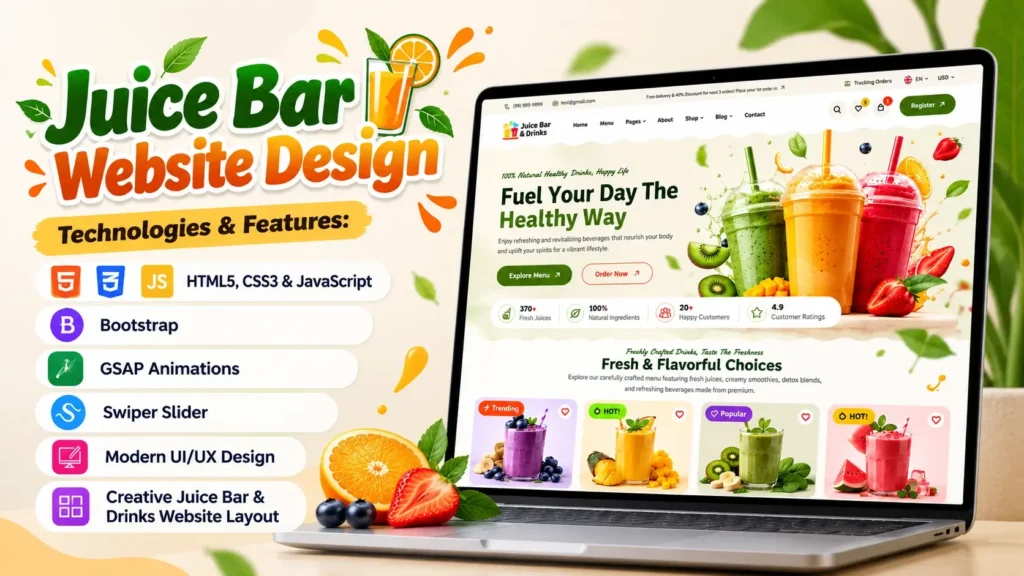
A fresh and attractive website can help a juice bar stand out in a competitive food and beverage market. From colorful fruit images to smooth animations and well-organized product sections, every design element can make a website more appealing to visitors. A good Juice Bar Website Design should not only look attractive but also help customers explore the menu, understand the brand, and find important information easily.
In this project, we explore a modern juice bar and drinks website built using HTML5, CSS3, JavaScript, Bootstrap, GSAP animations, and Swiper Slider. The design combines a vibrant visual style with interactive elements to create an engaging homepage for a juice shop, smoothie bar, beverage brand, or healthy drinks business.
Whether you are a beginner learning frontend development, a student working on a web design project, or a developer looking for inspiration for your next website, this project offers practical ideas you can study and customize.
Website performance is also important. According to Google, approximately 53% of mobile visits may be abandoned when a page takes longer than three seconds to load. This research highlights why attractive visuals should be balanced with fast loading and a smooth user experience. Source: Google AdSense Help.
Let’s explore the website design, its technologies, key features, customization options, and the steps you can follow to work with the source code.
What Is a Juice Bar Website Design?
A Juice Bar Website Design is a website layout created for businesses that sell fresh juices, smoothies, fruit drinks, shakes, and other beverages. It presents the brand, highlights popular products, and helps customers discover what the business offers.
A modern juice shop website usually combines bright colors, high-quality product images, readable typography, clear navigation, and prominent calls to action.
For example, a juice bar can use its homepage to introduce the business, display its best-selling drinks, highlight fresh ingredients, and direct visitors toward the menu or contact page.
This project focuses on a visually engaging homepage with modern styling, animation effects, slider functionality, and a creative beverage-focused layout.
Who Can Use This Website Template?
This website design can serve as a starting point for several types of projects:
- Juice bars: Showcase fresh juices, seasonal drinks, and signature beverages.
- Smoothie shops: Highlight fruit smoothies, protein shakes, and healthy drink options.
- Cafes: Create a dedicated section for juices, shakes, and cold beverages.
- Beverage startups: Present a new drinks brand with a modern online identity.
- Frontend developers: Study page layouts, animation techniques, and interactive components.
- Students: Explore a practical HTML, CSS, and JavaScript website project.
The existing design is a frontend starting point. Features such as online ordering, payment processing, customer accounts, and order tracking require additional development if they are not already implemented.
Overview of the Juice Bar Website Project
This project combines a modern visual layout with several frontend technologies. Its main purpose is to demonstrate how standard web technologies and animation libraries can work together to create an engaging drinks website.
| Project Detail | Description |
|---|---|
| Project type | Juice bar and drinks website |
| Primary page | Homepage |
| Core technologies | HTML5, CSS3, JavaScript |
| CSS framework | Bootstrap |
| Animation library | GSAP |
| Slider library | Swiper |
| Additional technology | jQuery and Three.js |
| Main purpose | Website design showcase and frontend development |
| Customization | Colors, images, text, sections, and animations |
The project also includes supporting assets such as images, icons, fonts, and stylesheets. These resources contribute to the overall appearance and behavior of the website.
Before publishing a customized version, review the complete project structure, confirm that all required assets are available, and check whether the external libraries are loaded correctly.
Key Features of This Juice Bar Website Design
A good website needs more than an attractive homepage. It should offer a consistent experience, make important information easy to find, and work properly across different devices.
Here are some of the main design elements and technical features to explore in this project.
1. Modern and Creative Homepage
The homepage is often the first part of a website visitors see. A strong design should communicate the business’s identity within a few seconds.
A juice bar homepage can achieve this with a clear headline, colorful drink photography, concise introductory text, and a visible call to action.
For example, a headline such as “Fresh Flavors, Naturally Better” immediately communicates the type of business. A supporting message can explain the brand’s focus on fruit-based drinks or freshly prepared beverages.
When customizing the homepage, keep the main message clear and avoid filling the first screen with too many competing elements.
2. Attractive Colors and Typography
Color plays an important role in food and beverage website design. Green can communicate freshness, orange can add energy, and yellow can create a bright visual atmosphere.
However, the best color palette depends on the brand rather than a fixed rule.
Choose two or three primary colors and use them consistently across buttons, headings, backgrounds, and supporting elements. Use a readable font for body text and a distinctive heading style to create visual hierarchy.
Make sure the text remains easy to read against colorful backgrounds. Good contrast improves usability on both desktop and mobile screens.
3. GSAP Animations
GSAP, short for GreenSock Animation Platform, is a JavaScript animation library used to create controlled movement and transitions.
In a juice bar website, animations can help introduce product images, reveal headings, animate decorative elements, or create smoother transitions between sections.
Well-planned animation can make the experience feel more polished. However, animation should support the content rather than distract visitors from it.
When editing the animation code, check the timing, movement, and behavior on smaller screens. Avoid unnecessary effects that delay access to important information.
4. Swiper Slider
Swiper is a slider library that supports interactive, touch-friendly carousels.
A juice shop could use a slider to display signature drinks, seasonal beverages, product photography, or customer testimonials.
For example, a featured drinks carousel can let visitors explore several products without requiring a separate section for every item.
When customizing a slider, confirm that navigation controls work correctly, images have appropriate dimensions, and the content remains usable on touchscreens. Do not assume that a slider is accessible or mobile-friendly simply because the library supports those capabilities; test the implementation.
5. Bootstrap-Based Layout
Bootstrap provides a collection of CSS components and responsive layout tools that can simplify frontend development.
It can help developers organize content into rows and columns, style buttons, manage spacing, and create layouts that adapt to different screen sizes.
This is particularly useful for a juice bar website because the homepage may include product cards, promotional sections, images, and several content blocks.
Bootstrap is widely used across the web. W3Techs reported on October 10, 2026, that Bootstrap was used by 13.3% of all websites in its survey, representing 74.8% of websites whose CSS framework was known. Source: W3Techs.
This makes Bootstrap a useful technology to understand when working on many types of frontend projects.
6. Interactive JavaScript Elements
JavaScript adds behavior to a website. Depending on the implementation, it can control navigation menus, sliders, animation triggers, interactive buttons, and other interface elements.
For this project, review how JavaScript files interact with the HTML structure and CSS classes before making major changes.
Avoid adding multiple scripts that perform the same task. Check the browser console for errors after editing code, especially if a library depends on a particular HTML element or class name.
7. Supporting Visual Assets
Images, icons, fonts, and backgrounds help establish the visual identity of a juice bar website.
High-quality beverage photography can make product sections more appealing, but large image files can also slow down the page.
Use appropriately sized images, compress them where possible, and provide descriptive alternative text for meaningful images. Decorative images should not add unnecessary noise for screen-reader users.
Keep asset filenames organized so that future updates are easier to manage.
Technologies Used in the Juice Bar Website
Understanding the technologies behind the project helps you make changes confidently instead of editing files without knowing their purpose.
HTML5: Website Structure
HTML defines the content and structure of a webpage. It organizes headings, paragraphs, images, navigation, links, buttons, and other elements.
For this project, start with index.html to understand the homepage structure. Look for the main sections and identify the elements responsible for the header, hero area, product content, and footer.
Use semantic HTML elements where appropriate. For example, <header>, <nav>, <main>, <section>, and <footer> make the page structure easier to understand.
CSS3: Styling and Layout
CSS controls the visual appearance of the website, including colors, typography, spacing, borders, backgrounds, and responsive layouts.
The project contains several stylesheets, including main.css and Bootstrap-related styling. Check the order in which these files load before changing existing rules.
If you want to change the primary brand color, search for the relevant CSS declarations or variables. Making related changes in one consistent place is easier to maintain than overriding the same styles repeatedly.
JavaScript: Functionality
JavaScript controls interactive behavior and can connect the visual layout with libraries such as GSAP and Swiper.
Review the script references in the HTML file and identify which files control specific features. Change one component at a time and test it before moving to the next.
This approach makes it easier to find errors and understand how the project works.
GSAP, Swiper, Bootstrap, and Other Libraries
Each library serves a different purpose:
- GSAP: Creates animations and timed transitions.
- Swiper: Provides interactive sliders and carousels.
- Bootstrap: Supports layout and interface styling.
- jQuery: Simplifies certain JavaScript operations in projects that depend on it.
- Three.js: Supports browser-based 3D graphics and related visual effects.
The presence of a library in the project does not mean every page element uses it. Review the actual code to understand which features depend on each library.
How to Set Up and Run the Website Source Code
Follow these steps to inspect the project and run it in a local development environment.
Step 1: Extract the Project Files
Extract the project archive into a dedicated folder on your computer.
Keep the original folder structure intact. Moving individual images, stylesheets, or scripts can break the paths referenced by the HTML and CSS files.
Step 2: Open the Project in a Code Editor
Open the project folder in a code editor such as Visual Studio Code.
Start with index.html and identify the stylesheet and JavaScript references. This gives you a basic understanding of how the homepage is assembled.
Step 3: Run the Website Locally
For a simple static website, you can open index.html directly in a browser. However, projects that use particular scripts, modules, or browser APIs may require a local development server.
A development server can also make testing and debugging more consistent.
Step 4: Check Images and External Libraries
Open the homepage and confirm that images, fonts, sliders, and animations load correctly.
If a section appears broken, inspect the browser console and network panel. Common causes include incorrect file paths, missing assets, blocked external scripts, or JavaScript errors.
Check for duplicate or malformed paths as well. A path containing an unexpected extra slash, for example, may need correction depending on how the asset is referenced.
Step 5: Test the Main Interactions
Try the navigation menu, slider controls, buttons, and any interactive effects.
If an element is only decorative, make sure it does not appear to be a functional button. If it is interactive, verify that it responds as expected.
Step 6: Test on Different Screen Sizes
Preview the homepage at desktop, tablet, and mobile widths.
Check whether the navigation remains usable, text wraps properly, images fit their containers, and buttons are easy to tap. Fix any horizontal scrolling or overlapping elements before publishing.
How to Customize the Juice Bar Website Template
One advantage of a well-organized source code project is that you can adapt it to different brands and business requirements.
Change the Website Name and Logo
Replace the existing brand name and logo with your own business identity. Check the header, footer, browser title, and any other location where the original branding appears.
Use a logo with suitable dimensions and make sure it remains clear on smaller screens.
Update the Colors and Fonts
Choose a color palette that matches the business. A tropical juice shop might use green and orange, while a premium smoothie bar may prefer a more restrained palette.
Update font families, heading sizes, and spacing consistently. Always check contrast and readability after making visual changes.
Replace Product Images
Use relevant images of juices, smoothies, fruit bowls, or other products the business actually offers.
Optimize the images for the space in which they appear. A large hero image may need a different crop and resolution from a small product thumbnail.
Write descriptive alt text for meaningful product images and avoid using filenames as the only description.
Edit the Homepage Content
Write a clear headline and a short introduction that explains the business. Add accurate details about ingredients, opening hours, location, and available services where relevant.
Use calls to action such as “Explore Our Menu” or “Contact Us” only when they lead to the correct destination.
Add Business Functionality
If the website will serve real customers, consider adding a menu page, contact form, location map, social media links, or online ordering system.
Remember that a frontend button alone does not process orders or payments. Those features need appropriate backend logic or integration with a suitable service.
SEO and Performance Tips for a Juice Bar Website
An attractive website needs a strong technical foundation to provide a good experience and support organic search visibility.
Use a Clear Heading Structure
Include one clear main heading that describes the page. Organize supporting content under logical H2 and H3 headings.
Use the phrase “Juice Bar Website Design” naturally where it helps explain the page topic. Avoid repeating it in every paragraph or forcing it into unrelated headings.
Optimize Images
Large images can affect loading performance, particularly on mobile connections.
Use modern image formats where suitable, specify image dimensions to reduce layout shifts, and lazy-load below-the-fold images when appropriate. Avoid lazy-loading the main hero image if doing so delays its appearance.
Improve Mobile Usability
Ensure that text is readable without zooming, navigation works with touch input, and interactive elements have adequate spacing.
Test the page on real devices when possible. A layout that looks correct in a desktop browser may behave differently on a smaller screen.
Review Core Web Vitals
Use PageSpeed Insights and Google Search Console to review performance and identify problems.
Pay attention to loading performance, layout stability, and interaction responsiveness. Animations, sliders, and large visual assets should be tested rather than assumed to be efficient.
Write Useful Page Metadata
Create a descriptive title and meta description that accurately represent the project. Use a short, readable URL and add descriptive image alt text.
SEO improvements can help search engines understand the page, but they cannot guarantee a particular ranking. Content quality, technical accessibility, competition, and user needs all matter.
Common Mistakes to Avoid
When working with a juice bar website source code project, a few mistakes can create unnecessary problems.
- Changing file paths without checking references: This can cause images, scripts, and stylesheets to stop loading.
- Adding too many animations: Excessive motion can distract visitors and affect performance.
- Ignoring mobile testing: A design that works on desktop may not fit smaller screens.
- Using oversized images: Large assets can slow the initial page load.
- Editing multiple files at once: Making several changes together can make errors harder to locate.
- Assuming every feature is fully functional: A visual button or form may need additional implementation.
- Ignoring library requirements: Some scripts rely on particular versions, initialization order, or HTML selectors.
- Publishing without testing: Broken links, missing images, console errors, and inaccessible controls should be checked before launch.
A useful workflow is to preserve the original project, make small changes, test each change, and keep a record of what you modified.
Why This Project Is Useful for Frontend Developers
This Juice Bar Website Design project can help beginners connect several frontend concepts in one practical example.
Instead of studying HTML structure, CSS styling, and JavaScript interactions separately, you can see how they work together in a real interface.
Beginners can practice changing text, adjusting colors, replacing images, and modifying layout spacing. Intermediate developers can investigate animation timelines, slider configuration, responsive behavior, and asset organization.
The project can also serve as a portfolio learning exercise. You can document the original design, explain the changes you made, and show screenshots of the result.
For a stronger portfolio presentation, describe your own contribution accurately. If you modified an existing project, explain which parts you customized rather than presenting the entire original design as entirely your own work.
Frequently Asked Questions
1. What Is a Juice Bar Website Design?
A Juice Bar Website Design is a website layout for a juice shop, smoothie bar, or beverage business. It typically includes branding, product imagery, menu information, and calls to action that help visitors explore the business.
2. Which Technologies Are Used in This Juice Bar Website Project?
The project uses HTML5, CSS3, JavaScript, Bootstrap, GSAP, and Swiper, along with additional libraries such as jQuery and Three.js. The exact role of each library depends on how it is used in the project files.
3. Can Beginners Customize This Juice Bar Website Template?
Yes. Beginners can start by changing the website name, logo, colors, text, and images. More advanced changes, such as modifying animation timelines or adding ordering functionality, require a better understanding of JavaScript and the relevant libraries.
4. How Can I Run the Juice Bar Website Source Code?
Extract the project files, open the folder in a code editor, and run the homepage in a browser. If the project relies on browser features that do not work through a local file, use a suitable local development server.
5. Is the Juice Bar Website Responsive?
Responsive behavior should be tested rather than assumed. Check the existing CSS and Bootstrap layout at desktop, tablet, and mobile widths, then correct any overlapping content, navigation issues, or horizontal scrolling.
6. Can I Use This Design for a Real Juice Shop?
The design can serve as a starting point for a real business website. Before launching, update the branding and business information, verify the asset and library licenses, test all links and forms, and implement any required backend features.
7. Does This Project Include Online Ordering?
The presence of a homepage design does not automatically mean online ordering is available. A working ordering system may require product data, cart functionality, order processing, and suitable backend or third-party integrations.
8. How Can I Improve the SEO of a Juice Bar Website?
Use descriptive page titles, useful content, logical headings, optimized images, mobile-friendly layouts, and fast-loading pages. Ensure that important links work and monitor the site’s search performance through Google Search Console.
9. What Is the Role of GSAP in This Website?
GSAP is used to create JavaScript-based animations. Depending on the implementation, it can animate headings, images, decorative elements, and section transitions. Animation timing and mobile performance should be tested after customization.
10. Can I Modify the Website’s Colors, Images, and Layout?
Yes. You can typically customize these elements by editing the relevant HTML, CSS, and asset files. Keep the folder structure intact, check for dependencies, and test the result after each major change.
Final Thoughts
A well-designed juice bar website brings together visual appeal, clear content, useful interactions, and reliable performance. This Juice Bar Website Design project offers a practical way to explore HTML5, CSS3, JavaScript, Bootstrap, GSAP animations, and Swiper sliders in one frontend example.
Start by understanding the existing structure, then customize the branding, images, colors, and content to match your goals. Test the page on different devices, optimize its assets, and verify that every interactive element works as intended.
Whether you are learning frontend development, building a portfolio, or planning a website for a beverage business, use the project as a foundation for experimentation and improvement. A strong final result comes from thoughtful customization, careful testing, and a focus on the people who will use the website.
Video Preview:-
Related Templates You May Like
- Fashion E-Commerce Website Design
- Admin Dashboard Template
- Shopping eCommerce Website Design
- Jewelry and Cosmetics eCommerce Website
🔥 5+ People Have Already Bought This
Grab it Now for Just 999 ₹2499


