
Introduction
A well-designed online fashion store needs more than attractive product images. It needs a clean interface, intuitive navigation, responsive layouts, clear product presentation, engaging promotional sections and a smooth shopping experience. This is where a carefully planned Fashion E-Commerce Website Design can make a significant difference.
E-commerce continues to become a major part of the global retail industry. According to an eMarketer forecast reported by Shopify, worldwide retail e-commerce sales were expected to reach approximately $6.42 trillion in 2025, representing around 20.5% of global retail sales. The same forecast projects online retail sales to reach approximately $7.89 trillion by 2028.
For developers, designers and students working on an online fashion store project, starting with a structured frontend template can save considerable development time. Instead of creating every interface element from the beginning, you can work with an established layout and customize it according to your project requirements.
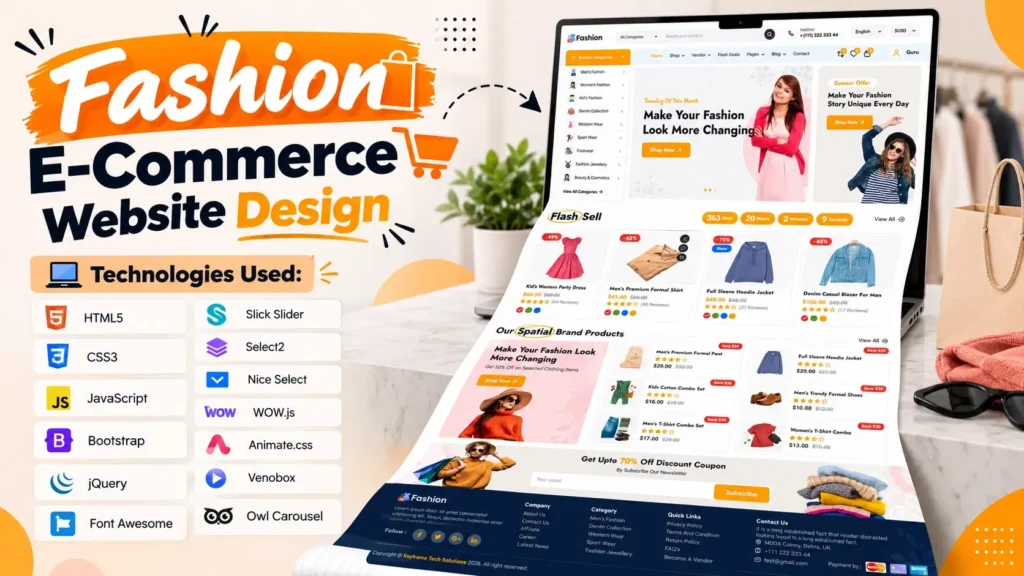
This fashion e-commerce website project provides a modern storefront interface built around HTML5, CSS3 and JavaScript, along with commonly used frontend libraries and plugins. It includes sections for products, categories, promotional offers, brands, blog content, navigation, sliders and other elements commonly found on a modern fashion shopping website.
Whether you are learning frontend development, preparing an academic project, creating a prototype or planning the interface for an actual e-commerce business, this template provides a useful starting point.
What Is a Fashion E-Commerce Website Design?
A Fashion E-Commerce Website Design is the visual and interactive frontend structure used to present fashion products online.
Unlike a simple business website, an e-commerce interface needs to guide visitors through multiple stages of discovery and shopping. Users should be able to browse categories, explore products, understand offers, view product information and move toward actions such as adding products to a cart or creating an account.
A modern fashion store interface generally includes:
- Header and navigation
- Search functionality
- Product categories
- Promotional banners
- Featured products
- Trending products
- New arrivals
- Best-selling products
- Shopping cart interface
- Wishlist interface
- Brand showcase
- Blog section
- Newsletter area
- Footer navigation
The goal is not simply to make the page visually attractive. Every section should have a purpose and contribute to a straightforward shopping journey.
Why a Modern Fashion Store UI Matters
Fashion is highly visual. Customers often make their first impression based on product photography, colors, typography, layout and overall presentation.
A cluttered interface can make even good products difficult to discover. On the other hand, a well-structured fashion store UI can make product browsing more comfortable and help visitors understand the site’s organization.
A strong e-commerce website design should focus on:
Clear Navigation
Visitors should quickly understand where they are and where they can go next. Categories, search, account options and cart controls should remain easy to find.
Strong Product Presentation
Product cards should provide enough information without overwhelming the visitor. Product images, names, pricing information, labels and actions should have a clear visual hierarchy.
Responsive Layout
Fashion shoppers use smartphones, tablets and desktop computers. A responsive interface helps maintain usability across different screen sizes.
Visual Consistency
Buttons, typography, spacing, cards and other UI elements should follow a consistent design system. This makes the website feel more professional.
Fast Interaction
Sliders, menus, product filters and other interactive components should work smoothly. Excessive animations or unnecessary scripts can negatively affect the user experience.
Main Sections Included in This Fashion E-Commerce Website
The project is structured as a complete fashion store homepage rather than a single product showcase.
Here are some of its major sections.
1. Header and Navigation
The header is one of the most important elements of an online store because it provides access to primary navigation and shopping-related actions.
The design includes common e-commerce elements such as:
- Logo area
- Navigation menu
- Search
- Account-related controls
- Wishlist
- Cart
- Mobile navigation support
A well-organized header gives visitors a clear starting point when exploring the website.
2. Hero Banner and Promotional Area
The hero section provides a large visual introduction to the fashion store.
This area can be used to promote:
- Seasonal collections
- New arrivals
- Special campaigns
- Product categories
- Fashion trends
- Limited-time promotions
Large banners are particularly useful for fashion websites because they provide space for strong visual storytelling.
3. Product Categories
Category navigation allows visitors to move from general browsing toward specific product groups.
For example, a fashion store could organize products into categories such as:
| Category | Possible Products |
|---|---|
| Women | Dresses, tops, skirts and accessories |
| Men | Shirts, jackets, trousers and footwear |
| Kids | Clothing and accessories |
| Shoes | Sneakers, casual shoes and formal footwear |
| Accessories | Bags, watches, belts and other items |
The exact categories can be changed according to the products offered by your store.
4. Flash Sale or Promotional Products
A dedicated promotional section can attract attention to selected products.
This type of section is useful for highlighting:
- Seasonal campaigns
- Limited-time promotions
- Featured collections
- Special product groups
- Time-sensitive offers
A countdown or visual emphasis can create a stronger sense of urgency, although the actual business logic should be connected to a backend system when the template is used for a production store.
5. Featured and Special Products
Featured products give store owners an opportunity to showcase selected items.
For example, a fashion business could use this section for:
- New collections
- Popular products
- Editor’s picks
- Seasonal clothing
- Premium products
The product content can be replaced with real inventory when integrating the frontend with an e-commerce backend.
6. Trending Products
A trending products section can help visitors discover products that deserve additional attention.
This is especially useful on fashion websites because customer preferences and seasonal trends change frequently.
The frontend structure can be connected to a database or e-commerce platform so that products are managed dynamically instead of being hard-coded into the HTML.
7. Best-Selling Products
Showing best-selling products provides another way to organize a large catalog.
On a production website, this section could eventually be connected to order data so that products are automatically sorted according to sales performance.
This is an important distinction between a frontend template and a complete e-commerce application: the template provides the presentation layer, while dynamic sales information requires backend logic and database integration.
8. New Arrivals
Fashion brands regularly introduce new collections. A dedicated new-arrivals section helps visitors discover recently added products.
This section can be customized with:
- Latest clothing
- New footwear
- Accessories
- Seasonal collections
- Newly launched products
9. Brand Showcase
A brand section can be useful for multi-brand fashion stores.
It can display brand logos or links to specific collections, allowing users to browse products based on brand preferences.
For a custom fashion business, these logos can instead represent collections, product lines or partner brands.
10. Blog Section
The included blog area can support content marketing alongside product promotion.
Fashion stores can publish articles about:
- Fashion trends
- Styling tips
- Seasonal collections
- Clothing guides
- Product care
- Shopping advice
- Fashion inspiration
This can help create a broader content ecosystem around the online store.
Technologies Used in the Project
The frontend uses several established web technologies and libraries.
HTML5
HTML5 provides the structural foundation of the website. It defines the page sections, navigation, product areas, content blocks, forms and other interface elements.
CSS3
CSS3 controls the visual appearance of the website, including:
- Typography
- Colors
- Spacing
- Layout
- Product cards
- Buttons
- Responsive behavior
- Animations
JavaScript
JavaScript adds interactive functionality to the frontend. It can be used for menus, sliders, dynamic UI behavior, counters and other interactions.
Bootstrap
Bootstrap helps create responsive layouts and reusable interface components.
jQuery
jQuery is used for frontend interactions and works with several of the project’s plugins.
Slick Slider
Slick is useful for creating responsive product and content carousels.
Select2 and Nice Select
These libraries improve the appearance and interaction of select/dropdown controls.
WOW.js and Animation Libraries
Animation-related libraries can add visual effects as users interact with or scroll through the page.
Font Awesome
Font Awesome provides icons that can be used for navigation, shopping actions, social links and other interface elements.
Who Can Use This Fashion E-Commerce Website Template?
This type of frontend project can be useful for several audiences.
Frontend Developers
Developers can use the existing structure as a starting point for building a custom fashion store.
Instead of beginning with an empty HTML document, developers can modify existing sections and replace the demonstration content with project-specific information.
Web Design Students
Students learning HTML, CSS and JavaScript can inspect how different components are organized.
The project can help them understand practical concepts such as:
- Website layout
- Responsive design
- CSS organization
- JavaScript interactions
- Slider implementation
- Component-based page sections
UI/UX Designers
Designers can study the arrangement of product cards, banners, categories and promotional sections to understand how an e-commerce homepage can be structured.
Small Businesses and Startups
A business preparing an online fashion store can use the frontend as a visual starting point before connecting it with an e-commerce platform or custom backend.
Agencies and Freelance Developers
Web professionals can use the template as a base for client-specific customization, provided they review the project’s license and usage requirements before deployment.
How to Customize the Fashion E-Commerce Website
One of the biggest advantages of working with source code is the ability to modify the interface according to your project.
Here is a practical customization workflow.
Step 1: Replace the Logo and Branding
Start by replacing the existing logo, favicon, brand name and visual identity.
Update:
- Logo
- Favicon
- Brand colors
- Typography
- Social links
Keep branding consistent throughout the website.
Step 2: Replace Product Images
Use your actual product photography instead of demonstration images.
For fashion stores, image quality matters significantly because visitors need to understand clothing details, colors and presentation.
Optimize images before uploading them to avoid unnecessarily large page sizes.
Step 3: Update Product Information
Replace placeholder product names and information with your own catalog data.
A production implementation should ideally load this information dynamically from a database or e-commerce platform.
Step 4: Modify Categories
Change the existing categories according to your target audience and inventory.
Avoid creating too many categories in the primary navigation. A simple hierarchy is generally easier for visitors to understand.
Step 5: Customize Banners
Replace the hero banners with images and messaging relevant to your fashion brand.
For example, you could create separate banners for:
- Summer collection
- Winter collection
- Men’s fashion
- Women’s fashion
- Footwear
- Accessories
Step 6: Connect Backend Functionality
The frontend is only one part of an e-commerce system.
A complete online store may also require:
- Product database
- User authentication
- Cart management
- Wishlist storage
- Checkout
- Payment gateway
- Order management
- Inventory management
- Shipping integration
- Admin dashboard
These features require backend development or integration with an existing e-commerce platform.
Source Code Structure and What to Check Before Deployment
Before putting an e-commerce template into production, developers should inspect the project rather than assuming that every linked page is already functional.
For example, this project contains frontend references to pages such as product/shop pages, cart, checkout, account pages and other e-commerce destinations. If those backend or additional pages are not included in the project package, they will need to be created or connected separately.
This is one of the details beginners often overlook.
A homepage can look like a complete online store while still being primarily a frontend presentation layer.
Before deployment, check:
- Internal links
- Image paths
- CSS paths
- JavaScript paths
- Plugin dependencies
- Responsive behavior
- Missing pages
- Forms
- Cart functionality
- Checkout functionality
- Authentication
- Product data
- SEO metadata
- Accessibility
- Performance
This simple checklist can prevent many problems during integration.
Responsive Fashion Website Design for Mobile Users
Responsive design should be treated as a core requirement rather than an optional feature.
According to Shopify’s reporting on global e-commerce trends, mobile phones accounted for 77% of e-commerce website visits in 2025, highlighting how important mobile browsing is for online stores.
For a fashion store, mobile usability should include:
- Easy-to-tap buttons
- Readable product information
- Properly sized product images
- Simple navigation
- Mobile-friendly menus
- Horizontal product sliders where appropriate
- Comfortable spacing
- Fast-loading media
Always test the template on multiple screen sizes before publishing it.
SEO Considerations for a Fashion E-Commerce Website
A visually attractive website still needs a solid SEO foundation.
When customizing this project, consider the following.
Use Descriptive Page Titles
Each important page should have a unique title that accurately describes its content.
Optimize Product Images
Use descriptive file names and appropriate alt text.
For example:
women-summer-dress.jpg
is more meaningful than:
IMG00123.jpg
Create Useful Product Content
Avoid publishing pages with only product names and images. Add useful descriptions, specifications, sizing information and other relevant details.
Use Structured Data
Depending on the final implementation, product, breadcrumb, organization and other relevant structured data can help search engines better understand the site.
Improve Core Web Vitals
Optimize:
- Images
- CSS
- JavaScript
- Fonts
- Third-party scripts
- Layout stability
Performance should be checked after all custom assets and tracking tools are added.
Build Helpful Supporting Content
The blog section can target informational searches around fashion, styling, product care and buying guidance.
This creates opportunities to connect informational content with relevant category and product pages.
SEO vs. Design: What Beginners Often Miss
A common mistake is assuming that a beautiful homepage automatically creates a search-friendly website.
It does not.
SEO depends on more than appearance. Search engines need understandable content, crawlable pages, useful internal links, accessible resources, appropriate metadata and a technically sound website.
For example, a visually impressive product card may still need:
- A crawlable product URL
- Descriptive product text
- Proper heading structure
- Image
alttext - Product structured data where appropriate
- Internal links
- Canonical handling
- Indexability controls
Therefore, use the template as a frontend foundation, then build the SEO architecture around the final website.
Why This Template Can Be a Useful Starting Point
The biggest advantage of a structured Fashion E-Commerce Website Design is that it gives developers a visual foundation to work from.
Instead of spending the first development phase creating basic interface components, you can focus on customization and functionality.
The project already demonstrates common e-commerce patterns such as:
- Product carousels
- Promotional sections
- Category navigation
- Brand presentation
- Responsive layouts
- Blog integration
- Shopping-related UI elements
This can make the transition from design concept to working project more straightforward.
Important Things to Understand Before Using the Source Code
A source-code template should be viewed as a development starting point rather than automatically assuming it is a complete production-ready store.
Before using it for a commercial project, check the following:
Review the License
Always verify the license associated with the template, images, fonts, icons and third-party libraries.
Replace Demonstration Content
Do not leave placeholder products, images, contact information or brand details on a live website.
Audit Third-Party Libraries
Check whether all included plugins and libraries are still necessary for your final project.
Removing unnecessary dependencies can simplify maintenance and improve performance.
Test Every Interactive Element
A button appearing on the screen does not necessarily mean that its underlying business logic exists.
Test menus, forms, sliders, product interactions, cart actions and navigation after integration.
Best Project Ideas Based on This Template
The design can be adapted for several types of projects, including:
- Fashion clothing store
- Boutique website
- Men’s fashion store
- Women’s clothing store
- Footwear marketplace
- Accessories store
- Lifestyle brand
- Online apparel catalog
- Fashion portfolio
- E-commerce UI project
- Frontend development practice project
The visual design can also be modified for other product categories by replacing imagery, typography, colors and product information.
Frequently Asked Questions
What is a Fashion E-Commerce Website Design?
A Fashion E-Commerce Website Design is the frontend interface used to present fashion products, categories, promotions and shopping-related features online. It typically includes responsive layouts, product cards, navigation, banners and other e-commerce UI components.
Which technologies are used in this fashion e-commerce website?
The project uses HTML5, CSS3 and JavaScript along with frontend libraries and plugins such as Bootstrap, jQuery, Slick Slider, Select2, Nice Select, Font Awesome and animation-related libraries.
Is this fashion e-commerce template responsive?
The project includes responsive CSS and mobile-oriented interface behavior. However, developers should test the customized version across current smartphones, tablets and desktop screen sizes before production deployment.
Can I customize the fashion store UI?
Yes. The source structure can be customized by changing the branding, colors, typography, images, product content, categories, banners and other frontend elements.
Does the template include complete e-commerce backend functionality?
The project primarily provides the frontend interface. Features such as database-driven products, authentication, order processing, inventory, payment integration and complete checkout workflows may require additional backend development or integration.
Can I connect this frontend to a backend?
Yes. Developers can connect the frontend to a custom backend, API, database or suitable e-commerce platform. The exact implementation depends on the technology stack selected for the project.
Can beginners learn from this source code?
Yes. Beginners familiar with basic HTML, CSS and JavaScript can inspect the project to understand how a larger e-commerce homepage is organized. It can be especially useful for learning practical frontend layouts and UI components.
What should I check before deploying the website?
Check links, images, scripts, responsive behavior, forms, product data, cart and checkout functionality, SEO metadata, structured data, performance, accessibility and third-party library requirements before deployment.
Can I use this design for a fashion business website?
It can serve as a frontend starting point, but you should review the project’s license and replace demonstration assets and content with your own properly licensed materials. You will also need to implement or connect the required business functionality.
Final Thoughts
A modern Fashion E-Commerce Website Design needs to combine visual appeal with usability, responsive behavior and a clear product discovery experience. This project provides a structured frontend foundation featuring product sections, categories, promotional areas, sliders, brands, blog content and other elements commonly expected from a fashion store interface.
For beginners, it can be a practical way to understand how a larger HTML, CSS and JavaScript project is organized. For experienced developers, it can provide a starting point for customization and backend integration.
The most important step is to look beyond the homepage design. A successful e-commerce website also needs reliable product data, useful content, mobile usability, technical SEO, secure transactions, proper checkout functionality and ongoing performance optimization.
Use the source code as a foundation, customize the visual identity, connect the required functionality and test the complete experience before launching your online fashion store.
Primary Focus Keyword: Fashion E-Commerce Website Design
Related Keywords: Fashion E-Commerce Website, Fashion Store Website Design, E-Commerce Website UI, E-Commerce Frontend, Fashion Store UI, HTML CSS JavaScript Website, Responsive E-Commerce Website, Modern E-Commerce Website Design, Fashion Website UI, E-Commerce Frontend Design.
Watch the Website Design and Code Preview
If you want to see the actual interface before working with the source code, a video demonstration can provide a quick overview of the homepage and its frontend structure.
The video showcases the fashion e-commerce homepage and includes a short code preview so developers can understand the type of frontend structure behind the visual design.
Related Templates You May Like
🔥 13+ People Have Already Bought This
Grab it Now for Just 999 ₹2499


