
A good food website needs to do more than display a menu. It should make visitors feel the product, understand the brand quickly, find important information easily, and move naturally toward an action. This is especially important for an ice cream business, where colors, product images, animations, categories, offers, and visual presentation can strongly influence how the website feels.
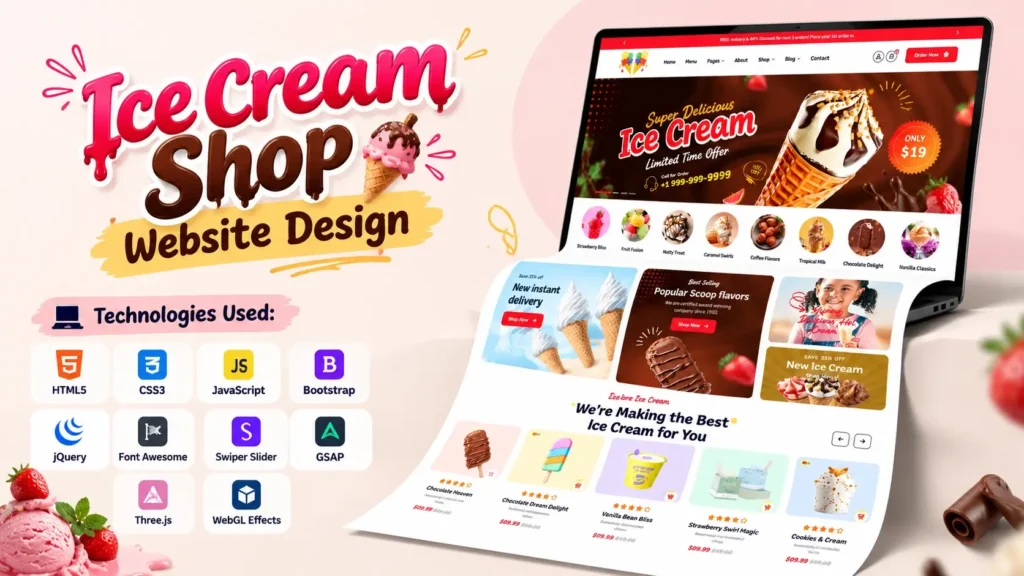
This Ice Cream Shop Website Design is a modern frontend project created for that kind of experience. It combines HTML, CSS and JavaScript with several popular frontend libraries and animation tools to create an attractive ice cream shop interface. The project includes a visually focused homepage, product sections, ice cream categories, promotional areas, testimonials, blog/news content, brand elements, contact information, and animated visual effects.
Mobile presentation is also important for a modern website. According to Statista data, mobile devices accounted for 51.48% of global website traffic in Q2 2026, excluding tablets. Google also recommends responsive web design and uses the mobile version of a site for mobile-first indexing.
That makes responsive frontend development an important part of any modern Ice Cream Shop Website Design.
What Is This Ice Cream Shop Website Design?
This project is a frontend website concept for an ice cream shop, dessert brand, café, or similar food business.
The design focuses heavily on visual presentation. Instead of using a simple text-based layout, the homepage combines large imagery, product cards, decorative graphics, sliders, animation effects, category sections, testimonials, promotional content, and other UI components.
The project is primarily built around:
- HTML5 for page structure
- CSS3 for styling and responsive layouts
- JavaScript for interactions
- Bootstrap for frontend layout and components
- jQuery for several interface functions
- Swiper for sliders and carousels
- GSAP for advanced animations
- Three.js and WebGL-related scripts for visual effects
- Font Awesome for icons
This makes the project useful not only as a website template but also as a learning reference for people studying modern frontend development.
Main Features of the Ice Cream Shop Website
The homepage contains several sections designed to create a complete food-business website experience.
1. Attractive Hero Section
The hero area is one of the most visually important parts of the design.
It uses large background imagery, decorative shapes, and supporting visual elements to immediately communicate the ice cream theme. A strong hero section is useful because visitors can understand the purpose of the website without scrolling through large amounts of text.
For a real business, this area could be customized with:
- Brand name
- Main product message
- Store location
- Call-to-action button
- Featured offer
- Ordering option
- Delivery information
The existing visual structure provides a starting point for that customization.
2. Ice Cream Category Sections
The project includes dedicated ice cream category imagery and content.
Category-based navigation is particularly useful for food websites because visitors often want to browse products according to type rather than reading everything on one page.
Possible categories for a real ice cream business could include:
| Category | Example Products |
|---|---|
| Ice Cream | Vanilla, Chocolate, Strawberry |
| Sundaes | Chocolate Sundae, Fruit Sundae |
| Cones | Waffle Cone, Classic Cone |
| Cakes | Ice Cream Cake, Celebration Cake |
| Desserts | Brownies, Dessert Cups |
The visual category structure can also be connected to separate product or menu pages when the website is expanded.
3. Product Showcase
Product presentation is another important component of the design.
The project contains numerous product-related images and pricing elements. These can be adapted for an actual ice cream shop by replacing the sample content with real product names, descriptions, prices, nutritional information, and high-quality product photography.
A useful product card should answer three basic questions quickly:
What is it?
What does it look like?
What action can I take next?
That simple approach can make a product section easier to use, especially on mobile devices.
4. Promotional Sections
The template includes dedicated promotional graphics and discount-related visual elements.
These areas can be used for seasonal campaigns such as:
- Summer specials
- New flavors
- Family combo offers
- Birthday packages
- Festival promotions
- Store opening campaigns
- Limited-time products
Instead of filling every section with promotional messages, businesses should keep the offer clear and specific. Too many competing messages can make an otherwise attractive homepage difficult to navigate.
5. Quality and Brand Value Sections
The homepage also includes sections communicating business qualities such as recipes, service, pricing, packaging, and product-related values.
This is useful because an attractive design alone does not establish trust.
For a real ice cream business, these sections could explain:
- Ingredient quality
- Preparation process
- Sourcing
- Hygiene standards
- Packaging
- Delivery process
- Customer service
- Store experience
These details can add useful business information while supporting the visual design.
Technologies Used in This Frontend Project
One of the interesting aspects of this Ice Cream Shop Website Design is that it uses more than basic HTML and CSS.
HTML5
HTML provides the structural foundation of the website.
The homepage contains sections for navigation, hero content, products, categories, promotional areas, testimonials, news, footer content, and other components.
For beginners, the HTML file is useful for understanding how a long-form business homepage can be organized into logical sections.
CSS3
The project uses a large custom stylesheet along with supporting CSS libraries.
The primary styling is handled through main.css, while additional stylesheets support Bootstrap, animations, sliders, navigation, icons, and popup functionality.
CSS controls areas such as:
- Typography
- Spacing
- Layout
- Product cards
- Buttons
- Backgrounds
- Decorative shapes
- Responsive behavior
- Animation styling
JavaScript
JavaScript adds interaction and dynamic behavior to the frontend.
The project includes a dedicated main.js file along with several JavaScript libraries.
These scripts support interactive elements such as navigation, sliders, counters, popups, animations, and visual transitions.
Bootstrap
Bootstrap is included as part of the frontend stack.
It can simplify responsive layouts and provide a structured grid system. Developers customizing the project can use Bootstrap classes while extending the design through the existing custom CSS.
Swiper
Swiper is used for modern sliders and carousel-style interfaces.
This is particularly useful for:
- Product sliders
- Testimonials
- Promotional content
- Image galleries
- Featured products
Sliders should be used carefully, however. Important content should not depend entirely on an automatic carousel because users may miss changing slides.
GSAP Animation
The project includes GSAP and related animation plugins.
GSAP can be used to create smooth, controlled animations for elements entering the screen, scrolling interactions, text effects, and other visual transitions.
For designers, this is one of the more interesting parts of the source structure because it demonstrates how a static webpage can be transformed into a more interactive experience.
Three.js and WebGL Effects
The project also includes Three.js and WebGL-related JavaScript files.
This adds another layer to the frontend design. WebGL-based effects can create interactive visual transitions and image effects that are difficult to achieve with basic CSS alone.
However, these effects should be tested carefully on mobile devices and lower-powered hardware.
A visually impressive effect is useful only when it does not interfere with usability or page performance.
Ice Cream Shop Website Design and Responsive Development
Responsive design should not be treated as an optional feature.
Google explains that responsive web design is a recommended approach for mobile-friendly websites, and Google Search uses the mobile version of a website for indexing and ranking through mobile-first indexing.
For an ice cream business, this matters because visitors may discover the website while they are outside, searching from a smartphone.
A responsive layout should make it easy to:
- Browse products
- Read prices
- Open the menu
- Find the location
- Contact the shop
- View offers
- Read reviews
- Access ordering information
When customizing this project, test it on multiple screen sizes rather than checking only the desktop version.
Understanding the Project File Structure
The project is organized into a main HTML file and supporting asset folders.
A simplified structure looks like this:
Ice Cream Shop/
│
├── index.html
│
└── assets/
    ├── css/
    │   ├── main.css
    │   ├── bootstrap.min.css
    │   ├── animate.css
    │   ├── swiper-bundle.min.css
    │   ├── magnific-popup.css
    │   ├── meanmenu.css
    │   └── nice-select.css
    │
    ├── js/
    │   ├── main.js
    │   ├── bootstrap.bundle.min.js
    │   ├── jquery-3.7.1.min.js
    │   ├── swiper-bundle.min.js
    │   ├── gsap.min.js
    │   ├── three.js
    │   ├── webgl.js
    │   └── other supporting scripts
    │
    ├── img/
    │   └── home-5/
    │       ├── hero images
    │       ├── product images
    │       ├── category graphics
    │       ├── brand graphics
    │       ├── testimonial images
    │       └── decorative assets
    │
    └── webfonts/
This organization makes it easier to identify where a particular part of the website needs to be changed.
For example, if you want to modify the appearance of a button, you would normally start by checking the CSS.
If you want to change a slider’s behavior, inspect the JavaScript.
If you want to replace an ice cream image, check the image assets and the corresponding HTML reference.
How to Customize This Ice Cream Website Project
The project can be customized for different businesses without changing its entire structure.
Step 1: Update the Brand Identity
Start with the logo, business name, typography, and brand colors.
The project contains logo assets that can be replaced with your own branding.
Keep the visual identity consistent throughout the navigation, buttons, headings, product cards, and footer.
Step 2: Replace Product Content
Update sample products with actual information.
Each product should ideally have:
- Product name
- Short description
- Price
- High-quality image
- Category
- Relevant product details
Avoid adding unnecessary text to product cards. The homepage should remain easy to scan.
Step 3: Update Business Information
Replace placeholder contact details with real information.
Important details can include:
- Address
- Phone number
- Opening hours
- Social profiles
- Google Maps location
- Delivery areas
This is especially important if the website is being used for a local ice cream shop.
Step 4: Customize the Homepage Sections
Not every business needs every section.
A small local shop might need:
Hero → Categories → Products → About → Reviews → Location → Contact
A larger dessert brand might need:
Hero → Categories → Featured Products → Offers → Story → Products → Reviews → Blog → Contact
The existing design can therefore be treated as a starting framework rather than something that must remain unchanged.
How This Source Code Helps Beginners Learn Frontend Development
Beginners often learn HTML and CSS by creating small sections separately.
A complete project provides a different learning experience.
Instead of looking at one button or one card, you can see how different pieces work together to create an actual business website.
For example, a beginner can study:
- How navigation is structured
- How hero sections are designed
- How product cards are organized
- How responsive layouts are implemented
- How external libraries are connected
- How JavaScript files are loaded
- How animations are initialized
- How image assets are organized
- How a long homepage is divided into sections
The project can therefore work as a practical frontend reference for students, developers, designers, and people building their portfolio.
Important SEO Improvements Before Launching the Website
The original project is primarily a design and frontend template, so a real production website should receive an SEO pass before launch.
One important detail is the HTML metadata. The current homepage contains a generic title and description related to the template rather than a real business.
For an actual website, replace these with unique metadata.
For example:
Title:
[Brand Name] | Premium Ice Cream & Desserts
Description:
Explore handcrafted ice cream, sundaes and desserts at [Brand Name]. View our menu, visit our store and discover our latest flavors.
You should also improve:
- Image alt text
- Heading structure
- Internal links
- Canonical URL
- Open Graph metadata
- Local business information
- Product structured data where appropriate
- Breadcrumbs on deeper pages
- XML sitemap
- Robots.txt
- Page loading performance
SEO should be added around real content rather than simply repeating the phrase “Ice Cream Shop Website Design.”
Performance Considerations You Should Not Ignore
The project includes several JavaScript libraries and animation technologies.
That provides a rich visual experience, but it also means developers should review performance before publishing the website.
Large images should be compressed and served in suitable formats.
Unused libraries should be removed if the final website does not need them.
Animations should be tested on mobile devices.
You should also check:
- Core Web Vitals
- JavaScript execution
- Image dimensions
- Font loading
- Layout shifts
- Third-party scripts
- Mobile navigation
- Browser compatibility
This is one area where many visually attractive website templates need additional work before being turned into a production website.
A Useful Improvement: Build Around the Customer Journey
One improvement that is often overlooked is designing sections around what the visitor actually wants to do.
An ice cream website visitor may have a simple journey:
Discover → Browse → Choose → Locate or Order → Contact
Your website should support that journey.
For example, the hero section can introduce the brand.
The category section can help visitors browse.
Product cards can help them choose.
The location or ordering section can help them take action.
The contact section can provide a final way to reach the business.
This approach is more useful than adding sections simply because they look attractive.
Can This Ice Cream Website Be Used for Other Businesses?
Yes. Although the visual direction is designed around an ice cream business, the overall frontend structure can be adapted to other food and dessert websites.
Possible use cases include:
- Dessert shops
- Bakeries
- Cafés
- Juice bars
- Sweet shops
- Restaurants
- Food delivery brands
- Frozen dessert businesses
- Small food startups
The images, colors, product information, headings, icons, and business content should be replaced to match the new industry.
Who Can Use This Ice Cream Shop Website Design?
This project can be useful for several types of users.
Frontend Developers
Developers can use it to study layout systems, animation libraries, sliders, JavaScript interactions, and asset organization.
Web Design Students
Students can examine how a complete website is structured instead of learning from isolated code snippets.
Freelance Web Designers
Freelancers can use the project as a starting point for creating customized food-business websites.
Small Business Owners
Business owners can understand what sections and functionality a modern ice cream website may need before discussing a project with a developer.
UI Designers
Designers can study the visual hierarchy, product presentation, image placement, spacing, and decorative elements.
Final Thoughts
A successful Ice Cream Shop Website Design should combine visual appeal with usability.
This project provides a strong frontend foundation through its HTML structure, custom CSS, JavaScript interactions, responsive styling, product sections, category layouts, sliders, animations, and visual effects.
Its technology stack also makes it interesting from a learning perspective. Beginners can study the HTML and CSS structure, while more experienced developers can explore GSAP animations, Swiper components, JavaScript interactions, Three.js, and WebGL-related effects.
The most important step, however, is customization.
Replace the sample branding, products, images, contact details, metadata, and business information before launching the website. Then test the complete experience on mobile and desktop, review performance, improve accessibility, and connect the design to the actual business journey.
When those elements work together, an attractive frontend can become a practical website experience rather than simply a collection of visual sections.
Frequently Asked Questions
What is an Ice Cream Shop Website Design?
An Ice Cream Shop Website Design is a website interface created specifically for an ice cream, dessert, or similar food business. It can include product sections, categories, promotional areas, testimonials, contact information, and ordering or location features.
Which technologies are used in this Ice Cream Shop Website?
The project uses HTML, CSS and JavaScript along with technologies and libraries such as Bootstrap, jQuery, Swiper, GSAP, Three.js, WebGL-related scripts, Font Awesome, and supporting animation libraries.
Is this Ice Cream Shop Website responsive?
The project includes responsive frontend styling and Bootstrap-based components. However, before launching a customized version, developers should test the complete website across different screen sizes and devices.
Can beginners understand the source code?
Yes. Beginners can start with the HTML structure and CSS files before moving into JavaScript and animation libraries. Studying the project section by section is easier than trying to understand every script at once.
Can I customize the Ice Cream Shop Website Design?
Yes. The visual content can be customized by changing the logo, colors, images, product names, descriptions, pricing, business information, navigation, and other page content.
Can this website design be used for a bakery or café?
Yes. The structure can be adapted for other food businesses such as bakeries, cafés, dessert shops, juice bars, sweet shops, and restaurants by replacing the relevant content and imagery.
Does the project include JavaScript animations?
Yes. The project includes GSAP and several supporting animation scripts. It also contains Three.js and WebGL-related files for advanced visual effects.
What should I change before using the website for a real business?
At minimum, update the branding, product information, images, contact details, navigation links, metadata, business information, and SEO elements. You should also test responsiveness, accessibility, performance, and all interactive components before launch.
Is an Ice Cream Shop Website useful for a local business?
Yes. A website can provide customers with useful information such as products, prices, opening hours, location, contact details, offers, and brand information. For local SEO, the website should contain accurate business information and relevant location-focused content.
How can I improve this website for SEO?
Start with a unique title and meta description, useful page content, descriptive image alt text, logical headings, internal links, mobile-friendly design, fast-loading images, structured data where appropriate, and accurate business information. Google recommends responsive web design as a mobile-friendly configuration.
Video Preview of the Ice Cream Shop Website
If you want to see the visual experience before working with the source structure, a video preview can be useful.
A suitable video can demonstrate the homepage, animations, product sections, responsive layout, and a short view of the underlying HTML structure.
When embedding the video on your website, use a responsive video container so that the player works properly on desktop, tablet, and mobile screens.
Related Templates You May Like
- Fashion E-Commerce Website Design
- Admin Dashboard Template
- Shopping eCommerce Website Design
- Jewelry and Cosmetics eCommerce Website
🔥 33+ People Have Already Bought This
Grab it Now for Just 999 ₹2499


