
Introduction
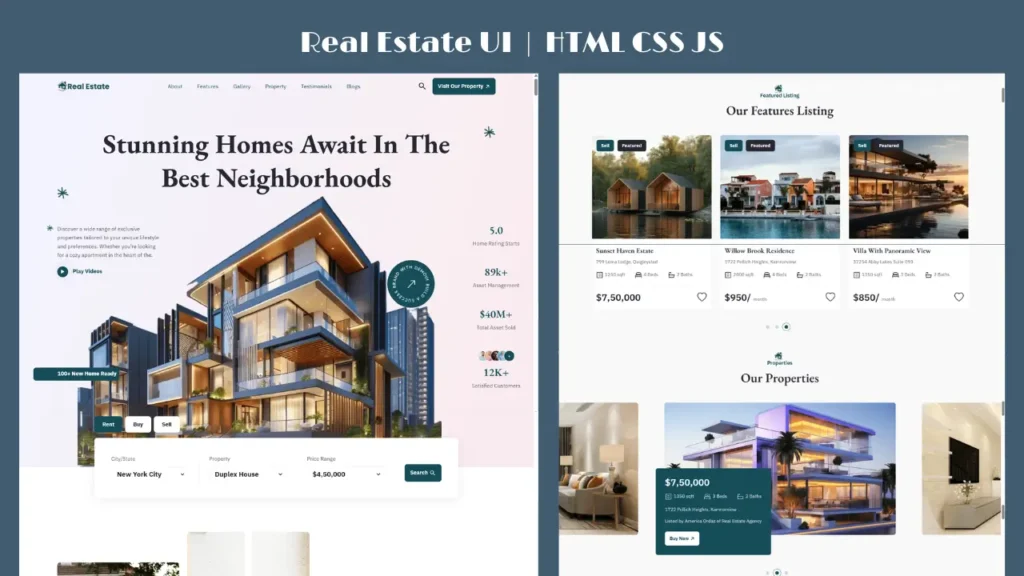
If you are searching for a real estate website using HTML CSS JavaScript, you are in the right place. In this guide, you will explore a modern, responsive real estate landing page design along with a quick frontend code preview.
This type of website is perfect for property listings, real estate agencies, and developers who want to build a clean and professional UI using core frontend technologies.
Real Estate Website Demo (UI + Code Preview)
Below is a complete preview of the real estate website design along with a short code walkthrough.
What is a Real Estate Website Using HTML CSS JavaScript?
A real estate website is a platform where users can explore property listings, view details, and connect with agents. Using HTML, CSS, and JavaScript, you can create a fast, responsive, and visually appealing website without complex frameworks.
This project focuses on:
- Clean UI design
- Responsive layout
- Smooth animations
- Easy navigation
Key Features of This Real Estate Website
✅ Modern Landing Page Design
This real estate landing page HTML CSS project uses a clean and minimal layout that improves user experience.
✅ Fully Responsive Layout
The website adjusts perfectly on mobile, tablet, and desktop devices.
✅ Property Listing Section
Properties are displayed using cards with images, pricing, and details.
✅ Smooth Animations
JavaScript and CSS animations enhance the visual appeal.
✅ User-Friendly Navigation
Simple menus and structured sections help users explore easily.
Technologies Used
This real estate project using HTML CSS and JavaScript is built using:
- HTML5 – Website structure
- CSS3 – Styling and responsiveness
- JavaScript – Interactivity
- Bootstrap – Grid and layout system
How to Create a Real Estate Website Using HTML CSS JavaScript
Follow these simple steps to build your own real estate website:
Step 1: Create Basic HTML Structure
Start with sections like header, hero, property listings, and contact.
Step 2: Design Using CSS
Style your layout with colors, spacing, and responsive design.
Step 3: Add JavaScript
Use JavaScript for sliders, animations, and dynamic elements.
Step 4: Make it Responsive
Use media queries or Bootstrap to ensure mobile compatibility.
Example Code (Property Card UI)
Here is a simple example used in this real estate website HTML CSS JS project:
<div class=”property-card”>
<img src=”property.jpg” alt=”real estate website html css javascript”>
<h3>Luxury Apartment</h3>
<p>Price: $450,000</p>
</div>
This structure is used to display property listings in a clean card layout.
Why Responsive Design is Important
A responsive real estate website ensures that users can browse properties on any device. Most users search for properties on mobile, so your website must:
- Load fast
- Display properly on small screens
- Provide easy navigation
This real estate landing page HTML CSS design is fully optimized for responsiveness.
SEO Benefits of This Real Estate Website
Creating a real estate website using HTML CSS JavaScript helps in:
- Faster loading speed
- Better mobile experience
- Clean code structure
- Improved search engine visibility
With proper SEO optimization, this type of website can rank for keywords like:
- real estate website html css javascript
- real estate landing page html css
- real estate project using html css and javascript
Customization Ideas
You can enhance this real estate website further by adding:
- Property search filters
- Google Maps integration
- Contact forms
- Backend for dynamic data
- User login system
FAQ (Frequently Asked Questions)
Q1. How to build a real estate website using HTML CSS JavaScript?
You can start by creating an HTML structure, styling it with CSS, and adding interactivity using JavaScript.
Q2. Is this real estate project good for beginners?
Yes, this project is perfect for beginners who want to learn frontend development.
Q3. Can I customize this real estate website design?
Yes, you can easily modify layout, colors, and features based on your requirements.
Related Website Templates You Should Explore
Admin Dashboard Template HTML CSS JavaScript – Modern Multipurpose Admin Dashboard UI
Create Responsive Autoplay Carousel using HTML CSS and JavaScript
Download Source Code
If you want to use this real estate website HTML CSS JavaScript project, you can access the complete source code below.
Conclusion
A modern real estate website plays a crucial role in attracting users and showcasing properties effectively. This real estate website using HTML CSS JavaScript provides a clean UI, responsive layout, and smooth user experience.
Whether you are a developer or a business owner, this project is a great starting point for building a professional website.
121 people bought this
Grab it Now for Just 199 ₹499


