
Introduction
If you are looking to build an animated portfolio website using HTML CSS JavaScript, this guide will help you create a modern, responsive, and visually engaging design.
A simple static portfolio is no longer enough. Today, users expect smooth animations, interactive elements, and a clean UI. This project focuses on creating a professional portfolio website that not only looks attractive but also improves user engagement.
Whether you are a beginner or an experienced developer, this portfolio website project using HTML CSS and JavaScript will help you enhance your frontend skills and create a strong online presence.
Live Preview of Animated Portfolio Website
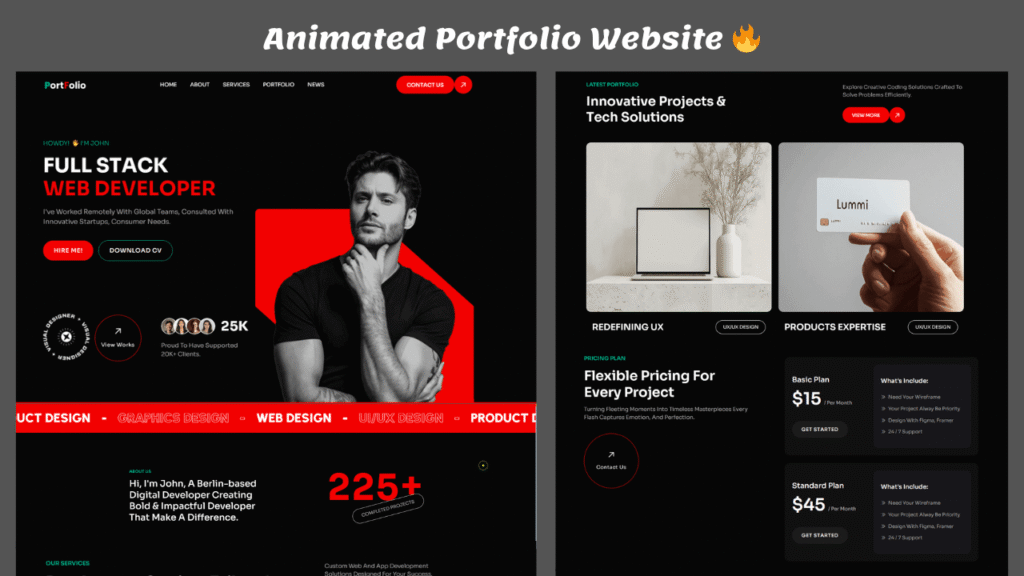
Below is a complete preview of the animated portfolio website along with UI animations and design flow.
What is an Animated Portfolio Website?
An animated portfolio website is a personal website that showcases your work, skills, and projects with interactive elements and smooth animations.
Using HTML, CSS, and JavaScript, you can create:
- Smooth scrolling effects
- Animated sections
- Interactive buttons
- Dynamic user experience
This makes your portfolio stand out from basic static websites.
Key Features of This Portfolio Website
✅ Smooth Animations
This animated portfolio website uses CSS transitions and JavaScript-based effects for smooth and engaging animations.
✅ Modern UI Design
A clean and minimal layout ensures a professional and visually appealing interface.
✅ Fully Responsive Layout
The design works perfectly on mobile, tablet, and desktop devices.
✅ Interactive Elements
Hover effects, animated buttons, and scroll-based animations improve engagement.
✅ Clean Code Structure
Well-organized HTML, CSS, and JavaScript files make it easy to understand and customize.
Technologies Used
This animated portfolio website using HTML CSS JavaScript is built with:
- HTML5 – Structure of the website
- CSS3 – Styling, layout, and animations
- JavaScript – Interactivity and dynamic behavior
How to Create an Animated Portfolio Website Using HTML CSS JavaScript
Follow these steps to build your own portfolio:
Step 1: Create HTML Structure
Add sections like hero, about, projects, and contact.
Step 2: Design with CSS
Use Flexbox or Grid to design layout and add animations using transitions.
Step 3: Add JavaScript Effects
Implement scroll animations and interactive behavior.
Step 4: Make It Responsive
Use media queries to ensure your portfolio looks perfect on all devices.
Example Code (Animated Element)
Here is a simple animation example used in this project:
<div class=”hero-title”>
<h1>My Portfolio</h1>
</div>.hero-title {
opacity: 0;
transform: translateY(50px);
animation: fadeIn 1s ease forwards;
}@keyframes fadeIn {
to {
opacity: 1;
transform: translateY(0);
}
}
This creates a smooth fade-in animation effect for the hero section.
Importance of Responsive Design
A responsive portfolio website ensures your design works smoothly across all devices.
Benefits include:
- Better user experience
- Lower bounce rate
- Improved SEO performance
This portfolio website HTML CSS JavaScript project is fully responsive.
Why Animated Portfolio Websites Are Important
An animated portfolio helps you:
- Capture user attention instantly
- Showcase your frontend skills
- Stand out from competitors
- Create a memorable experience
If you are applying for jobs or freelance work, a strong portfolio can significantly improve your chances.
Customization Ideas
You can enhance your portfolio by adding:
- Dark mode toggle
- Project filtering system
- Contact form integration
- Blog section
- Testimonials
SEO Benefits of a Portfolio Website
Creating a portfolio website helps in:
- Building personal branding
- Ranking on search engines
- Showcasing your projects professionally
Using proper SEO techniques like headings, meta tags, and optimized images can boost visibility.
FAQ (Ranking Booster)
Q1. How to create an animated portfolio website using HTML CSS JavaScript?
You can create it by structuring HTML, styling with CSS animations, and adding JavaScript for interactivity.
Q2. Is this portfolio project good for beginners?
Yes, this project is ideal for beginners learning frontend development.
Q3. Can I customize this portfolio website?
Yes, you can easily modify design, colors, and features.
Related Website Templates You Should Explore
Admin Dashboard Template HTML CSS JavaScript – Modern Multipurpose Admin Dashboard UI
Create Responsive Autoplay Carousel using HTML CSS and JavaScript
Download Source Code
If you want to use this animated portfolio website HTML CSS JavaScript project, you can access the complete source code below.
Conclusion
Building an animated portfolio website using HTML CSS JavaScript is one of the best ways to improve your frontend development skills and create a professional online presence.
With modern UI design, smooth animations, and responsive layout, this project helps you stand out and showcase your work effectively.
Start building your portfolio today and take your web development journey to the next level 🚀
80 people bought this
Grab it Now for Just 199 ₹499


