
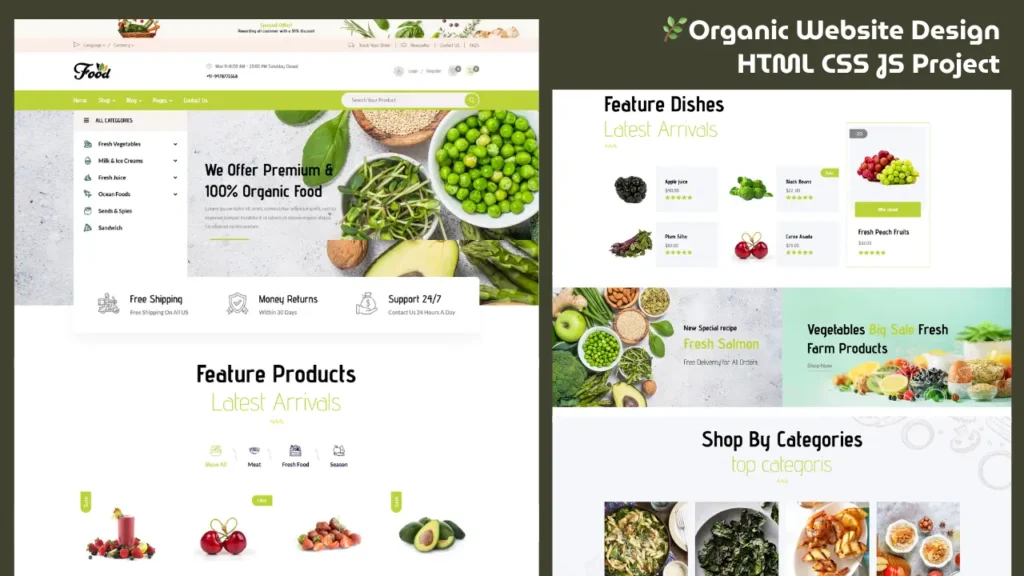
If you are looking for a clean and modern HTML CSS website project, this Organic Food Store Website Design is a perfect example for beginners and frontend developers.
In this guide, you will not only see the website layout but also understand how to build a responsive design using HTML and CSS step by step.
Website Preview (Live Design)
Below is a quick preview of the complete organic food store website design. Watch how the UI looks and how different sections are structured.
Why This HTML CSS Project is Useful
This project is designed to help you understand real-world frontend design concepts.
With this website, you will learn:
- How to create a responsive website using HTML CSS
- How to design a clean and modern UI
- How to structure a homepage layout
- How to build a beginner-friendly frontend project
This type of project is commonly used in portfolios and practical learning.
Website Layout Overview
The homepage of this organic website is divided into multiple sections to create a professional look.
🔹 Header Section
Includes logo, navigation menu, and a call-to-action button.
It helps users easily navigate across the website.
Hero Section
The hero section is the first visible area of the website.
It includes:
- Background image
- Heading text
- Short description
- Action button
This section grabs user attention instantly.
Categories Section
This section displays organic product categories like fruits, vegetables, and natural items.
Each category is presented in a card layout with images and titles.
Featured Products Section
A grid layout is used to show product items.
It includes:
- Product image
- Title
- Price placeholder
- Button
This section gives an eCommerce-style feel using only frontend technologies.
Offer Banner
A promotional banner is added to highlight offers or brand messages.
This improves user engagement and design appeal.
Footer Section
The footer contains:
- Contact details
- Links
- Social icons
It completes the website structure and improves usability.
How to Build This Website (Step-by-Step)
Follow these simple steps to create this HTML CSS project:
Step 1: Create HTML Structure
Start with a basic HTML file and divide the page into sections like header, hero, products, and footer.
Step 2: Add CSS Styling
Use CSS to design layout, colors, spacing, and fonts.
You can also use Bootstrap for faster development.
Step 3: Create Responsive Layout
Use media queries or Bootstrap grid to make the design responsive on mobile, tablet, and desktop.
Step 4: Add UI Components
Add buttons, cards, banners, and sections to improve the design.
Step 5: Optimize the Design
Keep spacing clean, use consistent colors, and make the UI simple and user-friendly.
Responsive Design Explained
This website is fully responsive and works smoothly on all devices.
- Mobile-friendly layout
- Flexible grid system
- Clean spacing and alignment
Responsive design is important for both user experience and search ranking.
Key Features of This Project
- Clean and modern UI design
- Beginner-friendly HTML CSS code
- Responsive layout
- Multiple homepage sections
- Portfolio-ready project
- Real-world website structure
SEO Tips for HTML CSS Projects
If you are publishing similar projects on your website, follow these tips:
- Use proper headings (H1, H2, H3)
- Add relevant keywords naturally
- Optimize images with alt tags
- Embed video previews
- Keep content helpful and structured
Who Should Use This Project?
This project is perfect for:
- Beginners learning web development
- Students working on projects
- Frontend developers
- Portfolio creators
- Anyone looking for website design ideas
Related Website Templates You Should Explore
Admin Dashboard Template HTML CSS JavaScript – Modern Multipurpose Admin Dashboard UI
Create Responsive Autoplay Carousel using HTML CSS and JavaScript
Get Complete Source Code
If you want to explore this project and understand how everything is built, you can access the complete source code below.
This project includes:
- Complete HTML structure
- CSS styling files
- Responsive layout design
- Ready-to-use UI sections
17 people bought this
Grab it Now for Just 199 ₹499


