
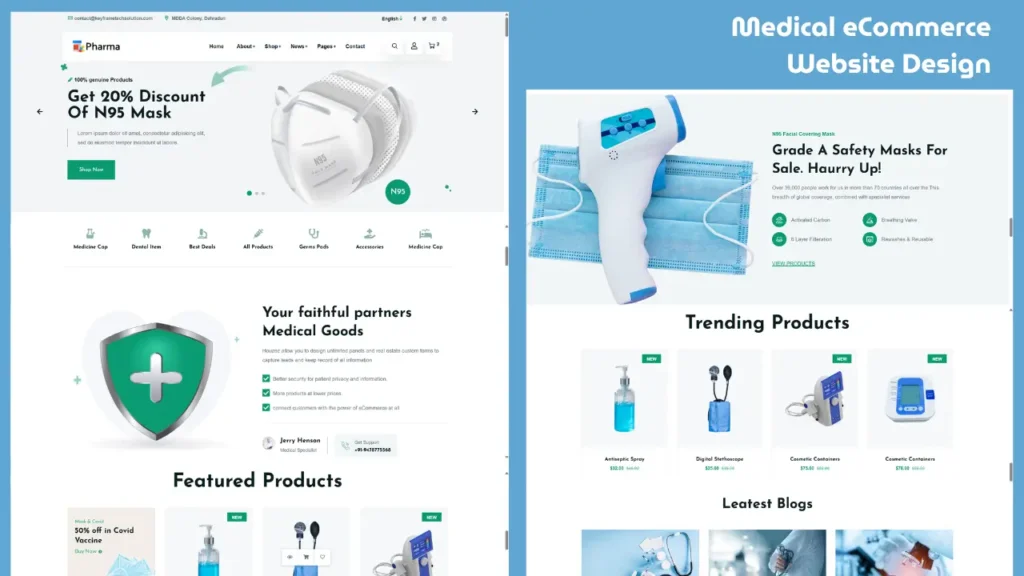
If you are looking for a modern medical website HTML CSS project, this complete frontend design will help you understand how real-world eCommerce UI works.
This project is designed using HTML, CSS, Bootstrap, and JavaScript, making it a perfect choice for beginners and frontend developers who want to build a professional healthcare or pharmacy website interface.
In this guide, you will explore the website layout, features, and structure along with a quick code preview.
Live Preview of Medical Website UI
Before diving into the project details, take a quick look at the medical eCommerce website design and its frontend structure.
Why This Medical Website Project is Useful
The demand for online healthcare platforms and pharmacy websites is increasing rapidly. Users expect clean design, easy navigation, and mobile-friendly layouts.
This project helps you:
- Understand real-world website structure
- Learn how eCommerce UI is designed
- Improve frontend development skills
- Create a portfolio-ready project
Project Features
This medical website HTML CSS project includes all essential UI components required in a modern website:
✔ Clean Header & Navigation
Simple and user-friendly menu for easy browsing.
✔ Hero Section
A professional banner section to highlight services or offers.
✔ Product Grid Layout
Well-structured product display section for medical items.
✔ Responsive Design
Fully optimized for mobile, tablet, and desktop screens.
✔ Smooth UI Effects
Hover effects and transitions improve user experience.
✔ Footer Section
Includes important links and basic information.
Technologies Used
This project is built using the following frontend technologies:
- HTML5 for structure
- CSS3 for styling
- Bootstrap 5 for responsive layout
- JavaScript & jQuery for interactivity
These technologies are widely used and beginner-friendly, making this project easy to understand and customize.
Project Folder Structure
Understanding the structure of the project is very important for beginners.
medical-ecommerce-website/
│
├── index.html
├── css/
│ ├── style.css
│ ├── responsive.css
│ └── plugins.css
│
├── js/
│ ├── main.js
│ └── plugins.js
│
└── images/
This structure helps you organize your files properly and makes the project easy to manage.
How to Run This Project
You can easily run this project on your system by following these steps:
- Extract the project folder
- Open the folder
- Locate the
index.htmlfile - Double-click or open it in your browser
That’s it. The website will run locally on your system.
Responsive Design Explained
This medical website is fully responsive, which means it automatically adjusts according to screen size.
- On desktop: Full layout with grid sections
- On tablet: Adjusted spacing and columns
- On mobile: Stacked layout for better readability
This is achieved using Bootstrap grid and custom CSS media queries.
Who Should Use This Project
This project is ideal for:
- Beginners learning HTML, CSS, and JavaScript
- Frontend developers building portfolio projects
- Students working on web development assignments
- Freelancers creating healthcare website UI
SEO & Performance Basics
To make this website more effective, you can apply simple optimizations:
- Add proper meta tags
- Use optimized images
- Minify CSS and JavaScript files
- Improve heading structure
These small improvements can make a big difference in performance and visibility.
How to Convert This into a Complete eCommerce Website
Currently, this is a frontend UI project. To make it fully functional, you can integrate:
- Backend (PHP, Node.js, or Django)
- Database (MySQL or MongoDB)
- User login system
- Payment integration
This will convert the design into a complete working website.
Frequently Asked Questions (FAQs)
Q1. Is this a complete eCommerce website?
No, this is a frontend UI design project built using HTML, CSS, and JavaScript.
Q2. Can beginners use this project?
Yes, this project is beginner-friendly and easy to understand.
Q3. Which technologies are used in this project?
HTML, CSS, Bootstrap, and JavaScript are used.
Q4. Can I customize this design?
Yes, you can easily modify the layout, colors, and content.
Final Thoughts
This medical website HTML CSS project is a great example of how modern eCommerce UI design works. It provides a clean layout, responsive design, and structured components that can be used in real-world projects.
If you want to improve your frontend development skills or build a professional portfolio, this project is a solid starting point.
Related Website Templates You Should Explore
Admin Dashboard Template HTML CSS JavaScript – Modern Multipurpose Admin Dashboard UI
Create Responsive Autoplay Carousel using HTML CSS and JavaScript
Download Source Code
If you want to explore this project in detail, you can access the complete source code below.
302 people bought this
Grab it Now for Just 199 ₹499


