
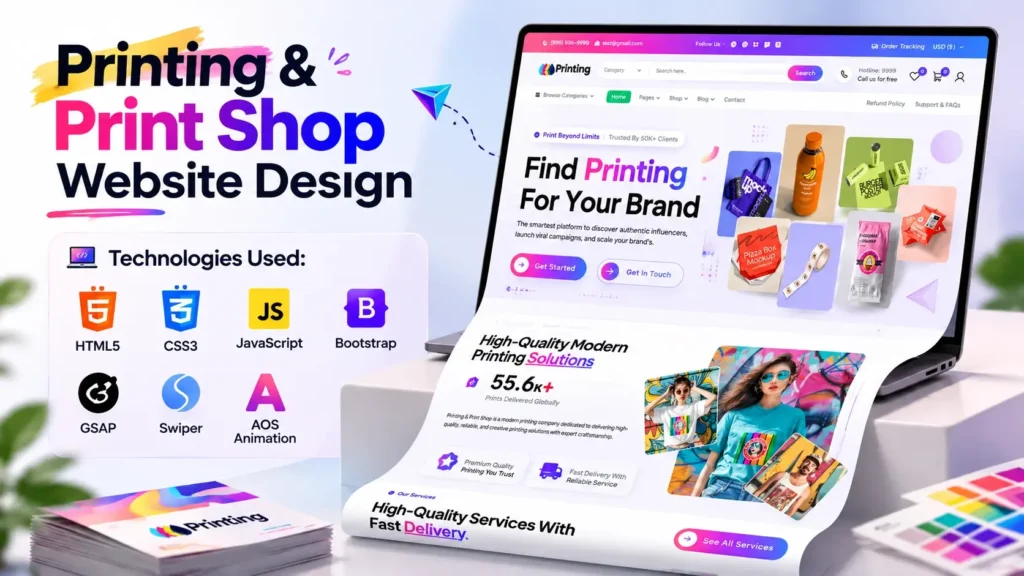
A printing business needs more than attractive flyers, brochures, banners, and business cards. Today, your website is often the first place potential customers look when they want to understand your services, view your work, check available options, or make an enquiry. That makes a professional Printing & Print Shop Website Design an important part of building a credible online presence.
A well-designed print shop website should immediately communicate what the business offers while making it easy for visitors to explore services and take action. It should also look good across desktop computers, tablets, and smartphones.
This project presents a modern Printing & Print Shop Website Design focused on a visually engaging homepage, responsive layouts, smooth animations, interactive sections, and a clean frontend development structure. The project uses HTML5, CSS3, JavaScript, Bootstrap, GSAP, Swiper, and AOS Animation to create a contemporary web experience.
The mobile-first approach is particularly important. According to StatCounter, mobile devices accounted for about 58.96% of worldwide web usage in September 2026, compared with 39.24% for desktop. That means a print business website cannot be designed only around a desktop screen.
In this article, we will explore the website design, its technologies, important UI sections, customization opportunities, performance considerations, and what developers or print businesses should consider before using a source code project.
What Is a Printing & Print Shop Website Design?
A Printing & Print Shop Website Design is a website interface created specifically for printing companies, digital printing businesses, custom print services, stationery providers, packaging companies, and related creative businesses.
Instead of using a generic business layout, a print shop website can be designed around services such as:
- Digital printing
- Offset printing
- Business card printing
- Flyer and brochure printing
- Poster printing
- Banner printing
- Packaging and label printing
- Custom stationery
- Promotional materials
- Large-format printing
The homepage is especially important because it creates the first impression. Visitors should quickly understand the business, see examples of its work, discover its services, and find a clear way to make an enquiry or continue browsing.
A modern print shop website can combine strong typography, product imagery, service cards, animated elements, sliders, calls to action, and responsive layouts without making the interface unnecessarily complicated.
Why Modern Print Shop Website Design Matters
Printing is a highly visual industry. Customers often want to see what a company can produce before contacting it.
A website therefore needs to communicate quality visually.
A professionally structured Printing & Print Shop Website Design can help a business:
- Present printing services clearly
- Showcase products and completed projects
- Build trust with potential customers
- Improve brand presentation
- Make services easier to discover
- Provide a mobile-friendly experience
- Create a central place for enquiries
- Support digital marketing campaigns
- Establish a professional online identity
However, attractive design alone is not enough.
A common mistake is creating a visually impressive homepage that becomes slow because of oversized images, unnecessary scripts, excessive animations, or poorly optimized assets.
The 2025 Web Almanac found that the median mobile homepage was approximately 2.56 MB, while the median desktop homepage was approximately 2.86 MB. Images represented the largest portion of those bytes, followed by JavaScript and fonts.
For a printing website that naturally depends on visual content, image optimization should therefore be treated as part of the design process rather than something added later.
Key Features of This Printing & Print Shop Website Design
The project is structured around a modern homepage experience with several frontend elements designed to make the interface more interactive.
1. Modern Homepage Interface
The homepage acts as the main presentation layer for the business.
A strong hero section can introduce the print shop with a clear headline, supporting message, relevant imagery, and an obvious action.
For a printing company, the first screen should answer three basic questions:
What does the business provide?
Who is it serving?
What should the visitor do next?
Keeping these answers visible helps prevent visitors from becoming confused when they first arrive.
2. Responsive Website Layout
Responsive design allows the website to adapt to different screen sizes.
This is especially important because customers may discover a print shop through mobile search, social media, messaging applications, or shared links.
A responsive print shop website should adjust:
- Navigation
- Typography
- Images
- Service cards
- Buttons
- Spacing
- Sliders
- Columns
- Content sections
The objective is not simply to make the desktop design smaller. The interface should remain usable and visually balanced at different viewport sizes.
3. Interactive Sliders
The project uses Swiper for slider-related functionality.
Sliders can be useful for presenting:
- Featured printing services
- Product categories
- Promotional campaigns
- Portfolio items
- Customer-focused highlights
- Important website sections
The important thing is to use sliders where they improve content discovery rather than turning every section into a carousel.
4. GSAP-Based Animation
The project also includes GSAP, a popular JavaScript animation library.
Animations can make a website feel more dynamic when used carefully.
For a print shop website, subtle animation can be applied to:
- Hero elements
- Text entrances
- Image transitions
- Product presentations
- Scroll interactions
- Decorative components
The goal should be controlled movement rather than animation everywhere.
Too many effects can distract visitors and increase the amount of JavaScript required by the page.
5. AOS Animation
The project includes AOS Animation, which can be used to create scroll-based reveal effects.
For example, service cards can appear as the visitor moves down the page.
This can make a long homepage feel more engaging while maintaining a straightforward content structure.
6. Bootstrap Framework
Bootstrap provides a practical foundation for responsive layouts and reusable interface components.
For developers, using Bootstrap can make it easier to structure:
- Containers
- Rows
- Columns
- Responsive breakpoints
- Buttons
- Navigation
- Forms
- Common UI components
It also makes the project easier for developers who are already familiar with the framework.
Technologies Used in the Print Shop Website Template
| Technology | Purpose |
|---|---|
| HTML5 | Page structure and semantic content |
| CSS3 | Styling, layouts and visual presentation |
| JavaScript | Interactions and dynamic functionality |
| Bootstrap | Responsive layout and reusable UI components |
| GSAP | Advanced animations |
| Swiper | Sliders and interactive carousels |
| AOS Animation | Scroll-based visual effects |
This combination makes the project suitable for developers who want a frontend foundation rather than a website locked into one particular CMS.
HTML5 for Structure and SEO
HTML5 provides the structural foundation of the website.
A good implementation should use semantic elements wherever appropriate, including:
<header><nav><main><section><article><footer>
Semantic HTML can make the document easier for browsers, assistive technologies, and search engines to understand.
Developers should also pay attention to:
- One clear H1
- Logical H2 and H3 headings
- Descriptive image alt text
- Meaningful link text
- Accessible form labels
- Proper button elements
- Clean page structure
The design may attract the visitor, but the underlying HTML helps communicate what the page actually contains.
CSS3 for a Professional Print Shop UI
CSS is responsible for much of the visual personality of a print shop website.
A printing company can benefit from a design system that uses consistent:
- Colors
- Typography
- Button styles
- Border treatments
- Card designs
- Spacing
- Image proportions
Because printing is closely associated with visual communication, the design should feel polished without becoming overwhelming.
A useful approach is to create a strong visual hierarchy. Primary actions should stand out, while supporting information remains easy to scan.
JavaScript for Website Interactions
JavaScript adds functionality beyond static HTML and CSS.
In this project, JavaScript supports interactive components and works alongside libraries such as GSAP, Swiper, and AOS.
Developers customizing the source code should review which scripts are actually required.
The 2025 Web Almanac reported that 98.1% of pages made at least one JavaScript request, highlighting how widespread JavaScript is across the modern web. It also notes that JavaScript can contribute substantially to page weight and performance costs.
This is an important lesson for template customization: adding another library is easy, but maintaining performance requires understanding what each script actually does.
Important Customization Ideas for a Printing Business
A website template should be treated as a starting point rather than the finished identity of a business.
Here are several areas that can be customized.
Replace Generic Content
Update the placeholder headings, descriptions, navigation labels, and calls to action with actual business information.
For example, instead of a generic button, use an action that matches the customer’s intent:
- Request a Quote
- View Printing Services
- Explore Our Products
- Contact the Print Team
- Discuss Your Project
Add Real Product Photography
Printing businesses are visual businesses, so real photographs can significantly strengthen the website.
Consider adding images of:
- Finished brochures
- Business cards
- Packaging
- Posters
- Labels
- Banners
- Signage
- Printing equipment
- Completed customer projects
Authentic project photography can provide stronger trust signals than generic stock imagery.
Create Service-Specific Pages
A homepage can introduce services, but dedicated pages provide more space to explain them.
Potential pages include:
- Digital Printing
- Business Card Printing
- Brochure Printing
- Poster Printing
- Packaging Printing
- Label Printing
- Large Format Printing
Each page can target a specific search intent while providing useful information for customers.
Add Local Business Information
If the printing company serves a specific city or region, clearly display:
- Business address
- Phone number
- Business hours
- Service area
- Email address
- Google Business Profile
- Directions
Consistent business information can also support local SEO efforts.
Performance Optimization for a Print Shop Website
A beautiful website can still perform poorly if its assets are not optimized.
This is particularly relevant to printing websites because large product images are often necessary.
Optimize Images
Use appropriately sized images instead of uploading extremely large originals.
Responsive images can allow browsers to select a more suitable image for different screen sizes. Google’s web.dev documentation notes that serving desktop-sized images to mobile devices can use 2–4 times more data than necessary in some situations.
Useful practices include:
- Compress images
- Use modern formats where appropriate
- Resize images before uploading
- Avoid unnecessarily large hero images
- Use responsive image techniques
- Lazy-load suitable below-the-fold images
Review JavaScript
Check whether every JavaScript library is necessary.
If a component is not being used, loading its supporting code can add unnecessary overhead.
This becomes especially important when combining Bootstrap, GSAP, Swiper, AOS, jQuery, and additional plugins.
Reduce Unnecessary Assets
The 2025 Web Almanac found that the median mobile page made around 72 requests, while the median desktop page made around 77 requests.
This does not mean every website must stay below a particular number, but it demonstrates why asset management matters.
A customized project should ideally load only what the current page needs.
SEO Tips for a Printing Website
A strong Printing & Print Shop Website Design should also have a strong content and SEO foundation.
Use Search Intent-Based Pages
Instead of putting every keyword on one homepage, create useful pages around real customer needs.
For example:
Printing Services
Target broader service intent.
Business Card Printing
Target a specific product intent.
Brochure Printing
Target another product-specific query.
Printing Company in [City]
Target local commercial intent.
This creates a clearer topical structure.
Optimize Page Titles
Every important page should have a unique title.
For example:
Business Card Printing Services | [Brand Name]
is more useful than using the same title across the entire website.
Create Helpful Content
A printing company can also publish educational articles such as:
- How to Choose the Right Paper for Business Cards
- Digital Printing vs Offset Printing
- What Is the Best Paper for Brochures?
- How to Prepare Artwork for Printing
- Common Poster Design Mistakes
- How Much Does Business Card Printing Cost?
These topics can attract users earlier in the buying journey.
Why This Template Can Be a Useful Starting Point
Starting with an existing Printing & Print Shop Website Design can save development time because the core visual framework, responsive structure, components, and interactions are already established.
However, developers should not simply publish the template unchanged.
A better workflow is:
1. Review the project structure
Understand the HTML, CSS, JavaScript, images, plugins, and dependencies.
2. Replace branding
Add the company’s logo, colors, typography, business information, and visual identity.
3. Rewrite the content
Use original service descriptions and customer-focused messaging.
4. Replace imagery
Use relevant printing products and genuine business photography.
5. Check every link
Make sure navigation and buttons point to actual pages.
6. Connect forms
A frontend form needs a proper backend or form-processing service if it is expected to receive real enquiries.
7. Test responsiveness
Check common mobile, tablet, and desktop viewport sizes.
8. Test performance
Review images, JavaScript, CSS, fonts, and third-party resources.
9. Add SEO fundamentals
Configure titles, descriptions, canonical URLs, structured data where appropriate, internal links, sitemap, robots.txt, and analytics.
10. Test before launch
Check forms, navigation, animations, sliders, accessibility, browser compatibility, and mobile usability.
Source Code Project vs Building From Scratch
There is no single development approach that works for every business.
A source code project provides a visual and technical foundation that developers can customize.
Building from scratch provides greater control from the beginning but requires additional design and development work.
For developers working on client projects, a well-structured template can therefore function as a starting framework while still allowing substantial customization.
The key is to understand the code rather than treating the template as something that should never be modified.
Common Mistakes to Avoid
Using Too Many Animations
Animation should support the content. Excessive movement can make the interface harder to use.
Uploading Huge Images
Print businesses often have high-resolution images, but the website should use web-optimized versions.
Keeping Placeholder Text
Generic content reduces the relevance and credibility of the final website.
Ignoring Mobile Design
With mobile accounting for nearly 59% of worldwide web usage in September 2026, mobile usability should be considered from the beginning.
Leaving Unused Libraries
Review JavaScript and CSS dependencies after customization.
Forgetting Forms
A contact form that visually works but does not actually send enquiries is not a complete business feature.
Where to Use This Printing Website Template
This type of website can be adapted for several businesses, including:
- Digital printing companies
- Local print shops
- Commercial printing businesses
- Custom printing services
- Packaging companies
- Stationery businesses
- Promotional product companies
- Graphic design and printing studios
- Large-format printing companies
- Sign and banner printing businesses
With suitable branding and content changes, the same frontend foundation can support different types of printing services.
Final Thoughts
A modern Printing & Print Shop Website Design should combine visual presentation, usability, responsive development, performance, and clear customer journeys.
The project discussed here provides a frontend foundation using HTML5, CSS3, JavaScript, Bootstrap, GSAP, Swiper, and AOS Animation. Its modern interface and interactive components make it a useful starting point for developers working on printing and creative-business websites.
But the most important part comes after the initial design.
A successful business website needs original content, optimized images, working forms, clear service pages, mobile usability, meaningful calls to action, technical SEO, and ongoing performance improvements.
For developers, the source code provides an opportunity to study how different frontend technologies work together. For printing businesses, it provides a visual direction that can be customized around their brand, services, products, location, and customers.
The strongest result is not simply a website that looks good. It is a website that helps visitors understand the business quickly, explore its services comfortably, and take the next step with confidence.
Frequently Asked Questions
What is a Printing & Print Shop Website Design?
A Printing & Print Shop Website Design is a website interface created specifically for printing businesses, print shops, digital printing companies, packaging businesses, and related services. It typically includes service sections, product showcases, contact options, responsive layouts, and business-focused calls to action.
Which technologies are used in this print shop website template?
This project uses HTML5, CSS3, JavaScript, Bootstrap, GSAP, Swiper, and AOS Animation. These technologies work together to provide structure, responsive layouts, interactive elements, sliders, and visual animations.
Is the Printing & Print Shop Website Design responsive?
The project is designed around a responsive frontend structure so that the interface can adapt to different screen sizes. Developers should still test the customized version across actual mobile, tablet, and desktop devices before deployment.
Can this template be customized for a printing company?
Yes. Developers can customize the branding, colors, typography, images, services, navigation, content, contact information, forms, and other sections according to the business requirements.
Can I add more printing service pages?
Yes. Dedicated pages can be created for services such as business card printing, brochure printing, poster printing, packaging, labels, banners, and digital printing. These pages can also support more focused SEO strategies.
Does the source code include a working contact form?
The frontend project includes form interfaces, but a production website needs a backend or suitable form-processing integration to actually receive and process customer submissions.
How can I improve the SEO of a print shop website?
Start with unique page titles and descriptions, helpful service pages, descriptive URLs, optimized images, internal linking, semantic HTML, structured data where appropriate, local business information, strong content, and good Core Web Vitals.
How can I improve the loading speed of a printing website?
Optimize images, reduce unnecessary JavaScript, remove unused assets, use appropriate image dimensions, optimize fonts, enable caching, and review third-party scripts. Image optimization is particularly important because visual assets can represent a large portion of modern webpage weight.
Is this type of website suitable for a local print shop?
Yes. A local print shop can customize the design with its location, service area, phone number, business hours, customer reviews, product photographs, enquiry options, and locally relevant service pages.
Can developers use this project as a frontend starting point?
Yes. A source code project can serve as a frontend foundation for customization. Developers should review the existing structure, dependencies, links, forms, assets, and scripts before deploying it as a production website.
Video Preview of the Printing & Print Shop Website
Related Templates You May Like
- Fashion E-Commerce Website Design
- Admin Dashboard Template
- Shopping eCommerce Website Design
- Jewelry and Cosmetics eCommerce Website
🔥 23+ People Have Already Bought This
Grab it Now for Just 999 ₹2499


