
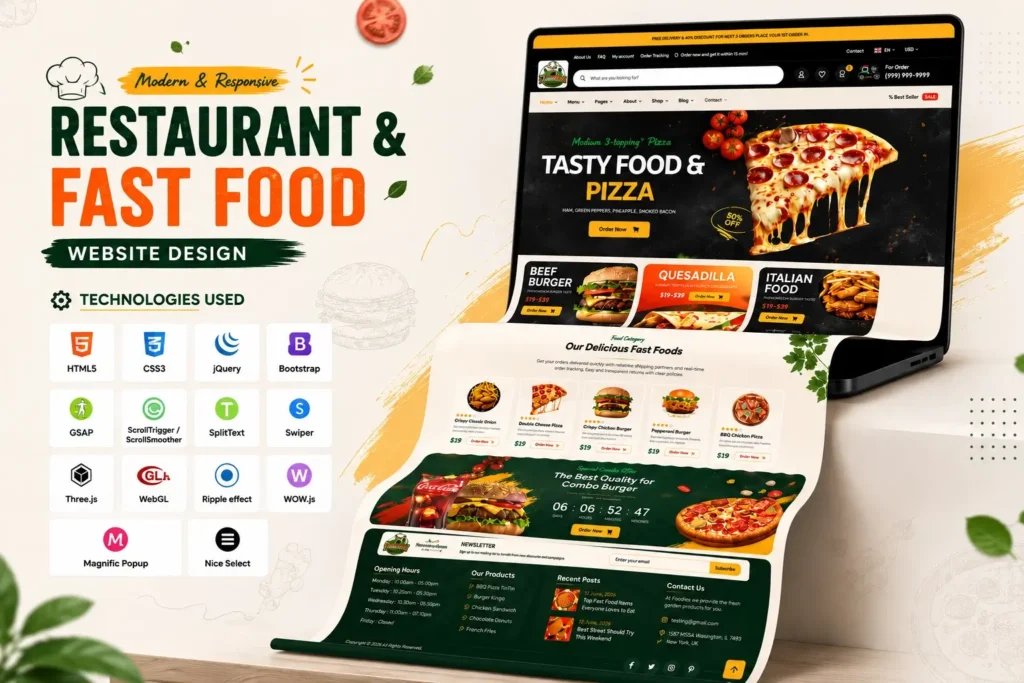
A modern restaurant website needs more than attractive food images. It needs a clear layout, fast interactions, responsive design, strong visual hierarchy, and an interface that makes it easy for visitors to explore menus, promotions, reservations, and other important information. This Restaurant Website Design project combines those elements into a visually engaging front-end experience built around a restaurant and fast-food theme.
In this project showcase, you can explore the complete homepage design and understand how its sections, animations, sliders, navigation elements, and interactive components come together. The project uses HTML5, CSS3, jQuery, Bootstrap, GSAP, ScrollTrigger, ScrollSmoother, SplitText, Swiper, Three.js, and WebGL-related effects to create a more dynamic interface.
The goal is not simply to make a restaurant page look attractive. A good food website should also make the visitor’s journey straightforward: discover the brand, understand the offering, browse food items, notice promotions, and move toward an action.
That matters especially on mobile. Google research has found that the probability of a mobile visitor bouncing increased by 32% when page load time increased from one second to three seconds.
This is why visual design should always be balanced with performance, usability, and responsive development.
Restaurant Website Design Project Overview
This project is designed as a modern restaurant and fast-food website template with a strong emphasis on visual presentation.
The homepage combines food-focused imagery with animated sections and interactive components to create an experience suitable for restaurants, cafés, food brands, takeaway businesses, and similar projects.
Rather than relying on a basic static layout, the interface uses multiple front-end techniques to create movement and depth.
Key highlights include:
- Modern restaurant homepage UI
- Responsive navigation
- Food and promotional sections
- Interactive sliders
- Menu and product-style components
- Search interface
- Cart and wishlist UI
- Quantity controls
- Price filtering interface
- Countdown component
- Animated content sections
- Smooth scrolling effects
- Image-based animations
- Popup interactions
- Mobile navigation
- Back-to-top functionality
- Custom cursor effects
- Responsive front-end structure
The result is a restaurant website design that can serve as a strong starting point for a real food business website or as a practical frontend development project for learning and customization.
The video focuses on the front page and then provides a short code preview from the same project. This gives you two perspectives: what the finished interface looks like and how the underlying frontend structure is organized.
Technologies Used in This Restaurant Website
One of the interesting aspects of this project is its combination of traditional frontend technologies with animation and interaction libraries.
| Technology | Purpose |
|---|---|
| HTML5 | Page structure and semantic content |
| CSS3 | Layout, styling and responsive presentation |
| Bootstrap | Responsive layout and reusable UI structure |
| jQuery | DOM manipulation and interactive behavior |
| GSAP | Advanced web animations |
| ScrollTrigger | Scroll-based animation control |
| ScrollSmoother | Smooth scrolling effects |
| SplitText | Animated text treatment |
| Swiper | Sliders and carousels |
| Three.js | 3D and interactive visual effects |
| WebGL | Browser-based graphical effects |
| Font Awesome | Interface icons |
| Magnific Popup | Popup and lightbox functionality |
Using several libraries does not automatically make a website better. The important part is knowing where each technology adds value.
For example, Swiper makes sense for touch-friendly food sliders, while GSAP is useful when more controlled animation timing is required. Bootstrap can simplify responsive layout work, while CSS remains essential for the visual identity of the page.
Why This Restaurant Website UI Stands Out
Many restaurant templates follow the same basic structure: header, hero banner, menu cards, about section, testimonials, contact section, and footer.
Those sections are useful, but the difference between an ordinary website and a memorable one often comes from how the sections behave and connect.
This project puts more attention on visual transitions and interaction.
1. Strong visual hierarchy
Food websites depend heavily on visual communication. Large imagery, headings, promotional content, prices, and calls to action need to compete for attention without making the page confusing.
The design uses spacing, typography, imagery, and section positioning to establish a clear hierarchy.
2. Animation with purpose
Animations are used to make sections feel more dynamic rather than simply adding movement everywhere.
GSAP, ScrollTrigger, SplitText, and related effects provide opportunities for:
- Text reveal animations
- Scroll-triggered transitions
- Image movement
- Section entrance effects
- Smooth visual transitions
- Interactive hover states
The important lesson for developers is that animation should support the content. If an effect delays the visitor from accessing important information, it should be simplified.
3. Interactive food presentation
Food websites benefit from components that allow visitors to explore multiple products without navigating through too many separate pages.
Sliders, product-style sections, quantity controls, filters, and promotional areas can help create this experience.
4. Responsive structure
A restaurant website is likely to receive visitors from smartphones as well as desktops. Therefore, responsive behavior should be considered from the beginning rather than added at the end.
Google’s guidance emphasizes creating helpful, people-first pages and providing a good overall page experience.
Restaurant Website Homepage Structure
A homepage works best when every major section has a reason to exist.
For a restaurant or fast-food website, the following structure can provide a useful foundation.
Header and Navigation
The header is the first major interaction point.
A restaurant website may need links to:
- Home
- About
- Menu
- Shop
- Reservation
- Blog or News
- Contact
The project also includes UI elements for search, account-related actions, wishlist, cart, language, and currency selection.
For a smaller restaurant, however, you may want to simplify these elements and keep only the features customers actually need.
Hero Section
The hero section should communicate the restaurant’s identity quickly.
A strong hero area generally combines:
- Short headline
- Supporting message
- Food imagery
- Primary call to action
- Secondary action when appropriate
Avoid filling the hero with too much text. Visitors should understand what the business offers within a few seconds.
Food and Menu Sections
The menu is one of the most important parts of a restaurant website.
A useful digital menu should make it easy to understand:
- Food name
- Image
- Price
- Category
- Short description
- Availability
- Relevant action
For larger menus, category filters or sliders can reduce scrolling and make discovery easier.
Promotional Sections
Restaurants frequently use offers, seasonal products, combo meals, or featured dishes to attract attention.
A promotional banner can therefore become a useful visual break between content sections.
However, promotions should not overwhelm the primary navigation or make important information difficult to find.
Product and Cart Interactions
The project includes interface elements such as quantity controls and cart-related UI.
These components are particularly useful if the template is later connected to an ecommerce or food-ordering backend.
The current frontend should be viewed as the presentation and interaction layer. Real ordering functionality would require backend logic, database integration, payment processing, authentication, order management, and appropriate security controls.
Source Code Structure
One advantage of working with a structured source code project is that you can inspect individual technologies instead of treating the template as a black box.
The project contains a primary HTML page together with CSS, JavaScript, images, and supporting libraries.
The main structure can be thought of as:
Restaurant Website Project
│
├── index.html
│
├── assets/
│   ├── css/
│   │   └── main.css
│   │
│   ├── js/
│   │   └── main.js
│   │
│   └── img/
│
└── supporting libraries
The main HTML file controls the page structure, CSS controls presentation, and JavaScript handles interactive behavior and animation.
This separation is particularly useful for beginners because you can change one layer at a time.
For example:
- Change colors and spacing → CSS
- Change headings and sections → HTML
- Change animations → JavaScript/GSAP
- Change images → image assets
- Change slider behavior → Swiper configuration
What You Can Customize
A template becomes much more useful when it can be adapted to a specific brand.
You can customize the project in several ways.
Brand Identity
Replace the existing logo, colors, typography, and imagery with your own brand assets.
A restaurant selling burgers may need a completely different visual identity from a premium Italian restaurant.
Menu
Update the food categories, product names, prices, descriptions, and images.
You can also restructure the menu depending on whether the business offers:
- Burgers
- Pizza
- Indian food
- Desserts
- Beverages
- Café items
- Combos
- Takeaway meals
Calls to Action
The CTA should match the actual business goal.
Examples include:
View Menu
Book a Table
Order Online
Explore Today’s Specials
Contact Restaurant
Typography
Typography has a significant impact on the personality of a food website.
A casual fast-food brand may benefit from bold, expressive typography, while a premium restaurant may require a more refined combination of serif and sans-serif fonts.
Important Performance Considerations
A visually impressive website can still perform poorly if its assets and effects are not optimized.
This is particularly important for restaurant websites because large food photographs can significantly increase page weight.
Google’s research has highlighted how page-load delays can increase bounce probability on mobile.
Before deploying a customized version, consider the following:
Optimize Food Images
Use appropriately sized images rather than uploading unnecessarily large originals.
Modern image formats can also help reduce file size where browser compatibility and workflow allow.
Review JavaScript Libraries
This project contains several libraries and animation systems. A production website does not necessarily need every library.
Remove dependencies that are not required by the final design.
Lazy-Load Appropriate Images
Images outside the initial viewport can often be loaded later so the browser can prioritize important content.
Minify Production Assets
For deployment, minified CSS and JavaScript can reduce transfer size.
Test on Real Mobile Devices
Do not rely exclusively on desktop browser resizing.
Check:
- Navigation
- Buttons
- Food cards
- Sliders
- Images
- Text size
- Touch interactions
- Loading performance
A Common Mistake: Adding Too Many Effects
There is a temptation to use every animation available when working with a visually rich template.
That can hurt the user experience.
A better approach is to identify the moments where animation adds meaning.
For example:
Good use: A food image gently enters as the visitor reaches the section.
Less useful: Every paragraph, icon, button, and image performs a different animation.
Restaurant websites should feel energetic, but they should still feel easy to use.
This is one of the areas where this project can be particularly useful for learning: you can inspect the existing effects and decide which ones genuinely improve the interface.
Who Can Use This Restaurant Website Template?
This type of restaurant website design can be adapted for several businesses and projects.
Restaurants
Use the layout as a foundation for a restaurant homepage, menu presentation, reservation website, or brand website.
Fast-Food Businesses
Bold imagery, promotional banners, product cards, and interactive sections work particularly well for fast-food brands.
Cafés and Bakeries
Replace the food imagery and content with coffee, bakery products, desserts, or breakfast items.
Food Startups
A startup can use the frontend as the visual foundation for a larger food-ordering platform.
Frontend Developers
Developers can study the project to understand how HTML, CSS, JavaScript, Bootstrap, GSAP, Swiper, and other libraries work together.
Students and Beginners
The project can be useful as a practical frontend development reference because the finished interface gives beginners something concrete to inspect and modify.
How to Work With the Source Code
If you are new to frontend development, avoid changing everything at once.
A better workflow is:
Step 1: Open the Main HTML File
Start with index.html and identify the major sections.
Look for:
- Header
- Hero
- Menu
- Promotional blocks
- Product sections
- Footer
Step 2: Inspect the CSS
Open the main stylesheet and locate the classes controlling the section you want to modify.
Change one property at a time.
Step 3: Identify JavaScript Dependencies
Before editing an animation, determine whether it is controlled by standard JavaScript, jQuery, GSAP, Swiper, or another library.
This prevents accidental conflicts.
Step 4: Replace Content
Update text, images, prices, categories, and brand information.
Step 5: Test Responsiveness
Check the page at desktop, tablet, and mobile widths.
Step 6: Optimize Before Publishing
Compress images, remove unnecessary scripts, check broken links, and test the final website.
An Important Source-Code Insight
One detail developers should check before using a template in production is dependency and page-reference completeness.
A template may contain links to pages such as About, Contact, Menu, Shop, Reservation, FAQ, or Blog without necessarily including every destination page in the project package.
That means you should inspect internal links before publishing.
Do not assume that every navigation item already points to a completed page.
Likewise, third-party libraries should be reviewed for version compatibility, licensing requirements, performance impact, and whether they are actually needed for your final implementation.
This simple verification step is often overlooked when developers focus only on the visual appearance.
Why People-First Content Matters for Template Websites
A source-code website should not publish a page that only says “Here is a template” and then provide a button.
Users benefit much more from practical information.
For example, a useful template page should explain:
- What the project is
- Which technologies it uses
- What sections are included
- Who can use it
- How it can be customized
- What developers should check
- How responsive behavior works
- What functionality is frontend-only
- What needs backend integration
This approach also aligns with Google’s current guidance around helpful, reliable, people-first content. Google specifically recommends original information, substantial value, clear expertise, and content that satisfies the visitor’s goal rather than content created primarily to manipulate rankings.
In other words, SEO should support the resource—not replace the resource.
Final Thoughts
This Restaurant Website Design project is more than a visual homepage. It is a practical frontend example showing how HTML5, CSS3, Bootstrap, jQuery, GSAP, Swiper, SplitText, ScrollTrigger, and other technologies can work together to create a modern food-focused interface.
The strongest use of the project is not simply copying the appearance. Study the structure, understand how the components work, replace the branding and content, remove unnecessary dependencies, optimize the assets, and adapt the interaction model to the actual needs of your restaurant or food business.
For beginners, it provides a useful way to move from basic HTML and CSS exercises toward a more complete frontend project. For experienced developers, it can serve as a starting UI that can be connected to a CMS, ecommerce system, reservation platform, or custom backend.
Most importantly, remember that a beautiful restaurant website should ultimately make the customer’s experience easier. Design, performance, accessibility, responsive behavior, and clear calls to action should work together—not compete with one another.
Frequently Asked Questions
What is a restaurant website design?
A restaurant website design is the visual and interactive structure used to present a restaurant online. It typically includes branding, food menus, images, promotions, contact information, reservations, and calls to action.
Which technologies are used in this restaurant website project?
The project uses HTML5, CSS3, jQuery, Bootstrap, GSAP, ScrollTrigger, ScrollSmoother, SplitText, Swiper, Three.js, WebGL-related effects, and several supporting frontend libraries.
Is this restaurant website responsive?
The project is built with responsive frontend techniques and Bootstrap-based layout components. However, you should test the customized version across real desktop, tablet, and mobile devices before production deployment.
Can I customize the restaurant website design?
Yes. The HTML, CSS, JavaScript, images, typography, colors, content, menu items, promotional sections, and branding can be customized according to the requirements of your project.
Can this template be connected to an online ordering system?
Yes, but the frontend alone does not constitute a complete ordering platform. You would need backend functionality for products, customers, orders, authentication, payments, inventory, and order management.
Can beginners use this restaurant website source code?
Yes. Beginners can start by studying index.html, then move to the CSS stylesheet and JavaScript files. Changing one section at a time is a good way to understand how the project works.
Does a restaurant website need animations?
Not necessarily. Animation can improve visual engagement, but it should not interfere with navigation, readability, accessibility, or page performance. Use animation where it supports the user experience.
What should I check before publishing the website?
Check responsive behavior, internal links, image optimization, JavaScript dependencies, accessibility, loading performance, browser compatibility, SEO metadata, forms, and any backend integrations required by the business.
How can I optimize a restaurant website for SEO?
Start with useful people-first content, descriptive page titles and headings, optimized images, relevant internal links, mobile-friendly design, fast performance, crawlable pages, descriptive URLs, structured data where appropriate, and accurate business information. Google’s Search Essentials recommends using the words people actually search for in prominent and descriptive locations while prioritizing helpful content.
Can this project be used as a portfolio project?
Yes. It can demonstrate practical frontend skills such as responsive layout development, UI implementation, JavaScript interactions, animation libraries, sliders, and component customization. When presenting it in a portfolio, clearly explain your own contribution and the technologies you worked with.
Watch the Restaurant Website Design in Action
If you want to understand the project before looking at the source code, the video below provides a visual overview of the homepage.
Related Templates You May Like
6 people bought this
Grab it Now for Just 499 ₹999


