
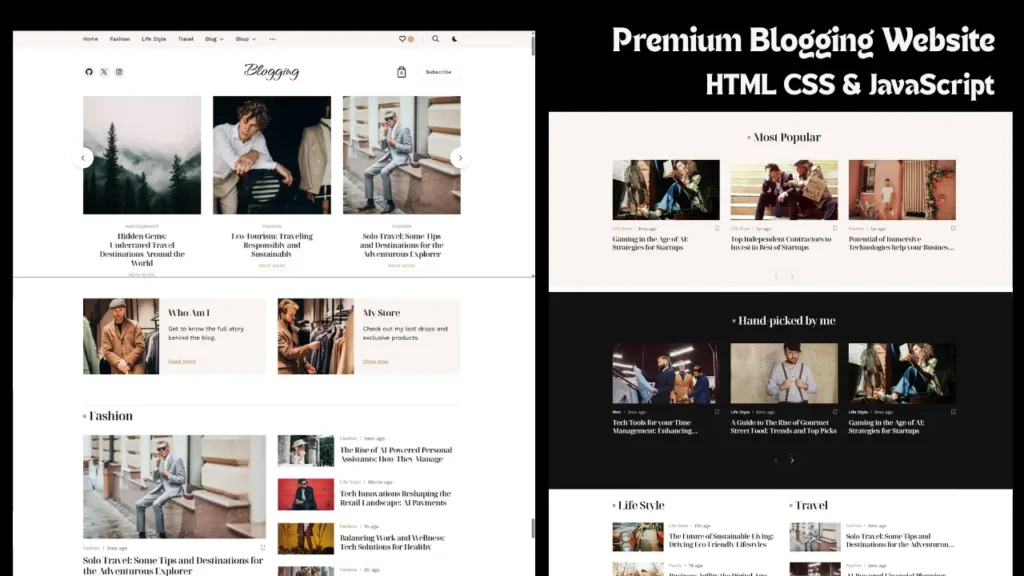
Creating a modern and responsive blog website is one of the most important skills in frontend web development. A clean blog design with smooth animations, responsive sections, and modern UI elements helps improve user experience and website engagement. In this project, you will explore a responsive blog website design built using HTML, CSS, JavaScript, Bootstrap, Swiper.js, and Anime.js.
This modern blogging website comes with a professional homepage layout, animated sections, responsive grids, featured blog cards, sliders, search functionality, and interactive UI elements. The design is optimized for desktop, tablet, and mobile devices, making it suitable for modern blogging platforms, online magazines, portfolio blogs, and news websites.
The website layout focuses on clean structure, responsive performance, and modern frontend design practices. Developers can use this project to improve frontend development skills and learn how modern blog website interfaces are created.
Modern Blog Website UI Design
A modern UI design makes a huge difference in website engagement. This responsive blog website uses clean spacing, attractive typography, modern cards, and smooth animations to create a professional user experience.
The homepage includes:
- Hero banner section
- Featured blog posts
- Trending article cards
- Interactive sliders
- Responsive navigation menu
- Sidebar widgets
- Search popup section
- Footer layout
The combination of these sections creates a visually appealing blogging interface suitable for modern web design trends.
YouTube Video Preview
Technologies Used in This Blog Website Project
This frontend project uses multiple technologies to create a responsive and interactive user interface.
HTML5
HTML5 provides the structure of the website using semantic elements that improve SEO and readability.
CSS3
CSS3 is used for styling, responsive layouts, animations, hover effects, spacing, and visual improvements.
JavaScript
JavaScript adds interactivity to the website including sliders, animations, and dynamic frontend functionality.
Bootstrap
Bootstrap helps create a mobile-friendly responsive layout that works perfectly on all screen sizes.
Swiper.js
Swiper.js is used to create modern sliders and carousel sections for featured content and blog previews.
Anime.js
Anime.js adds smooth animations and transitions that improve the overall visual experience.
Responsive Layout for All Devices
Modern websites must work properly on every screen size. This responsive blog website automatically adjusts its layout for:
- Desktop devices
- Tablets
- Smartphones
- Large screens
- Small mobile screens
Responsive grids, flexible images, optimized typography, and mobile-friendly navigation improve accessibility and user experience.
The mobile version of the website is designed carefully to ensure smooth browsing without layout issues.
Smooth Animations and Interactive Effects
Animations are an important part of modern frontend design. This project includes multiple animation effects that create an engaging browsing experience.
Animation features include:
- Hover animations
- Smooth transitions
- Animated sliders
- Scroll effects
- Interactive cards
- Dynamic content sections
These animations help the website feel modern and visually attractive while maintaining good performance.
Professional Frontend Structure
The project follows a clean frontend structure that improves maintainability and readability. The organized layout makes it easier for developers to understand the design and customize sections according to their needs.
The structure includes:
- Organized CSS files
- JavaScript functionality files
- Image assets
- Font assets
- Responsive components
- Reusable UI sections
This organized setup is useful for frontend practice projects and modern UI development.
SEO Friendly Blog Website Design
This project follows SEO-friendly frontend practices that help improve search engine visibility and user experience.
SEO features include:
- Semantic HTML5 tags
- Responsive design
- Fast loading layout
- Clean code structure
- Proper heading hierarchy
- Optimized UI sections
- Mobile-friendly interface
A well-optimized frontend layout improves both usability and search engine performance.
Features of This Responsive Blog Website
Main features included in this project:
- Responsive blog layout
- Modern UI design
- Interactive frontend structure
- Smooth animations
- Bootstrap responsive grid
- Featured post sliders
- Mobile-friendly navigation
- Search popup section
- Professional homepage design
- Clean frontend code
These features make the project suitable for modern web development inspiration.
Why This Frontend Project is Useful
This project is useful for:
- Frontend developers
- Beginners learning web development
- UI/UX designers
- Portfolio website inspiration
- Blogging website ideas
- Responsive website practice
- Modern frontend design learning
Developers can understand how professional blogging websites are structured using modern frontend technologies.
Frequently Asked Questions
How to create a responsive blog website using HTML CSS JavaScript?
You can create a responsive blog website by using HTML for structure, CSS for styling, JavaScript for interactivity, and Bootstrap for responsive layouts.
Is this blog website mobile responsive?
Yes, this website is fully responsive and optimized for desktop, tablet, and mobile devices.
Which technologies are used in this project?
This project uses HTML5, CSS3, JavaScript, Bootstrap, Swiper.js, and Anime.js.
Can beginners understand this frontend project?
Yes, beginners can explore the project structure and understand how responsive frontend layouts and animations work.
Is this website suitable for portfolio projects?
Yes, this modern blog website design can be used as a frontend portfolio and UI inspiration project.
Related Website Templates You Should Explore
Admin Dashboard Template HTML CSS JavaScript – Modern Multipurpose Admin Dashboard UI
Create Responsive Autoplay Carousel using HTML CSS and JavaScript
Conclusion
Responsive website design has become an essential part of modern frontend development. This responsive blog website project demonstrates how HTML, CSS, JavaScript, Bootstrap, Swiper.js, and Anime.js can be combined to create a professional blogging interface with modern UI elements and smooth animations.
The project includes responsive layouts, interactive sections, modern sliders, and clean frontend structure that improve both usability and visual appearance. Whether you are learning frontend development or looking for website design inspiration, this project provides a great example of a modern blogging website interface.
With its clean design, responsive structure, SEO-friendly layout, and professional appearance, this project is suitable for developers, designers, and content creators interested in modern web development.
7 people bought this
Grab it Now for Just 199 ₹499


