
Introduction
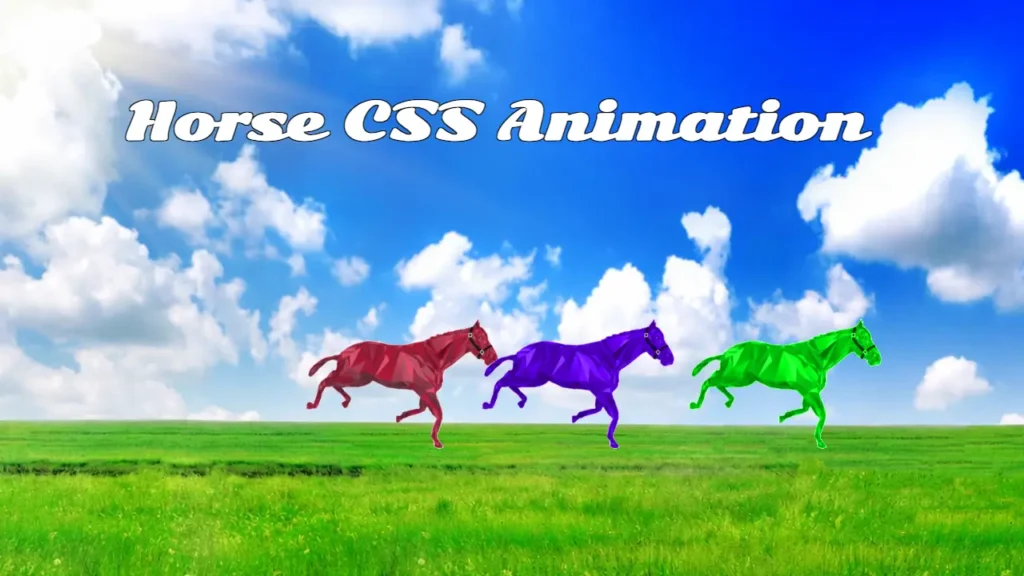
CSS animations are one of the most exciting parts of modern web development. They help developers create interactive experiences that capture user attention and make websites more engaging. The Horse CSS Animation project is a creative HTML and CSS animation that showcases multiple running horses moving smoothly across a scenic landscape using CSS keyframes.
This project is ideal for beginners who want to understand how CSS animations work in real-world scenarios. Instead of relying on complex JavaScript libraries, the animation uses pure HTML and CSS techniques to create smooth movement effects. According to web design studies, interactive visual elements can significantly improve user engagement and time spent on a webpage, making animation skills valuable for modern frontend developers.
Whether you are a student, web developer, frontend learner, or someone looking for a creative CSS animation project, this Horse CSS Animation source code provides an excellent opportunity to learn animation fundamentals while exploring a visually appealing design.
Horse CSS Animation Project Preview
The project displays multiple animated horses running across a beautiful grass field under a bright sky background. Each horse moves continuously from one side of the screen to the other, creating a simple yet impressive animation effect.
Project Highlights
- Running horse animation effect
- Pure HTML5 and CSS3 implementation
- CSS Keyframe animations
- Lightweight project structure
- Beginner-friendly source code
- Easy customization options
- No external frameworks required
- Smooth continuous animation
Project Information
| Feature | Details |
|---|---|
| Project Name | Horse CSS Animation |
| Technologies Used | HTML5, CSS3 |
| Animation Type | CSS Keyframes |
| Difficulty Level | Beginner |
| Responsive | Can Be Customized |
| JavaScript Required | No |
| Use Case | Learning & Frontend Practice |
Technologies Used
HTML5
HTML is used to create the structure of the project and place the horse animation elements inside the webpage.
CSS3
CSS is responsible for:
- Styling the layout
- Positioning elements
- Creating animation effects
- Managing movement transitions
- Controlling animation speed
CSS Keyframes
The movement of horses is achieved through CSS keyframes that continuously animate the horse images across the screen.
Key Features of Horse CSS Animation
Multiple Running Horses
The animation includes multiple horse elements moving simultaneously, creating a realistic racing effect.
Attractive Background Design
A beautiful sky and grass field background enhances the overall visual appeal of the project.
Smooth Animation Effects
The horse movement is handled using CSS keyframes, resulting in smooth transitions across the screen.
Lightweight and Fast
Since the project only uses HTML and CSS, it remains lightweight and loads quickly.
Easy to Understand
The source code is organized in a simple manner, making it easy for beginners to study and modify.
How This Animation Works
The Horse CSS Animation project uses a combination of positioning and CSS keyframes.
Step 1: Background Setup
The project uses a landscape background image to create a racing environment.
Step 2: Horse Placement
Horse images are placed using CSS positioning techniques.
Step 3: Animation Creation
CSS keyframes animate the horses from left to right.
Step 4: Continuous Movement
The animation repeats infinitely, creating a never-ending running effect.
Project Folder Structure
Horse CSS Animation
│
├── index.html
│
└── img
    ├── bg.png
    ├── bg2.png
    ├── horse-red.gif
    ├── horse-green.gif
    └── horse-blue.gif
This simple structure makes it easy to understand how the project is organized.
Why Beginners Should Explore This Project
Learning animations can be challenging when starting with advanced libraries. This project simplifies the process by focusing on core frontend concepts.
Learn CSS Animation Fundamentals
Understand how CSS keyframes control movement and timing.
Improve Frontend Skills
Gain practical experience with:
- CSS Positioning
- Keyframes
- Layout Design
- Visual Effects
Build Better Projects
Animation knowledge helps developers create more interactive and engaging websites.
Portfolio Inspiration
The project can be customized and extended into a more advanced frontend showcase.
Customization Ideas
One of the biggest advantages of this project is its flexibility.
Add More Horses
Create a larger racing scene by adding additional horse elements.
Change Animation Speed
Adjust animation duration values to create different movement speeds.
Add Moving Clouds
Introduce cloud animations for a more dynamic environment.
Create a Race Track
Replace the grass field with a racing track for a professional racing theme.
Add Scoreboard Features
Display race rankings and timers for an enhanced user experience.
Improve Mobile Responsiveness
Optimize the layout for smartphones and tablets.
Who Should Download This Project?
This Horse CSS Animation source code is suitable for:
- HTML beginners
- CSS learners
- Frontend developers
- Web design students
- Animation enthusiasts
- Portfolio builders
- Coding tutorial creators
- UI design learners
Benefits of Learning CSS Animation Projects
Animation projects provide practical experience that goes beyond theory.
Better Understanding of Motion Design
Animations help developers understand movement, timing, and user interaction.
Improved User Experience Skills
Modern websites often use animation to improve usability and engagement.
Stronger Frontend Portfolio
Creative projects help showcase development skills more effectively.
Real-World CSS Practice
Developers gain hands-on experience with concepts frequently used in professional projects.
Future Enhancement Ideas
Developers can expand this project with advanced features such as:
- Parallax backgrounds
- GSAP animations
- Interactive controls
- Speed adjustment buttons
- Sound effects
- Race completion indicators
- Dark mode support
- Responsive layouts
These enhancements can transform the project into a complete frontend animation showcase.
Conclusion
The Horse CSS Animation project is a creative and beginner-friendly example of how HTML and CSS can be used to create engaging visual effects. With smooth running horse animations, attractive design elements, and a simple project structure, it serves as an excellent learning resource for frontend developers.
Whether you want to improve your CSS animation skills, study keyframe techniques, or explore creative web design concepts, this project provides valuable hands-on experience. Download the source code, experiment with the animation settings, and customize the project to create your own unique frontend animation experience.
Frequently Asked Questions
What is Horse CSS Animation?
Horse CSS Animation is an HTML and CSS project that displays animated horses moving across a webpage using CSS keyframe animations.
Does this project require JavaScript?
No. The project works entirely with HTML5 and CSS3.
Is this project beginner-friendly?
Yes. The source code is simple and easy to understand, making it suitable for beginners.
Can I customize the horse speed?
Yes. You can change animation duration values in the CSS file to control speed.
Can I add more animated horses?
Yes. Additional horse elements can be added to create a larger racing scene.
Is this project useful for frontend learning?
Absolutely. It helps developers understand CSS animations, positioning, and visual effects.
Can I use this project in my portfolio?
Yes. After customization and optimization, it can become a valuable frontend portfolio project.
Which technologies are used in this project?
The project uses HTML5, CSS3, background images, and animated horse GIF assets.
Related Website Templates You Should Explore
Admin Dashboard Template HTML CSS JavaScript – Modern Multipurpose Admin Dashboard UI
Create Responsive Autoplay Carousel using HTML CSS and JavaScript
56 people downloaded this
Get It FREE Now


