
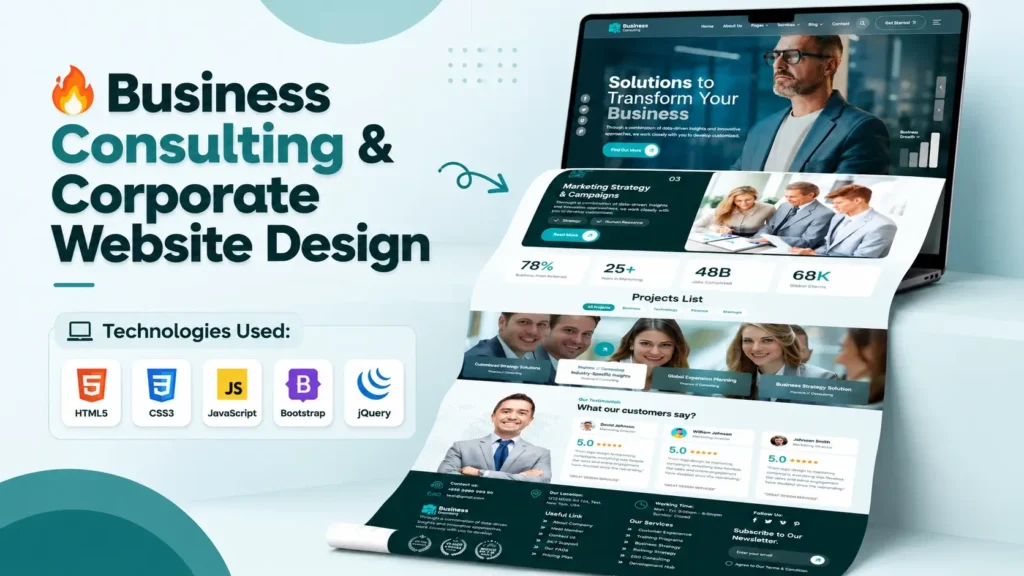
A professional online presence is essential for business consultants who want to showcase their expertise, explain their services, and build trust with potential clients. A well-planned business consulting website design can help communicate a company’s value, present its experience, and guide visitors toward requesting a consultation. For developers and website creators, starting with a structured HTML, CSS, and JavaScript template can also make the development process more efficient.
Whether you are building a consulting website for a client, creating a portfolio project, or exploring frontend development, a modern business consulting website template provides a practical foundation. It offers a starting point for arranging content, styling page sections, and implementing interactive elements without designing every component from scratch.
Research published by Stanford University’s Web Credibility Project identifies professional appearance, usability, and useful information as important factors in website credibility. Its guidelines draw on research involving more than 4,500 people. This highlights an important principle for consulting businesses: a website should look professional while making essential information easy to find.
In this guide, we will explore the key features of a business consulting website, the technologies behind its frontend, how to customize its source code, and the SEO and performance improvements that can help create a more effective website.
What Is Business Consulting Website Design?
Business consulting website design is the process of creating a website for consultants, advisory firms, management professionals, and business service providers. Its purpose is to present expertise, explain services, establish credibility, and encourage potential clients to take the next step.
Unlike a general business website, a consulting website must communicate knowledge and trust clearly. Visitors often want to understand what problems a consultant solves, what experience the team has, and how the engagement process works before making contact.
A strong consulting company website design typically includes:
- A professional homepage with a clear value proposition
- Dedicated sections for consulting services
- Information about the company and its expertise
- Case studies, projects, or client testimonials where available
- Clear contact details and consultation calls to action
- Responsive layouts for mobile devices, tablets, and desktops
- Search engine-friendly content and navigation
The best design is not necessarily the one with the most animations or visual effects. It is the one that helps the intended audience understand the business and find relevant information with minimal effort.
Explore a Modern Business Consulting Website Template
A business consulting website template gives developers a structured starting point for creating a professional consulting website. Instead of building every layout element individually, developers can inspect the existing design, understand how the files are organized, and modify the components to suit a particular business.
A typical HTML, CSS, and JavaScript consulting website project may include a homepage, navigation menu, service sections, promotional banners, animated counters, image sliders, and contact calls to action.
These elements work together to create a consistent user experience. For example, the homepage can introduce the consulting firm, while service sections explain its expertise and a prominent contact button directs visitors toward an enquiry.
The video can showcase the homepage, visual sections, navigation, and a short source code preview. This gives visitors an immediate understanding of the design before they explore the project files.
When evaluating a template, look beyond its appearance. Check whether the layout is understandable, whether the assets are organized properly, and whether the existing components can be adapted to your project requirements.
Key Features of a Professional Consulting Website Design
1. Clean and Professional Homepage
The homepage creates the first impression of a consulting business. It should communicate what the company does, whom it helps, and what visitors should do next.
A well-designed homepage commonly contains a hero section, a short introduction, service highlights, credibility indicators, and a contact call to action.
Use a clear headline instead of a vague statement. For example, a management consulting firm might explain that it helps businesses improve operational efficiency or plan sustainable growth.
Relevant images, readable typography, consistent spacing, and a focused color palette can strengthen the presentation without overwhelming visitors.
2. Service Presentation and Navigation
Consulting companies may offer business strategy, financial advisory, marketing consulting, operations management, human resources consulting, or digital transformation services.
Each major service should be easy to identify. Use descriptive headings, short explanations, and links to detailed service pages where appropriate.
Navigation should follow a logical structure. Visitors should not need to search through multiple menus to find services, company information, or contact details.
For a smaller website, a straightforward navigation menu may be sufficient. Larger consulting firms may benefit from grouped service categories and dedicated landing pages.
3. Responsive Website Layout
A responsive business website adjusts its layout to different screen sizes. This is particularly important because potential clients may discover a consulting firm through a mobile search, social media link, or shared message.
Responsive design involves more than shrinking a desktop layout. Developers should consider flexible grids, suitable image dimensions, readable font sizes, and touch-friendly buttons.
Test the website on several viewport widths. Check whether the navigation works, text remains readable, cards stack properly, and important calls to action remain visible.
4. Interactive Elements and Animations
JavaScript can add useful interactions to a consulting website. Depending on the project, these may include mobile navigation toggles, image carousels, animated statistics, accordions, or popup components.
Animations should support the content rather than distract from it. Excessive movement can make a professional website feel cluttered and may affect performance.
A practical approach is to keep essential information accessible even when an animation or external JavaScript library fails to load.
5. Trust-Building Sections
Consulting is a relationship-driven service. Visitors need reasons to believe that a firm has the knowledge and experience to address their problems.
Useful trust-building elements include:
- Consultant biographies and relevant qualifications
- Genuine client testimonials published with permission
- Detailed case studies and measurable outcomes
- Industry experience and areas of specialization
- Clear business contact information
- Transparent explanations of the consulting process
Do not invent testimonials, client logos, awards, or business results. Accurate evidence and clear communication are more valuable than impressive-looking claims that cannot be verified.
Technologies Used in a Business Consulting Website Project
A frontend website template may use several technologies to control its structure, appearance, and behavior. Understanding their individual roles makes customization easier, especially for beginners.
| Technology | Main purpose | Typical use |
|---|---|---|
| HTML5 | Defines page structure | Headings, navigation, sections, links, and forms |
| CSS3 | Controls visual presentation | Colors, typography, spacing, layouts, and responsive styling |
| JavaScript | Adds interactivity | Menus, animations, counters, and dynamic behavior |
| Bootstrap | Provides reusable frontend components | Grid layouts, navigation, buttons, and responsive utilities |
| jQuery | Simplifies certain JavaScript operations | Event handling and plugins that depend on jQuery |
Not every project needs every technology. Some templates use modern JavaScript without jQuery, while others rely on Bootstrap or additional libraries for specific features.
Before making changes, inspect the project’s actual files and dependency versions. A library appearing in a folder does not automatically mean that every page uses it.
Understanding the HTML, CSS, and JavaScript Source Code
One of the most useful ways to learn frontend development is to connect what you see in the browser with the code responsible for it.
HTML: The Structure of the Website
HTML defines the content and organization of the page. It determines where headings, paragraphs, navigation menus, images, buttons, and other elements appear.
For example, the main homepage heading should communicate the website’s primary message. Service sections can use descriptive headings, while links should lead to relevant pages or actions.
When customizing HTML, preserve a logical heading hierarchy and use semantic elements where appropriate. These practices improve maintainability and help browsers and assistive technologies interpret the content.
CSS: The Visual Design
CSS controls the visual appearance of the website. It manages the layout, colors, fonts, spacing, borders, backgrounds, and responsive behavior.
If you want to change the primary color, adjust the relevant CSS rules rather than adding conflicting styles throughout the project. If the template uses CSS variables, updating a shared variable may allow you to change several components consistently.
After changing styles, test both desktop and mobile layouts. A design adjustment that looks attractive on a large monitor may create overflow or readability problems on a smaller screen.
JavaScript: The Interactive Behavior
JavaScript adds functionality that goes beyond static HTML and CSS. It can control navigation interactions, animate counters, respond to button clicks, and initialize third-party components.
When modifying JavaScript, inspect the existing event handlers and dependencies before replacing code. Changing a library initialization setting without understanding its purpose may break a slider, popup, or animation.
For beginners, a good learning method is to change one component at a time, refresh the page, and observe the result.
How to Customize a Business Consulting Website Template
Customizing a template involves more than changing the company name and logo. The goal is to align the website with the business’s audience, services, brand identity, and conversion objectives.
Step 1: Review the Project Structure
Start by opening the main HTML file and identifying the stylesheets, scripts, images, fonts, and other assets it references.
A typical project might follow this structure:
business-consulting/
├── index.html
├── assets/
│   ├── css/
│   │   └── main.css
│   ├── js/
│   │   └── main.js
│   └── img/
└── README.md
Actual folders and filenames vary between projects. Always follow the structure of the template you are using rather than assuming that every project contains these exact files.
Step 2: Update Branding and Business Information
Replace placeholder branding with the company’s approved logo, business name, color palette, and contact details.
Review all text, including button labels, footer information, image captions, and metadata. Remove any demonstration content that does not apply to the business.
Use a consistent tone throughout the website so that the homepage, service descriptions, and contact page feel like parts of the same brand.
Step 3: Adapt the Services and Content
Identify the consulting firm’s main services and organize them around the questions potential clients are likely to ask.
Explain what each service involves, who it is intended for, and what type of business challenge it addresses. Where appropriate, link to detailed service pages that provide additional information.
Avoid making guaranteed claims about business growth or financial outcomes unless they are appropriately supported and qualified.
Step 4: Check Internal Links and Assets
A template may contain links to pages that are not included in the project package. It may also reference images, fonts, or scripts using paths that no longer work.
Click every major navigation link and check whether each required file exists. Replace broken paths, remove unused links, and ensure that contact buttons perform the intended action.
This step is easy to overlook, but a visually polished homepage is not enough if important navigation links lead to missing pages.
Step 5: Test the Website Before Publishing
Open the project in a local development environment or an appropriate local web server. Check the console for JavaScript errors and inspect the page at different screen sizes.
Test navigation, sliders, forms, buttons, and other interactive components. If the template includes a contact form, confirm that its submission process is connected to a working backend or form service.
Only publish the website after checking the actual user experience rather than relying on the homepage screenshot alone.
SEO Best Practices for a Business Consulting Website
A professional design can support search visibility, but visual appearance alone does not guarantee higher Google rankings. Search engines need understandable content, accessible pages, and useful information that satisfies the visitor’s intent.
Use the Focus Keyword Naturally
Place the focus keyword, Business Consulting Website Design, in appropriate locations such as the page title, H1 heading, introduction, and relevant section headings where it fits naturally.
Use related phrases such as business consulting website template, consulting company website design, and HTML CSS business website when they genuinely describe the page.
Avoid repeating the exact keyword in every paragraph. Search optimization should make the content clearer, not less natural.
Write Helpful Page Titles and Meta Descriptions
Create a unique title that accurately describes the page. A concise title might be:
Business Consulting Website Design | HTML CSS Template
Write a meta description that explains what visitors can find on the page. Include relevant terms naturally, but avoid promising features that the template does not contain.
Improve Loading Speed and Core Web Vitals
Website speed affects the experience visitors have when opening a page, especially on mobile connections.
Google’s 2017 mobile speed research reported that, as page load time increased from one second to three seconds, the probability of a mobile visitor bouncing increased by 32%. This is a historical research finding rather than a prediction for every modern website, but it demonstrates why performance deserves attention.
To improve performance:
- Compress images and use suitable image formats.
- Load only the scripts and libraries the website actually needs.
- Minify production CSS and JavaScript when appropriate.
- Avoid unnecessary animations and oversized visual assets.
- Check Core Web Vitals using current performance testing tools.
- Test the page on mobile devices and realistic network conditions.
Use Semantic HTML and Accessible Images
Use descriptive headings, meaningful link text, and appropriate HTML elements. Add useful alternative text to informative images and use empty alternative text for purely decorative images when appropriate.
Make sure text has sufficient contrast and that interactive elements can be operated using a keyboard.
These practices improve usability and make the website easier to understand for a broader range of visitors.
Build a Logical Internal Linking Structure
Connect relevant pages through clear internal links. For example, the homepage can link to consulting services, company information, case studies, and contact details.
If the website includes individual service pages, link to them using descriptive anchor text. Ensure that important pages are accessible through navigation and are not isolated from the rest of the website.
SEO improvements should support genuine discovery and usability rather than creating unnecessary pages solely to target variations of the same keyword.
What to Check Before Choosing a Website Source Code Project
A template that looks impressive in a preview may still require substantial work before it is ready for a live business website. Evaluate the project from both a design and technical perspective.
| Evaluation area | What to inspect | Why it matters |
|---|---|---|
| Design quality | Layout, typography, spacing, and consistency | Establishes a professional visual presentation |
| Responsive behavior | Navigation, cards, images, and buttons on mobile | Helps visitors use the site across devices |
| Code organization | Clear HTML, CSS, and JavaScript files | Makes customization easier |
| Dependencies | Library versions and external scripts | Helps identify compatibility and maintenance needs |
| Page completeness | Navigation targets and referenced assets | Reduces broken links and missing resources |
| Performance | Image sizes, scripts, and rendering behavior | Supports a smoother browsing experience |
| Documentation | Setup instructions and customization notes | Helps beginners understand the project |
One additional check is often missed: review the project’s usage licence and attribution requirements before deploying it for a client or commercial business. Confirm that you are permitted to modify, redistribute, or use the assets in the way you intend.
Also inspect the source for hardcoded credentials, unnecessary tracking scripts, outdated dependencies, or external resources that should not be trusted automatically.
Common Mistakes to Avoid in Consulting Website Design
Even a good business website template can produce a poor result when it is customized without a clear plan.
Overloading the homepage: Too many banners, animations, and competing calls to action can make the message difficult to understand. Prioritize the business’s main value proposition and the next step you want visitors to take.
Using generic content: Vague service descriptions do little to distinguish one consulting firm from another. Explain the firm’s actual expertise and the business problems it addresses.
Ignoring mobile usability: Small text, crowded menus, and oversized images can frustrate visitors on mobile devices. Test the complete experience on smaller screens.
Leaving placeholder information: Demo testimonials, sample contact details, and irrelevant project names can damage trust. Replace them with verified information or remove them.
Assuming the template is production-ready: A working homepage does not prove that every link, form, dependency, and security-related setting is ready for publication. Test the complete project before launch.
Treating design as the entire SEO strategy: Search performance also depends on useful content, technical accessibility, indexing, internal linking, and how well the page satisfies the user’s search intent.
How a Good Consulting Website Supports Business Goals
A consulting website should do more than display services. It should help the right visitors understand the business and decide whether to make contact.
Start by identifying the main conversion goal. For one firm, it may be booking an introductory consultation. For another, it may be requesting a proposal or submitting an enquiry.
Make the next action clear and ensure the associated form asks only for information that is genuinely necessary. Explain what happens after submission so that visitors understand the next step.
Measure relevant outcomes after launch. Useful indicators may include qualified enquiry submissions, consultation bookings, engagement with service pages, and mobile usability. Traffic alone does not show whether the website is attracting the right audience.
Use the data to identify opportunities for improvement. If visitors reach a service page but rarely contact the business, review the clarity of the offer, the supporting evidence, the calls to action, and the form experience before redesigning the entire website.
Conclusion
A well-executed Business Consulting Website Design combines a professional appearance with clear messaging, accessible navigation, responsive layouts, and trustworthy business information. An HTML, CSS, and JavaScript template can provide a useful starting point, whether you are learning frontend development, building a portfolio project, or preparing a website for a consulting business.
However, the quality of the final result depends on what you do with the starting code. Review the project structure, customize the branding and content, verify every link, test interactive components, and improve performance before publication. Pay equal attention to technical quality and the information visitors need to make an informed decision.
Explore the business consulting website template and inspect its source code to understand how the layout, styling, and interactions work together. With thoughtful customization and consistent testing, you can turn a starter project into a professional website that reflects a consulting firm’s identity and business goals.
Frequently Asked Questions (FAQs)
1. What is business consulting website design?
Business consulting website design is the process of creating a professional website for consulting firms and independent consultants. It typically includes service information, company details, expertise, case studies, contact options, and responsive layouts.
2. Which technologies are used in a business consulting website template?
Common technologies include HTML5 for structure, CSS3 for styling, and JavaScript for interactive behavior. Some templates also use Bootstrap, jQuery, sliders, or other frontend libraries.
3. Can beginners customize a business consulting website HTML template?
Yes. Beginners can start by changing the company name, logo, text, images, and colors. Learning basic HTML, CSS, and JavaScript makes it easier to customize layouts and troubleshoot interactive components.
4. Is a business consulting website template suitable for commercial projects?
That depends on the template’s licence and the permissions attached to its code, fonts, images, and third-party libraries. Review the relevant terms before using the project for a client or commercial website.
5. How can I make a consulting website mobile-friendly?
Use responsive layouts, flexible images, readable typography, and touch-friendly controls. Test the navigation, forms, buttons, and page sections at different screen widths rather than checking only the desktop version.
6. How do I improve SEO for a consulting company website?
Use descriptive page titles, relevant headings, useful service content, descriptive internal links, optimized images, and accessible HTML. Also check indexing, page performance, mobile usability, and the accuracy of business information.
7. Why is website speed important for a consulting business?
A fast website helps visitors access services and contact information with less waiting. Optimize images, reduce unnecessary scripts, and monitor performance to identify slow-loading elements.
8. What should I check before publishing a website source code project?
Review the licence, file structure, dependencies, image paths, navigation links, responsive behavior, interactive components, forms, and browser console. Replace placeholder content and test the website before making it publicly accessible.
9. Which sections should a business consulting homepage include?
A useful homepage often includes a clear introduction, consulting services, company expertise, supporting evidence, client testimonials where available, and a prominent contact action. The exact structure should reflect the business’s audience and goals.
10. Does a professional website design guarantee higher Google rankings?
No. Professional design can support usability and credibility, but search rankings depend on many factors, including relevance, content quality, technical accessibility, competition, and other search systems. A good website should combine design quality with useful information and sound SEO practices.
Related Templates You May Like
- Fashion E-Commerce Website Design
- Admin Dashboard Template
- Shopping eCommerce Website Design
- Jewelry and Cosmetics eCommerce Website
🔥 15+ People Have Already Bought This
Grab it Now for Just 999 ₹2499


