
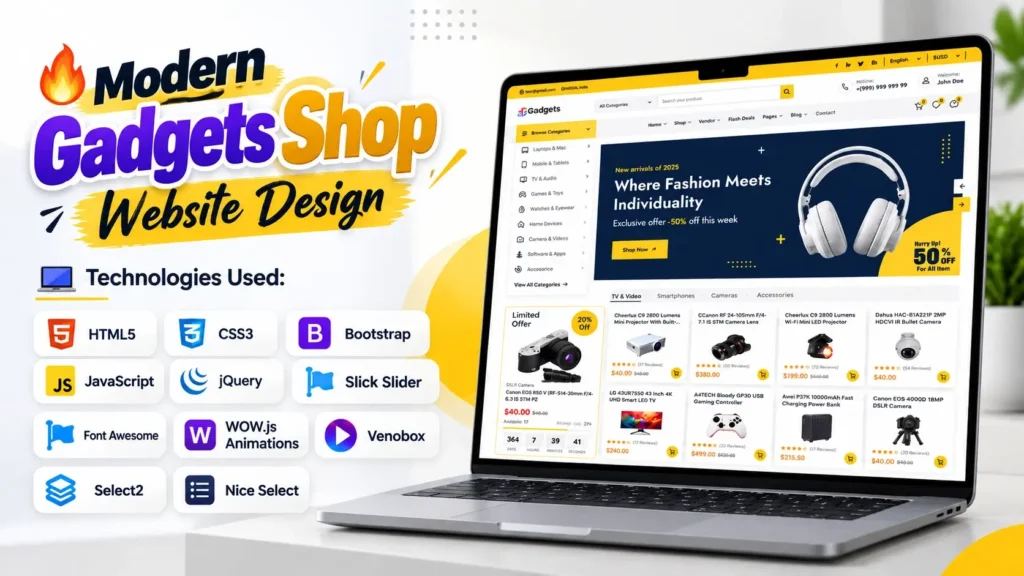
A modern online store needs more than an attractive homepage. Visitors should be able to explore product categories, recognize important information quickly, navigate comfortably on mobile devices, and understand where to go next. That is why Gadgets Shop Website Design is a useful project for anyone learning frontend development or planning an electronics eCommerce website.
This Gadgets Shop project features an electronics-store-inspired interface with product search, category navigation, promotional sections, product presentation areas, and supporting UI elements. Its frontend is built using HTML5, CSS3, Bootstrap, JavaScript, and jQuery, along with additional libraries for sliders, animations, select menus, and other interactive effects.
Whether you are a student building a portfolio, a beginner learning web development, or a developer looking for an electronics store website template, this project provides a practical starting point. You can study the existing layout, understand how its files work together, and adapt the design to your own requirements.
The opportunity is significant: Shopify’s commerce research and other industry analyses consistently highlight the importance of online shopping experiences, while Statista has estimated global retail eCommerce sales in the trillions of US dollars annually. An effective storefront therefore needs to combine visual appeal with usability, performance, accessibility, and a clear shopping journey.
In this guide, we will explore the website’s design, technologies, major components, project structure, setup process, customization ideas, and the important steps required before turning a frontend template into a working online store.
What Is a Gadgets Shop Website Design?
A Gadgets Shop Website Design is a website interface created for presenting electronic products and related accessories. Depending on the business, a store may showcase smartphones, laptops, headphones, smartwatches, cameras, gaming accessories, speakers, and other consumer electronics.
The design usually combines a recognizable brand identity, category navigation, search functionality, promotional banners, product cards, and links to product details. These elements help visitors move from discovering a product category to exploring individual products.
This project focuses on the frontend presentation layer. Its HTML defines the page structure, CSS controls the appearance, and JavaScript-based libraries support interactive interface elements. The provided project includes a main index.html file and local CSS, JavaScript, and image assets.
It is important to understand the scope: a polished storefront interface does not automatically provide a complete eCommerce system. Product inventory, customer accounts, payment processing, order management, and database operations require additional backend functionality or integration with an eCommerce platform.
Key Features of This Gadgets Shop Website Template
A useful website template should provide more than a good-looking first screen. Its layout should help visitors understand the store and give developers a clear foundation for customization.
1. Modern Homepage Layout
The homepage acts as the store’s digital entrance. The Gadgets Shop design uses a structured header, navigation areas, and dedicated content sections to create a recognizable online retail experience.
You can customize the main banner, replace sample product imagery, introduce your own brand colors, and update the text to reflect your electronics business. A strong hero section should communicate what the store sells and direct visitors toward a relevant category or featured product.
2. Product Search and Category Navigation
Customers visiting an electronics store may already know which product they want. A visible search area and well-organized categories can make it easier to find the right section.
The template includes a search interface and category-selection controls. These are useful starting points for organizing categories such as laptops, mobile devices, televisions, audio equipment, cameras, and accessories.
However, a visible search field is not the same as a functioning product search engine. The supplied HTML contains a search form with a placeholder action. To deliver actual search results, you must connect it to JavaScript filtering, a backend endpoint, or an eCommerce platform.
3. Product Presentation Areas
Product cards are central to an electronics store because visitors need to compare items quickly. A useful product card typically includes a clear image, product name, price, and a link to more information.
Depending on the final implementation, you can add ratings, availability, discount labels, short specifications, and call-to-action buttons. Keep the most important details visible without overcrowding each card.
Use consistent image dimensions and compress images before uploading them. This helps the page maintain a tidy appearance and reduces unnecessary loading time.
4. Responsive Layout
Shoppers may visit an online store from a desktop computer, tablet, or smartphone. A responsive layout adjusts content to different screen sizes instead of forcing every visitor to use a desktop-style interface.
This project includes Bootstrap and a dedicated responsive stylesheet. These provide a foundation for building layouts that adapt to different devices.
Still, the presence of responsive CSS does not guarantee that every section works perfectly on every screen. Test navigation, search controls, product cards, banners, and spacing on actual mobile-sized viewports before publishing.
5. Interactive UI Elements
The project references several JavaScript and jQuery libraries to support interface behavior and visual effects. These include Slick Slider for carousel functionality, WOW.js for scroll-triggered animations, Venobox for lightbox-style content, Select2 and Nice Select for selection controls, and supporting scripts for tabs and sliders.
These libraries can improve the presentation when used carefully. Too many animations or unnecessary effects, however, can distract visitors and increase page complexity.
For a production store, prioritize predictable interactions, clear feedback, keyboard accessibility, and fast loading over decorative effects.
6. Header, Navigation and Supporting Sections
The header includes areas for branding, category selection, search, and customer-support information. The template also contains navigation links for store sections and supporting pages.
These elements help demonstrate how a larger eCommerce interface can be organized. Before launching, replace placeholder contact details, sample user information, and demonstration links with accurate business information.
Technologies Used in the Gadgets Shop Project
The project combines core frontend technologies with third-party libraries. Each technology has a different role in building and maintaining the interface.
| Technology | Purpose |
|---|---|
| HTML5 | Defines page structure and content |
| CSS3 | Controls styling, layout, colors, and typography |
| Bootstrap | Provides responsive layout utilities and UI components |
| JavaScript | Supports browser-side interactions |
| jQuery | Simplifies DOM manipulation and event handling |
| Slick Slider | Supports carousel and slider layouts |
| Font Awesome | Provides interface icons |
| WOW.js | Enables scroll-triggered animation effects |
| Venobox | Supports lightbox-style media presentation |
| Select2 and Nice Select | Enhance select controls |
| Additional jQuery plugins | Support tabs, range sliders, counters, and related UI features |
The project also includes local stylesheets for responsive behavior, mobile navigation, animations, spacing, and other interface components.
Why Use HTML, CSS, Bootstrap and JavaScript Together?
HTML provides the structure, CSS determines how that structure looks, and JavaScript adds behavior. Bootstrap helps developers build responsive layouts without writing every layout rule from scratch.
jQuery is used by several libraries included in this project, so it should remain available unless you replace those dependencies with alternatives. Before removing any library, check which scripts depend on it and test the affected sections.
This combination makes the project useful for learning how a traditional multi-library frontend is organized. It also provides an opportunity to practice reading existing code rather than building every interface element from the beginning.
Project File Structure Explained
Understanding the folder structure makes customization easier and helps you troubleshoot missing assets.
index.html
This is the main homepage file. It contains the page markup, text, navigation, form elements, stylesheet references, and script references.
Open it in a code editor to examine the layout. Search for section comments to locate individual parts of the page and update content in small, controlled steps.
assets/css/
This directory contains the stylesheets. The main style.css file controls much of the site’s appearance, while responsive.css handles responsive styling. Other files provide styles for Bootstrap, sliders, animations, selection controls, and supporting components.
For visual changes, start with the relevant section in style.css. Avoid changing minified vendor stylesheets unless you understand the consequences, because your edits can be difficult to maintain.
assets/js/
This folder contains JavaScript files and supporting libraries. The custom.js file is a useful place to investigate project-specific interactions, while files such as slick.min.js, wow.min.js, and bootstrap.bundle.min.js provide library functionality.
Make changes carefully and check the browser console if an interaction stops working.
assets/images/
The design references local images, logos, category graphics, and other visual assets. Keep the directory structure intact when replacing images, or update the corresponding file paths in the HTML and CSS.
Important implementation note: The supplied project references image assets such as gadget_logo.png and favicon.png. Verify that every referenced file exists in the final package. Missing images can create broken layouts even when the HTML itself is valid.
How to Set Up the Gadgets Shop Website Project
You can inspect the frontend locally before making any major changes.
Step 1: Prepare the Project Files
Extract the project archive into a dedicated folder on your computer. Keep index.html and the assets directory in their original relative locations.
If you move individual CSS, JavaScript, or image files, update their references accordingly.
Step 2: Open the Homepage
Open index.html in a modern browser to inspect the initial interface. For a more convenient development workflow, use a local development server through your preferred code editor or development environment.
A local server is particularly helpful when testing JavaScript interactions and checking how the page behaves during development.
Step 3: Inspect the Browser Console
Open your browser’s developer tools and check the Console and Network panels. Look for JavaScript errors, failed asset requests, missing images, and stylesheet loading problems.
A template can appear visually correct at first glance while still containing broken links or incomplete interactions.
Step 4: Review the Layout on Multiple Screens
Test the homepage at desktop, tablet, and mobile widths. Check that menus are usable, text remains readable, images scale appropriately, and important buttons do not overlap.
Also test keyboard navigation and visible focus states so visitors can use the interface without relying entirely on a mouse.
Step 5: Customize One Section at a Time
Start with the brand name, logo, colors, typography, and main banner. Next, update product imagery, category labels, navigation links, and sample content.
After each group of changes, reload the page and test the affected area. This approach makes it easier to identify the cause of a problem.
How to Customize the Gadgets Shop Website Design
A template becomes more useful when it reflects a real brand and its customers. Use these practical improvements to move beyond the default appearance.
Create a Consistent Brand Identity
Choose a small color palette and apply it consistently to buttons, headings, links, banners, and highlights. Use a readable font and maintain a clear hierarchy between headings, descriptions, prices, and supporting information.
Your logo should remain sharp at different sizes. Avoid stretching it or using a low-resolution image in the main header.
Improve Product Information
Electronics shoppers often compare specifications before making a decision. Add relevant information such as storage capacity, display size, compatibility, connectivity, warranty details, and included accessories where appropriate.
Present only specifications that are accurate for the product. Clear information builds trust and reduces confusion.
Improve Navigation and Search
Group products into logical categories and avoid unnecessarily deep navigation menus. If the store contains many items, implement search suggestions, relevant filters, sorting, and useful empty-result messages.
Test the search with different product names and common spelling variations. Search should help visitors recover when they do not know the exact product title.
Optimize Images and Performance
Large images and unnecessary scripts can slow down a storefront. Resize images to the dimensions actually required, use modern formats such as WebP where supported, and lazy-load suitable below-the-fold images.
Minify your own production CSS and JavaScript when appropriate, but keep development files manageable. Review third-party scripts and remove dependencies that are genuinely unused.
Do not assume that adding a caching plugin or compressing files automatically makes a page fast. Measure the page with tools such as PageSpeed Insights and investigate the issues they report.
Add Accessible Interactions
Use descriptive text for buttons, meaningful alternative text for informative images, and appropriate labels for form controls. Make sure dropdowns and menus can be operated with a keyboard and that text and controls have sufficient contrast.
Accessibility improvements often benefit mobile users and visitors navigating with assistive technologies as well.
Is This Template a Complete eCommerce Website?
No. The supplied project is primarily a frontend template, not a fully operational online store.
The HTML references additional pages such as shop listings, product details, cart, checkout, sign-in, and customer dashboard pages. Those links indicate the intended broader store experience, but the referenced PHP pages are not included in the supplied ZIP archive.
To build a complete store, you will need to implement or integrate the missing functionality.
| Requirement | What you need to add |
|---|---|
| Product catalog | Product data, categories, inventory, and product detail pages |
| Search and filters | Search logic, filtering, and sorting |
| Shopping cart | Cart state, quantity updates, and item removal |
| Checkout | Customer details, order validation, and checkout flow |
| Payments | A suitable payment provider and secure server-side verification |
| User accounts | Authentication, account management, and session security |
| Order management | Database storage, order status, and administrative tools |
For a small demonstration, some interactions can be simulated in JavaScript. For a real store, sensitive operations such as payments, authentication, pricing validation, and order creation must be handled securely on the server or by a trusted commerce platform.
Never store payment secrets in frontend JavaScript or rely on browser-side validation alone.
SEO Tips for an Electronics Store Website
A visually appealing website still needs to be discoverable and understandable. Apply these SEO fundamentals when adapting the template for a real store.
Use Descriptive Page Titles and Headings
Give each important page a clear title that reflects its actual content. Product pages should use the product name and relevant distinguishing information instead of repeating a generic homepage title.
Use a logical heading hierarchy and write naturally for shoppers rather than repeating the same keyword in every heading.
Write Useful Product Descriptions
Avoid copying manufacturer descriptions without adding useful context. Explain important specifications, compatibility, intended use, warranty details, and differences between product variations.
Original, accurate information helps customers make better decisions and gives each product page a clearer purpose.
Add Structured Product Data Where Appropriate
For eligible product pages, implement relevant structured data that matches the information visible on the page. Product structured data can help search engines understand product details, including price and availability when those details are correctly provided.
Validate the markup and keep it synchronized with the actual product information. Structured data does not guarantee a rich result or a higher ranking.
Keep the Technical Foundation Clean
Use descriptive URLs, crawlable internal links, accurate image alternative text, and a sensible sitemap. Check for broken links and ensure important pages can be crawled and indexed.
Google recommends creating helpful, reliable, people-first content rather than producing pages solely to manipulate rankings. Read its official guidance on creating helpful, reliable content.
Common Mistakes to Avoid
When adapting an electronics store template, watch out for these issues:
- Leaving placeholder information: Replace sample email addresses, phone numbers, account names, and social links.
- Assuming every button works: Test each control and connect it to its intended functionality.
- Ignoring missing pages: Create the destination pages or remove links that do not serve a purpose.
- Using oversized product images: Optimize image dimensions and file sizes.
- Overloading the homepage: Prioritize important categories and products instead of displaying everything at once.
- Ignoring mobile testing: Verify menus, product cards, forms, and banners on smaller screens.
- Treating the frontend as secure by default: Implement authentication, authorization, payment verification, and data validation on the appropriate backend systems.
These checks are especially important before using the template for a business that accepts customer information or processes orders.
Who Can Use This Gadgets Shop Website Project?
This project can be useful for several types of users.
Students and beginners can study the HTML structure, practice CSS customization, and understand how JavaScript libraries are integrated into a real-looking storefront.
Frontend developers can use the interface as a reference when practicing responsive layouts, navigation systems, product cards, and reusable UI patterns.
Designers can explore its visual hierarchy and adapt the color palette, typography, spacing, and product presentation to create a distinct brand experience.
Business owners and agencies can use the design as a starting reference for planning an electronics storefront. Before launch, the project should be customized, tested, and connected to the required backend or commerce platform.
Frequently Asked Questions
1. What is a Gadgets Shop Website Design?
A Gadgets Shop Website Design is a storefront interface created for presenting electronic products such as smartphones, laptops, headphones, cameras, and accessories. It typically includes category navigation, product cards, search controls, and promotional sections.
2. Which technologies are used in this Gadgets Shop project?
The project uses HTML5, CSS3, Bootstrap, JavaScript, and jQuery. It also references libraries such as Slick Slider, Font Awesome, WOW.js, Venobox, Select2, and Nice Select for additional interface features.
3. Is this Gadgets Shop template responsive?
The project includes Bootstrap and a responsive stylesheet, which provide a foundation for responsive layouts. However, you should test all major sections on mobile, tablet, and desktop screens before publishing.
4. Does the project include a complete shopping cart and checkout system?
The supplied ZIP contains the frontend homepage and its assets, but it does not include all the referenced PHP pages or a complete backend. A functional cart, checkout, database, and payment workflow must be implemented or integrated separately.
5. Can beginners customize this website template?
Yes. Beginners can start by changing the logo, colors, text, images, and category labels. It is best to make small changes, preview the page, and test related interactions before moving to more complex modifications.
6. How can I run the Gadgets Shop website project locally?
Extract the project files, keep the assets directory in place, and open index.html in a browser. For development and testing, a local server is recommended. Check the browser console for missing files and JavaScript errors.
7. How can I improve the SEO of an electronics store website?
Use descriptive titles, useful product descriptions, clear category pages, crawlable links, optimized images, mobile-friendly layouts, and valid structured data where relevant. Keep product information accurate and avoid duplicate or thin pages.
8. Can I use this frontend as the foundation for a real electronics store?
Yes, it can serve as a frontend starting point. You must first review the applicable license, customize the design, test its usability, and implement the backend, security, product management, checkout, and payment features required by your business.
Final Thoughts
The Gadgets Shop Website Design project provides a useful foundation for exploring modern electronics storefront interfaces with HTML, CSS, Bootstrap, JavaScript, and jQuery. Its layout and supporting libraries make it a practical learning resource for understanding how a frontend website is organized.
The most valuable next step is to move beyond appearance. Customize the design for a clear audience, check every link, improve accessibility, optimize images, and test the page on different devices. If you intend to launch a real store, add the backend services and security controls needed to manage products, customers, orders, and payments.
A successful eCommerce website is not simply attractive; it helps visitors find relevant products, understand their choices, and complete their intended tasks with confidence.
Watch the Gadgets Shop Website Preview
Watch the website preview to see the homepage layout, navigation, product presentation, and visual styling in action. The video also includes a short glimpse of the project code so you can see the technologies and structure behind the interface.
Website Preview and Source Code Walkthrough
Use an appropriate responsive video embed on your website. Replace this placeholder with the actual YouTube embed URL when the video is published.
Related Templates You May Like
- Fashion E-Commerce Website Design
- Admin Dashboard Template
- Shopping eCommerce Website Design
- Jewelry and Cosmetics eCommerce Website
🔥 5+ People Have Already Bought This
Grab it Now for Just 999 ₹2499


