
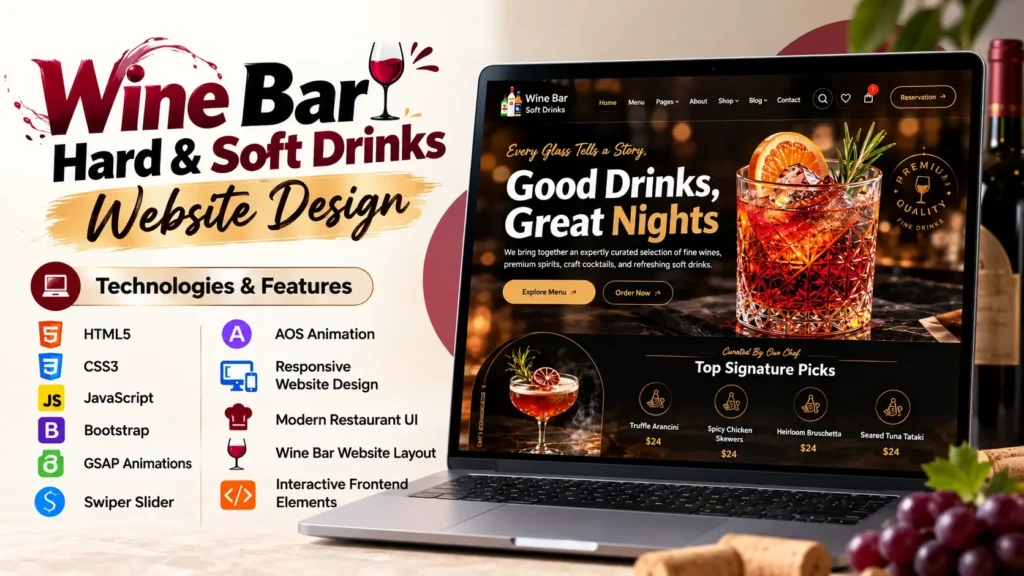
A wine bar needs more than an attractive menu and a good location. In today’s digital-first environment, your website is often one of the first places potential customers interact with your brand. A well-planned Wine Bar Website Design can create the right first impression, present your menu clearly, showcase the atmosphere of your venue, and guide visitors toward reservations or other important actions.
This project is designed around a modern wine bar and restaurant concept with an elegant visual style, responsive layouts, interactive elements, sliders, animations, and structured frontend code. It combines HTML5, CSS3, JavaScript, Bootstrap, GSAP, Swiper and other frontend technologies to create a polished restaurant website experience.
The importance of restaurant technology continues to grow. According to the National Restaurant Association’s 2025 research, 75% of delivery customers said that technology options such as ordering and payment are important when choosing a restaurant. The percentage rises to 82% among Gen Z adults. NRA
That does not mean every wine bar needs to turn its website into a complicated ordering platform. Instead, it shows why a restaurant website should be easy to navigate, visually appealing, mobile-friendly, and designed around customer expectations.
This article explores the project, its design approach, technologies, major sections, SEO considerations, customization opportunities, and practical ways developers and website owners can use the source code.
What Is a Wine Bar Website Design?
A Wine Bar Website Design is a website interface specifically created for wine bars, wine lounges, restaurants, tasting rooms, and hospitality businesses.
Unlike a generic business website, a wine-focused website needs to communicate atmosphere and experience. Typography, imagery, spacing, colors, menus, animations, and calls to action all contribute to how visitors perceive the brand.
A strong wine bar website can include:
- Hero banner
- Restaurant introduction
- Wine or food menu
- Featured products
- About section
- Gallery
- Customer testimonials
- Reservation section
- Location information
- Contact details
- Blog or news section
- Social media links
- Responsive mobile navigation
The goal is not simply to make the page look beautiful. The website should help visitors quickly answer practical questions.
For example:
What does this wine bar offer?
Where is it located?
What does the menu look like?
Can I make a reservation?
What kind of atmosphere can I expect?
How can I contact the business?
Good design makes these answers easy to find.
Why Modern Wine Bar Website Design Matters
A wine bar sells an experience as much as it sells food and beverages.
Someone searching for a wine lounge may want to see the atmosphere before visiting. They may be interested in the interior, menu, featured wines, events, location, opening hours, and overall brand personality.
A professionally structured website can communicate all of this before the customer arrives.
The National Restaurant Association’s technology research found that 76% of restaurant operators considered technology a competitive advantage. NRA
For a wine bar, the website can therefore become part of the customer experience rather than functioning as a simple online business card.
Visual presentation builds the first impression
Wine is strongly associated with presentation and lifestyle. A cluttered interface can make even an excellent restaurant appear less professional.
A better approach uses:
- Strong visual hierarchy
- High-quality imagery
- Elegant typography
- Balanced whitespace
- Clear navigation
- Consistent branding
- Carefully selected animations
The design should feel premium without making the visitor work to find information.
Key Features of This Wine Bar Website Project
This project contains several features that make it suitable for a modern restaurant or wine bar website.
1. Modern Hero Section
The hero section is the first major visual element visitors see.
It can be used to introduce the wine bar, highlight a campaign, showcase a signature experience, or direct visitors toward a key action.
A strong hero section generally contains:
- A compelling headline
- Supporting text
- High-quality background imagery
- Primary call to action
- Secondary navigation option
- Visual animation
The hero should communicate the brand quickly rather than filling the screen with unnecessary text.
2. Responsive Website Layout
A modern website needs to work across different screen sizes.
The project uses responsive frontend techniques and Bootstrap-based layouts to help the interface adapt to:
- Desktop computers
- Laptops
- Tablets
- Smartphones
This is especially important for restaurants because customers frequently search for places while they are away from their computers.
Recent global web traffic data also reinforces the importance of mobile design. StatCounter data compiled by Statista showed that mobile devices accounted for approximately 58.5% of worldwide website visits in 2025. Statista
For that reason, responsive design should not be treated as an optional feature.
3. Wine and Food Presentation
One of the most important parts of a wine bar website is presenting the products and menu in an attractive but readable format.
A good menu section should avoid overwhelming users.
Instead, information can be organized into categories such as:
- Red wine
- White wine
- Rosé
- Sparkling wine
- Signature drinks
- Appetizers
- Main dishes
- Desserts
The exact categories can be changed according to the business.
Developers can also add product images, descriptions, pricing, ingredients, dietary information, or links to detailed menu pages.
4. Swiper Slider Integration
The project uses Swiper for interactive slider components.
Sliders can be useful for:
- Featured wines
- Restaurant images
- Testimonials
- News articles
- Promotional content
- Product highlights
However, sliders should be used carefully.
A common mistake is adding sliders simply because they look impressive. If every section moves automatically, visitors may find the page distracting.
Use animation to support the content rather than compete with it.
Technologies Used in the Wine Bar Website
The source code uses several popular frontend technologies and libraries.
| Technology | Purpose |
|---|---|
| HTML5 | Page structure and content |
| CSS3 | Styling, layout and visual presentation |
| JavaScript | Interactive functionality |
| Bootstrap | Responsive layout and components |
| GSAP | Advanced animations |
| Swiper | Sliders and carousels |
| AOS | Scroll-based animation |
| jQuery | Supporting interactive functionality |
| Font Awesome | Icons |
| Three.js/WebGL | Advanced visual effects |
This combination provides developers with a strong starting point for creating a modern restaurant website.
GSAP Animations for a More Interactive Experience
One of the more interesting parts of this project is the use of GSAP animation.
GSAP, or GreenSock Animation Platform, is widely used for creating smooth web animations.
It can control:
- Text animation
- Image movement
- Scroll effects
- Element transitions
- Page interactions
- Timeline-based animations
The project also includes related GSAP components such as ScrollTrigger and other animation utilities.
For a wine bar website, subtle animation can help create a premium feeling.
For example, a heading could appear smoothly when the user reaches a section. Images could reveal themselves during scrolling. Cards could have controlled hover interactions.
The important point is moderation.
A website should still feel fast and usable when animations are disabled or when the visitor is using a slower device.
Why Source Code Structure Matters
A visually impressive website is only part of a successful frontend project.
The underlying source code also matters.
Developers should be able to identify:
- HTML structure
- CSS styling
- JavaScript functionality
- External libraries
- Images
- Fonts
- Icons
- Reusable components
- Responsive rules
Keeping these areas organized makes future customization easier.
For example, if a restaurant wants to change its branding later, the developer should be able to modify typography, colors, images, and content without rebuilding the entire interface.
This is one area where many website projects fall short. A design may look good initially but become difficult to maintain because styles and scripts are poorly organized.
How to Customize This Wine Bar Website
The project can be adapted for different businesses without changing the entire concept.
Change the Brand Identity
Start with the visual identity.
You can customize:
- Logo
- Brand colors
- Fonts
- Background images
- Button styles
- Icons
- Decorative elements
For example, a traditional wine bar might use a darker and more sophisticated visual direction, while a modern wine lounge could use brighter colors and minimalist typography.
Replace the Website Content
The existing restaurant content can be replaced with your own:
- Business name
- About text
- Menu items
- Wine categories
- Prices
- Opening hours
- Address
- Phone number
- Social profiles
Always make sure the content accurately represents the real business.
Replace Images
Images have a major impact on hospitality websites.
Suitable images include:
- Wine bottles
- Wine glasses
- Restaurant interiors
- Food photography
- Dining tables
- Wine tasting
- Events
- Staff
- Exterior location
Use properly licensed images and optimize them before publishing.
Large unoptimized images can negatively affect loading performance.
SEO Tips for a Wine Bar Website
A beautiful website still needs search-friendly content.
If you are using this project for a real wine bar, SEO should be considered during customization rather than after development.
Optimize the Page Title
Your title should explain what the business is and, where appropriate, include its location.
For example:
Luxury Wine Bar in Dehradun | Wine, Dining and Events
Avoid repeatedly inserting keywords into every section.
Create a Useful Meta Description
The meta description should explain what visitors can expect.
For example:
Discover a stylish wine bar offering curated wines, dining, tasting experiences and events in Dehradun. Explore the menu and plan your visit.
The wording should encourage clicks without making unrealistic claims.
Use Proper Heading Structure
Use one clear H1 and organize the remaining content with H2 and H3 headings.
A possible structure could be:
H1: Wine Bar in Dehradun
H2: Explore Our Wine Collection
H2: Food and Dining
H2: About Our Wine Bar
H2: Upcoming Events
H2: Visit Us
This makes the content easier for users and search engines to understand.
Add Local SEO Information
For a physical wine bar, local SEO can be extremely valuable.
Include accurate:
- Business name
- Address
- Phone number
- Opening hours
- Location
- Google Business Profile
- Driving directions
You can also implement relevant structured data where appropriate.
Make sure the information is consistent across your website and business profiles.
Mobile UX Should Be a Priority
One of the biggest mistakes developers make with restaurant websites is designing primarily for desktop screens.
A customer may discover a wine bar through social media while sitting in a car, walking around a city, or looking for somewhere to eat in the evening.
That means important information should remain easy to access on a small screen.
Pay particular attention to:
- Navigation
- Button size
- Text readability
- Image dimensions
- Menu accessibility
- Reservation actions
- Contact information
- Page loading speed
A responsive layout is only the beginning. Mobile usability should be tested on real devices whenever possible.
Performance Considerations for Restaurant Websites
Animations and large images can make a website visually impressive, but they can also increase page weight.
Before publishing the project, developers should check:
Image optimization
Compress large images and use modern formats where appropriate.
JavaScript loading
Review unnecessary scripts and libraries.
CSS
Remove unused styles when practical.
Fonts
Avoid loading excessive font variations.
Animations
Use animations where they provide visual value rather than everywhere.
Third-party libraries
Every additional library introduces potential performance overhead.
A good website balances visual quality, functionality, SEO, and speed.
That balance is more valuable than simply adding more effects.
Who Can Use This Wine Bar Website Template?
This type of website project can be adapted for several hospitality businesses.
Wine Bars
Showcase wine collections, events, menus and reservations.
Wine Lounges
Create a stylish online presence focused on atmosphere and customer experience.
Restaurants
Adapt the layout to highlight food menus, dining experiences and reservations.
Wine Shops
Replace restaurant sections with product categories and shopping-related information.
Tasting Rooms
Use galleries, tasting experiences, schedules and booking sections.
Cafes and Lounges
Modify the colors, images and content to create a different hospitality brand.
The source code gives developers a visual and technical foundation that can be customized according to the business requirements.
What Developers Should Check Before Publishing
Before deploying a customized wine bar website, use this checklist.
| Area | What to Check |
|---|---|
| Design | Branding, typography and visual consistency |
| Mobile | Smartphone and tablet responsiveness |
| SEO | Titles, descriptions, headings and URLs |
| Images | Compression, dimensions and alt text |
| Links | Internal and external links work correctly |
| Forms | Contact and reservation forms function properly |
| Performance | Page speed and unnecessary scripts |
| Accessibility | Contrast, keyboard access and readable content |
| Local SEO | Address, phone and opening hours |
| Security | Forms, plugins and server configuration |
| Analytics | Analytics and Search Console setup |
This final quality check can prevent many problems after launch.
What Makes This Wine Bar Website Design Different?
A common approach to restaurant templates is to focus entirely on appearance.
A better approach considers the entire customer journey.
A visitor should be able to:
Discover → Understand → Explore → Trust → Take Action
The hero section helps with discovery.
The menu and about sections help visitors understand the business.
Images and featured content help them explore.
Testimonials, business information and professional presentation help establish trust.
Finally, reservations, contact buttons, location information, or ordering options help the visitor take action.
This customer journey is an important detail that is often overlooked when evaluating website templates.
Final Thoughts on Wine Bar Website Design
A successful Wine Bar Website Design should combine attractive visuals with practical usability.
This project provides a strong frontend foundation using HTML5, CSS3, JavaScript, Bootstrap, GSAP, Swiper and other supporting technologies. Its modern layout and animation system make it suitable for wine bars, restaurants, lounges, tasting rooms and other hospitality businesses.
However, the source code should be treated as a starting point rather than the final website.
The most valuable customization comes from adapting the project to the actual business. Replace generic content with authentic information, use relevant photography, improve the menu structure, optimize performance, add local SEO information, and make important customer actions easy to find.
For developers, the project can also be a useful learning reference for understanding responsive layouts, sliders, animation libraries, frontend interactions and restaurant-focused UI design.
Ultimately, the best website is not necessarily the one with the most animations or the most complicated interface. It is the one that gives visitors the information they need, creates confidence in the brand, works smoothly on their device, and makes the next step obvious.
Frequently Asked Questions
What is a Wine Bar Website Design?
A Wine Bar Website Design is a website interface created specifically for wine bars, wine lounges, tasting rooms and related hospitality businesses. It typically includes menus, galleries, business information, reservations, contact details and visually engaging sections.
Which technologies are used in this wine bar website project?
The project uses HTML5, CSS3, JavaScript, Bootstrap, GSAP, Swiper, AOS, jQuery, Font Awesome and other frontend technologies and libraries.
Can this wine bar website template be customized?
Yes. Developers can customize the branding, colors, typography, images, menu, content, sections, contact information, animations and other interface elements according to project requirements.
Is this website responsive?
The project uses responsive frontend techniques and Bootstrap-based layouts to support different screen sizes, including desktop, tablet and mobile devices.
Can I use this design for a restaurant?
Yes. The layout can be adapted for restaurants, cafes, lounges, tasting rooms and other hospitality businesses by replacing the wine-specific content and visual assets.
Does the project include JavaScript animations?
Yes. The project uses JavaScript-based interactions and animation libraries including GSAP. It also includes slider functionality through Swiper and other interactive components.
How can I improve the SEO of a wine bar website?
Start with a clear page title, useful meta description, logical heading structure, optimized images, fast loading performance, mobile usability, descriptive content, local business information and relevant structured data.
Why is mobile responsiveness important for a restaurant website?
Many restaurant customers discover businesses and access websites through smartphones. A responsive website ensures that menus, contact details, images, navigation and important actions remain usable across smaller screens.
Can the source code be used as a starting point for a custom website?
Yes. Developers can use the project structure as a starting point and modify the HTML, CSS, JavaScript, images and components to match a specific brand or business requirement.
Where to Show the Website Code in a Video
If you are creating a video around this project, the best approach is to show the finished result first.
Visitors generally want to understand what the project looks like before seeing its technical implementation.
A simple video flow could be:
1. Show the complete hero section
2. Scroll through the main sections
3. Highlight animations and sliders
4. Show the responsive design
5. Briefly display the source code
6. End with the project features and technology stack
If the source code is shown for approximately 10 seconds, focus on the most relevant section rather than rapidly scrolling through hundreds of lines.
A short code preview can be particularly useful when the video is embedded alongside the project article because visitors can visually connect the source code with the interface they just saw.
Related Templates You May Like
- Fashion E-Commerce Website Design
- Admin Dashboard Template
- Shopping eCommerce Website Design
- Jewelry and Cosmetics eCommerce Website
🔥 16+ People Have Already Bought This
Grab it Now for Just 999 ₹2499


