
Introduction
A well-designed technology stack section can do much more than simply list programming languages and development tools. When presented with a clean interface, interactive categories, responsive cards, and subtle animations, it can become one of the most engaging sections on a modern website.
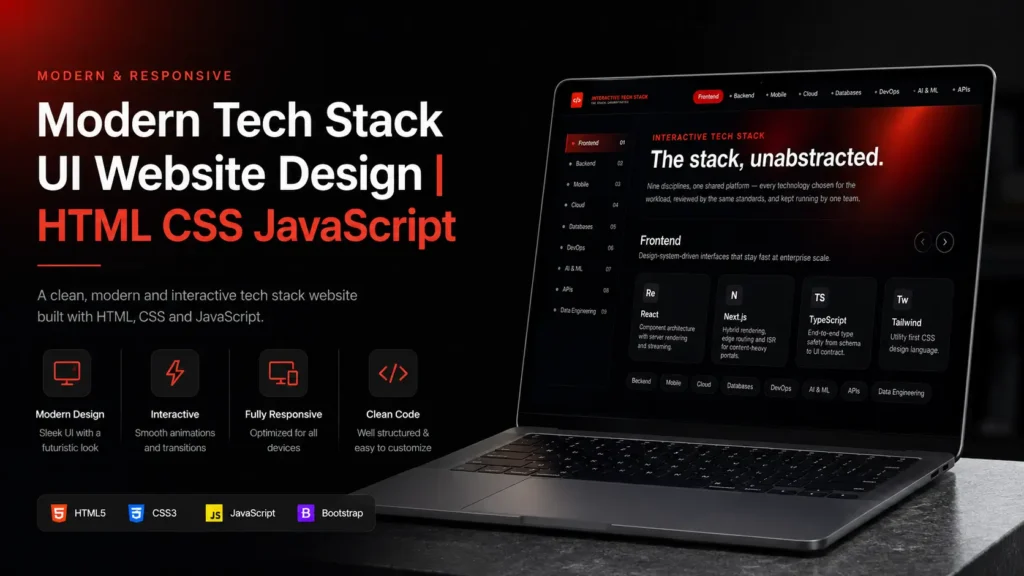
This Tech Stack UI Design is a front-end project created with HTML, CSS, and JavaScript. It presents different technology categories through an interactive interface, allowing visitors to explore technologies such as Frontend, Backend, Mobile, Cloud, Databases, DevOps, AI & ML, APIs, and Data Engineering.
The project is particularly useful for developers, agencies, software companies, SaaS websites, technology portfolios, and anyone building a modern web development project.
JavaScript is especially relevant for this type of interface. According to W3Techs, JavaScript is used on approximately 98.9% of websites as a client-side programming language, showing just how important JavaScript remains in modern web development.
But the real value of this project isn’t simply the technologies used. It’s the way those technologies are combined to create an organized, interactive, and visually appealing user experience.
In this guide, we’ll explore the design, technologies, structure, features, customization possibilities, and practical uses of this modern Tech Stack UI Design.
What Is a Tech Stack UI Design?
A Tech Stack UI Design is a website interface used to visually display the technologies, programming languages, frameworks, databases, platforms, and development tools used by a developer, agency, startup, or software company.
A basic technology list might simply contain text such as:
- HTML
- CSS
- JavaScript
- React
- Node.js
- Python
- MySQL
However, a modern interface can make this information much easier to scan and understand.
Instead of presenting everything in a long list, this project organizes technologies into separate categories and displays them through interactive cards.
For example, a visitor can select Frontend to explore frontend technologies, switch to Backend, and then move to Cloud or AI & ML without leaving the section.
This approach makes the content more visual while keeping the interface organized.
Why Modern Tech Stack Sections Matter
Technology-focused businesses need to communicate technical expertise quickly.
A potential client visiting a web development agency website may want to know:
- Which technologies does the company work with?
- Does the team support modern frontend frameworks?
- Which databases are available?
- Can the company handle cloud infrastructure?
- Does the team work with AI and machine learning?
- Which APIs and backend technologies are supported?
A well-designed technology section answers these questions without forcing visitors to read a large amount of text.
This is where an interactive Tech Stack Website Design becomes useful.
Instead of overwhelming visitors with dozens of logos and paragraphs, the interface creates a visual hierarchy that guides users through the information.
Key Features of This Tech Stack UI
The project combines several front-end techniques to create a practical and visually engaging interface.
1. Interactive Technology Categories
The interface separates technologies into different categories.
The project includes categories such as:
| Category | Purpose |
|---|---|
| Frontend | Client-side development technologies |
| Backend | Server-side development technologies |
| Mobile | Mobile application development |
| Cloud | Cloud platforms and services |
| Databases | Data storage technologies |
| DevOps | Deployment and infrastructure tools |
| AI & ML | Artificial intelligence and machine learning |
| APIs | Application programming and integration technologies |
| Data Engineering | Data processing and engineering technologies |
This organization makes a large technology list much easier to navigate.
2. Technology Cards
Each technology can be presented inside a dedicated card.
A card-based layout provides enough visual space for:
- Technology logo
- Technology name
- Short description
- Category
- Visual branding
- Hover interaction
This makes the interface suitable for both professional company websites and developer portfolios.
3. Horizontal Navigation
The design uses navigation controls to move through technology cards.
Instead of displaying every item simultaneously, visitors can browse through the available technologies using previous and next controls.
This approach helps maintain a clean layout while allowing the section to contain a larger amount of information.
4. Smooth User Interactions
JavaScript handles the interactive behavior of the interface.
Interactions can include:
- Category switching
- Card navigation
- Previous and next controls
- Progress indicators
- Dynamic content changes
These interactions make the section feel more like a modern application rather than a static list.
5. Responsive Layout
A modern website needs to work across different screen sizes.
The Tech Stack UI can be adapted for:
- Desktop computers
- Laptops
- Tablets
- Mobile phones
Responsive behavior is particularly important when technology cards are displayed horizontally.
Technologies Used in This Project
The project is built around three fundamental front-end technologies.
HTML5
HTML provides the structure of the interface.
It defines elements such as:
- Headings
- Navigation
- Technology categories
- Cards
- Buttons
- Containers
- Content sections
A well-structured HTML foundation also makes the interface easier to maintain and customize.
CSS3
CSS controls the visual appearance of the Tech Stack UI.
It can be used for:
- Layout
- Typography
- Spacing
- Colors
- Borders
- Shadows
- Responsive behavior
- Hover effects
- Transitions
- Animations
The combination of CSS Grid, Flexbox, transitions, and media queries can produce a polished responsive interface without requiring a large framework.
JavaScript
JavaScript provides the interactive functionality.
For this project, JavaScript can control category selection, card movement, navigation buttons, and progress states.
Because JavaScript executes directly in the browser, it is well suited to interactive front-end components.
How the Tech Stack UI Works
The interface follows a relatively simple interaction pattern.
First, the visitor sees the available technology categories.
When a category is selected, the interface displays the technologies associated with that category.
For example:
Frontend → HTML → CSS → JavaScript → Frameworks
A visitor can then move between cards using navigation controls.
The JavaScript logic updates the visible state without requiring the entire webpage to reload.
This creates a smoother experience and keeps the visitor focused on the technology information.
What Makes This Design Different?
Many technology sections follow the same predictable pattern: a heading followed by a grid of logos.
That approach works, but it doesn’t always create a memorable experience.
This project focuses on interaction and information hierarchy.
Instead of asking visitors to scan a large collection of logos, the interface gives them a controlled way to explore technologies.
One important design principle here is progressive disclosure.
Rather than showing everything at once, the interface reveals information in manageable groups.
This is particularly useful when a company works with a large number of technologies.
Responsive Web Design Considerations
A Tech Stack UI should not be designed only for desktop screens.
On a smaller screen, a horizontal card layout can become difficult to use if the cards are too wide or navigation controls are positioned poorly.
A responsive implementation should consider:
Mobile Typography
Headings should scale appropriately so they don’t occupy most of the screen.
Card Width
Technology cards should remain readable without forcing users to zoom or scroll unnecessarily.
Touch Interaction
Buttons should have enough space around them for comfortable touch interaction.
Navigation
Previous and next controls should remain easy to locate on smaller screens.
Content Density
Showing fewer cards at once can improve readability on mobile devices.
These details can significantly improve the usability of an interactive Tech Stack UI.
Performance and User Experience
Visual design should never come at the expense of website performance.
A technology section might contain dozens of icons, animations, external libraries, and other assets. If these resources are poorly optimized, the interface can become slower than necessary.
Google’s web.dev guidance identifies three Core Web Vitals that focus on loading performance, interactivity, and visual stability: LCP, INP, and CLS. Recommended thresholds include an LCP of 2.5 seconds or less, an INP of 200 milliseconds or less, and a CLS of 0.1 or less.
For this reason, consider:
- Compressing technology logos
- Using appropriately sized images
- Avoiding unnecessary JavaScript
- Minimizing large animation effects
- Loading only required libraries
- Keeping CSS organized
- Testing the interface on mobile devices
A beautiful interface is more useful when it remains fast and responsive.
Best Ways to Customize the Tech Stack UI
One of the biggest advantages of a source-code project is that developers can adapt the structure to their own website.
Change the Technology Categories
You can replace the existing categories with technologies relevant to your business.
For example, a WordPress development company could create categories such as:
- WordPress
- WooCommerce
- PHP
- MySQL
- Elementor
- SEO
- APIs
A software development company could instead highlight:
- Frontend
- Backend
- Cloud
- DevOps
- AI
- Databases
Replace Technology Icons
Technology logos are one of the most important visual elements of this interface.
Use recognizable and properly licensed icons that match the technologies you actually support.
Consistent icon sizing is also important because logos naturally have different shapes.
Modify Colors
The CSS can be customized to match an existing website’s branding.
You can adjust:
- Background colors
- Text colors
- Card backgrounds
- Borders
- Accent colors
- Hover states
- Button styles
Change Card Content
Each card can contain additional information.
For example:
React
Frontend JavaScript library used for building component-based interfaces.
This provides more context than displaying a logo and name alone.
Add More Categories
If your project uses additional technologies, new categories can be added to the HTML and connected to the JavaScript navigation logic.
Where Can You Use This Tech Stack Website Design?
This UI component can work across many types of websites.
Web Development Agencies
Agencies can use it to show clients which development technologies their team works with.
Software Companies
Software companies can present their technology ecosystem in a structured format.
SaaS Websites
SaaS businesses can use technology sections to communicate their infrastructure and development capabilities.
Developer Portfolios
Individual developers can showcase their strongest programming languages and frameworks.
Startup Websites
Startups can use the component to demonstrate their technical foundation without adding a long technical explanation.
Technology Blogs
Technology websites can adapt the component into interactive technology directories or educational sections.
How to Make a Tech Stack Section More SEO-Friendly
The design itself does not automatically make a website rank.
SEO depends on the overall page structure, content quality, technical performance, relevance, and user experience.
For a technology page, consider using descriptive HTML headings rather than placing all information inside images.
For example:
H2: Frontend Technologies
Then use individual technology names as headings or clearly readable text.
This allows search engines and users to understand the subject of the section.
You can also provide useful descriptions rather than simply listing logos.
For example:
JavaScript: A client-side programming language used to create interactive and dynamic web experiences.
This adds semantic context around the technology.
Source Code Structure
A simple implementation can separate the project into three main files:
tech-stack/
├── index.html
├── style.css
└── script.js
index.html
Contains the structure and content of the Tech Stack UI.
style.css
Controls layout, responsive behavior, typography, cards, animations, and visual styling.
script.js
Controls interactive functionality such as categories, navigation, sliders, and progress indicators.
Keeping these files separated makes the project easier to understand and maintain.
How Beginners Can Learn From This Project
This type of project is useful beyond its visual appearance.
Beginners can study it to understand how different front-end concepts work together.
For example, you can examine how HTML creates the component structure, how CSS creates the visual hierarchy, and how JavaScript changes the interface based on user interaction.
A good learning approach is to modify one feature at a time.
Start by changing the colors.
Then replace one technology.
Next, add another category.
After that, experiment with the navigation behavior.
This approach turns an existing HTML CSS JavaScript project into a practical learning exercise.
Important Things to Check Before Using the Source Code
Before adding a source-code project to a production website, review it carefully.
Check External Dependencies
Look for external fonts, icon libraries, JavaScript libraries, or CSS frameworks.
Make sure they are still available and compatible with your website.
Test Responsive Behavior
Check the design at multiple screen widths rather than testing only on a desktop monitor.
Validate the HTML
Clean HTML improves maintainability and accessibility.
Test JavaScript Interactions
Make sure category buttons, navigation controls, and other interactive elements behave correctly.
Optimize Assets
Large images and unnecessary libraries can affect page performance.
Review Accessibility
Use meaningful buttons, readable text, adequate contrast, and keyboard-friendly interactions where appropriate.
These checks are often overlooked when developers focus primarily on visual appearance.
IF YOU Want to Add This to a WordPress Website
The Tech Stack UI can also be adapted for WordPress websites.
Depending on your setup, you can place the HTML structure inside a suitable custom HTML area, add the CSS through your theme or custom CSS system, and enqueue JavaScript properly through the WordPress theme or plugin structure.
For larger projects, keeping CSS and JavaScript as separate assets is generally easier to maintain than placing a large amount of code directly inside a page builder block.
If you use a page builder, make sure the builder does not modify or strip required HTML, CSS, or JavaScript.
Common Mistakes to Avoid
Even a visually impressive technology section can become ineffective when implemented poorly.
Avoid using too many animations.
Animations should support navigation and feedback rather than distract from the content.
Don’t display technologies that your team doesn’t actually use.
A technology section should represent genuine expertise rather than being created solely to make a website appear more technical.
Also avoid using tiny logos.
Technology cards need to remain readable, particularly on mobile devices.
Finally, don’t forget performance testing after adding external assets.
A Better Approach: Design for Trust, Not Just Appearance
One insight that is often missed in technology showcase sections is the relationship between visual presentation and credibility.
Listing 30 technologies may initially look impressive, but a potential client may actually trust a website more when it clearly explains a smaller, relevant set of technologies.
For example, instead of displaying every possible framework, an agency could highlight the technologies it regularly uses and briefly explain where each one fits into its development process.
This creates a stronger connection between the technology list and the company’s actual capabilities.
The best Tech Stack UI isn’t necessarily the one with the most logos.
It’s the one that communicates technical capability clearly and honestly.
Final Thoughts
A modern Tech Stack UI Design using HTML, CSS, and JavaScript can transform a conventional technology list into an interactive and engaging website component.
The combination of category navigation, technology cards, responsive layouts, JavaScript interactions, and subtle visual effects makes this type of interface suitable for agencies, software companies, SaaS businesses, startups, portfolios, and technology websites.
For developers, the project also provides a practical example of how HTML, CSS, and JavaScript work together to create a complete front-end component.
The most important lesson is that good UI design isn’t only about adding animations or attractive cards. The interface should organize information, communicate expertise, remain accessible, perform well, and make it easy for visitors to understand what technologies are being used.
If you’re building a modern website and need a professional way to showcase your development stack, this Tech Stack Website Design provides a strong foundation that can be customized around your brand, technologies, and content strategy.
Frequently Asked Questions
What is a Tech Stack UI Design?
A Tech Stack UI Design is a visual website component used to showcase programming languages, frameworks, databases, cloud platforms, APIs, and other technologies used by a developer or organization.
Which technologies are used to build this Tech Stack UI?
The project is built primarily with HTML5, CSS3, and JavaScript. These technologies handle the structure, styling, responsive layout, animations, and interactive behavior.
Is this Tech Stack UI responsive?
Yes. The interface can be structured and customized to provide a responsive experience across desktop, tablet, and mobile screen sizes.
Can I customize the technology cards?
Yes. The HTML and CSS structure can be modified to change technology names, descriptions, icons, colors, layouts, and other visual elements.
Can I add more technology categories?
Yes. Additional categories can be added to the HTML structure and connected to the JavaScript functionality so visitors can browse more technology groups.
Can this UI be used on a developer portfolio?
Absolutely. A developer can use the component to showcase programming languages, frameworks, databases, cloud platforms, and development tools as part of a portfolio website.
Can this Tech Stack UI be used on a business website?
Yes. Web development agencies, software companies, SaaS businesses, startups, and technology companies can use it to communicate their technical capabilities.
Is JavaScript important for modern website interfaces?
Yes. JavaScript remains extremely widely used for client-side web development. W3Techs reports that JavaScript is used by approximately 98.9% of websites as a client-side programming language.
What should I check before using a source-code project?
Review the HTML, CSS, JavaScript dependencies, responsiveness, accessibility, browser compatibility, external assets, and performance before integrating the project into a production website.
How can I improve the performance of a Tech Stack UI?
Optimize images and icons, reduce unnecessary scripts, minimize excessive animations, load only required resources, and test the page using real-world performance measurements such as Core Web Vitals.
Conclusion
A professional technology section should do more than display a collection of logos. It should help visitors understand a company’s capabilities while maintaining a fast, accessible, and enjoyable browsing experience.
With a structured Tech Stack UI Design, HTML5, CSS3, and JavaScript can be combined to create a modern component that is visually engaging, responsive, customizable, and practical for real-world websites.
Whether you’re a beginner studying frontend development or a professional looking to add a technology showcase to a website, this project offers a useful starting point for building a polished and interactive web experience.
Video Preview
Related Templates You May Like
14 people bought this
Grab it Now for Just 499 ₹999


