
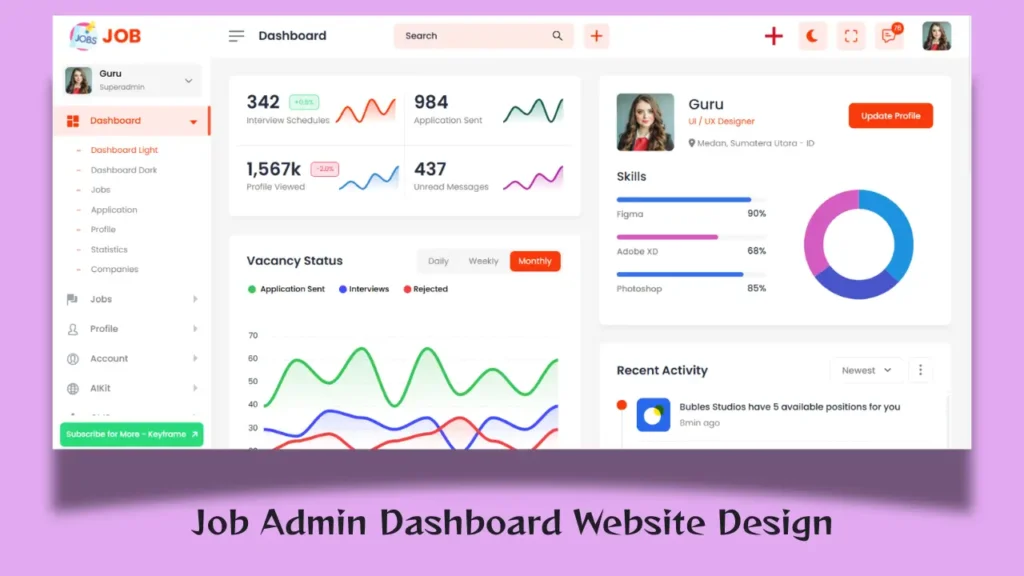
The recruitment industry has rapidly evolved over the past few years, and businesses now rely heavily on digital hiring platforms to manage candidates, job postings, recruiters, and employer accounts. At the heart of every successful recruitment platform is a powerful admin dashboard that helps administrators efficiently manage daily operations through a centralized system.
A modern dashboard admin interface is no longer limited to displaying statistics. In 2026, businesses demand responsive layouts, clean navigation, advanced analytics, candidate tracking, employer management, and a seamless user experience. Whether you are developing a recruitment platform, job board, HR portal, staffing solution, or career website, choosing the right admin dashboard template can significantly improve both productivity and user engagement.
Recent industry studies show that more than 75% of recruiters use digital recruitment software to streamline hiring processes and improve candidate management. This growing demand has increased the popularity of modern admin dashboard templates that combine attractive UI design with practical functionality.
This Job Portal Admin Dashboard Template is designed to provide a complete recruitment management experience with a clean admin dashboard ui, responsive design, professional components, and an intuitive user interface suitable for modern web applications.
Project Overview
This Job Portal Admin Dashboard is a professionally designed recruitment management interface that helps administrators manage jobs, candidates, companies, applications, reports, and platform settings from a single location.
The dashboard is built with modern frontend technologies and follows current UI/UX standards to ensure smooth navigation, excellent usability, and responsive performance across devices.
Whether you are a developer, startup founder, UI designer, freelancer, or agency owner, this dashboard provides an excellent foundation for building recruitment-related web applications.
Why Choose This Admin Dashboard Template?
Not all dashboard designs are created equally. Many templates focus only on appearance while ignoring usability and workflow efficiency.
This admin dashboard template is designed with real-world recruitment requirements in mind.
Key Advantages
- Clean and professional UI design
- Fully responsive layout
- Recruitment-focused dashboard structure
- Modern analytics widgets
- Candidate management system
- Job management interface
- Company management pages
- Interactive charts and reports
- Organized navigation system
- Scalable architecture
The goal is to reduce administrative workload while improving productivity.
Modern Admin Dashboard UI Design
The design of an admin dashboard ui plays a crucial role in user experience.
A cluttered dashboard often causes confusion, slows down workflows, and reduces productivity. This dashboard follows a clean design philosophy where important information remains accessible without overwhelming the user.
UI Highlights
- Minimalist layout
- Professional typography
- Clear visual hierarchy
- Consistent spacing
- Modern card components
- Interactive data tables
- Dashboard widgets
- Elegant color scheme
Every component is carefully designed to improve usability and navigation.
Dashboard Home Overview
The dashboard home page serves as the central control panel where administrators can quickly monitor platform performance.
Key dashboard metrics include:
- Total Jobs
- Active Job Listings
- Total Candidates
- New Applications
- Registered Companies
- Monthly Growth Statistics
- Recruitment Performance Metrics
Administrators can access critical information immediately after login without navigating through multiple pages.
Job Management Module
The job management section is one of the most important areas of any recruitment platform.
Administrators can:
Create New Jobs
Add detailed job listings including:
- Job Title
- Department
- Location
- Experience Level
- Employment Type
- Salary Information
Manage Existing Jobs
The dashboard allows administrators to:
- Edit jobs
- Update information
- Archive listings
- Remove expired jobs
- Monitor application activity
This streamlined workflow helps recruiters save time and improve efficiency.
Candidate Management System
A recruitment platform may process hundreds or even thousands of applications every month.
The candidate management module helps administrators organize applicants effectively.
Features Include
- Candidate profiles
- Resume management
- Application tracking
- Status updates
- Interview scheduling
- Candidate filtering
Recruiters can quickly identify qualified candidates and manage hiring pipelines efficiently.
Company Management Dashboard
Many job portals allow multiple companies to post vacancies.
The company management section enables administrators to manage employer accounts from one centralized interface.
Company Features
- Company profiles
- Verification status
- Job posting activity
- Employer management
- Organization details
- Company performance tracking
This ensures better platform control and improved credibility.
Application Tracking System
Managing applications is one of the most critical tasks in recruitment.
The dashboard provides a complete application management workflow.
Recruitment Stages
- Applied
- Under Review
- Shortlisted
- Interview Scheduled
- Selected
- Rejected
Administrators can monitor candidate progress throughout the hiring process.
Advanced Analytics and Reports
Modern recruitment decisions rely heavily on data.
The analytics section provides meaningful insights that help administrators improve hiring strategies.
Dashboard Analytics Include
| Metric | Purpose |
|---|---|
| Total Jobs | Track job growth |
| Applications | Measure candidate engagement |
| Companies | Monitor employer activity |
| Hiring Rate | Evaluate recruitment success |
| Monthly Growth | Analyze platform expansion |
| User Registrations | Track platform adoption |
These analytics help administrators make informed business decisions.
Fully Responsive Layout
Responsive design has become a necessity in modern web applications.
This dashboard admin interface automatically adapts to different screen sizes, ensuring a consistent user experience across devices.
Supported Devices
- Desktop Computers
- Laptops
- Tablets
- Mobile Phones
The responsive layout ensures users can access dashboard functionality from anywhere.
Essential Pages Included
A professional recruitment dashboard requires multiple management sections.
This project includes the following pages:
| Page Name | Function |
| Dashboard Home | Platform overview |
| Jobs Management | Manage vacancies |
| Candidates | Applicant management |
| Companies | Employer management |
| Applications | Application tracking |
| Reports | Performance analytics |
| User Profile | Account management |
| Settings | Platform configuration |
| Notifications | Activity monitoring |
These pages create a complete recruitment management ecosystem.
Technologies Used
This dashboard is built using modern frontend technologies to ensure scalability and performance.
Frontend Technologies
- HTML5
- CSS3
- JavaScript
- jQuery
- Bootstrap 5
UI Libraries
- Font Awesome
- Bootstrap Icons
- Interactive Components
- Data Tables
- Charts and Graphs
These technologies help developers customize and expand the project according to business requirements.
Admin Dashboard Features That Improve Productivity
One reason modern admin dashboard templates are popular is their ability to simplify complex workflows.
Quick Navigation
Administrators can access key sections within a few clicks.
Real-Time Information
Important updates are displayed instantly.
Organized Data
Information is presented in a structured format for better understanding.
Improved Decision Making
Analytics and reports help users make data-driven decisions.
These features significantly improve operational efficiency.
Security and Access Control
Security is a crucial part of any dashboard system.
This project is designed to support modern access management practices.
Security Features
- User Authentication
- Secure Login Interface
- Role-Based Access Control
- User Management
- Activity Monitoring
These features help maintain system security and administrative control.
Who Can Use This Dashboard Template?
This dashboard is suitable for multiple use cases.
Recruitment Platforms
Manage jobs, candidates, and hiring workflows.
HR Management Systems
Handle employee recruitment processes efficiently.
Staffing Agencies
Track applicants and client companies.
Career Websites
Manage employers, vacancies, and applications.
Recruitment Startups
Launch scalable hiring platforms quickly.
Its flexibility makes it suitable for both small and large-scale projects.
What Makes This Admin Dashboard UI Different?
Many dashboard templates focus solely on visual design.
This project balances design, usability, and functionality.
Unique Benefits
- Recruitment-focused architecture
- Modern UI components
- Professional dashboard design
- Responsive user experience
- Scalable structure
- Easy customization
- Clean code organization
These advantages make it an excellent choice for recruitment-related web applications.
Future Trends in Dashboard Design
Dashboard design continues evolving as businesses demand smarter tools.
Some emerging trends include:
- AI-powered recruitment analytics
- Real-time reporting
- Personalized dashboards
- Predictive hiring insights
- Advanced visualization tools
- Dark mode interfaces
Modern dashboard projects should be designed with scalability in mind to support future enhancements.
Conclusion
A professional admin dashboard, responsive dashboard admin interface, and modern admin dashboard ui are essential for building successful recruitment platforms in 2026. This Job Portal Admin Dashboard Template combines clean design, responsive layouts, candidate management, company tracking, application workflows, and advanced analytics into a complete recruitment management solution.
Whether you are developing a job board, staffing platform, HR portal, or recruitment management system, this project provides a strong foundation with organized architecture, professional design, and practical functionality. Its modern layout and scalable structure make it an ideal choice for developers, agencies, startups, and businesses looking to build next-generation recruitment platforms.
Frequently Asked Questions (FAQs)
What is an admin dashboard in a job portal?
An admin dashboard is a centralized control panel that allows administrators to manage jobs, candidates, companies, applications, reports, and platform settings from one location.
Why is an admin dashboard template important?
An admin dashboard template helps developers save development time while providing a professional interface, organized navigation, and modern user experience.
Is this dashboard responsive?
Yes, the dashboard is designed with a responsive layout that works smoothly across desktops, tablets, and mobile devices.
What technologies are used in this dashboard project?
The project uses HTML5, CSS3, JavaScript, jQuery, Bootstrap 5, icons, charts, and various UI components.
Can I customize the admin dashboard UI?
Yes, developers can customize layouts, colors, components, pages, and features according to project requirements.
Who can use this dashboard template?
This dashboard is suitable for job portals, HR management systems, staffing agencies, recruitment platforms, career websites, and hiring solutions.
Does the dashboard include candidate management features?
Yes, the dashboard includes candidate profiles, application tracking, status management, and recruitment workflow tools.
What pages are included in the dashboard?
The dashboard includes Home, Jobs, Candidates, Companies, Applications, Reports, Notifications, Profile, and Settings pages.
How does a dashboard admin improve recruitment management?
It centralizes recruitment operations, improves workflow efficiency, simplifies candidate tracking, and provides valuable analytics for decision-making.
What makes this admin dashboard different from other templates?
Its recruitment-focused structure, modern design, responsive layout, scalability, and organized user experience make it suitable for real-world hiring platforms.
Related Website Templates You Should Explore
Admin Dashboard Template HTML CSS JavaScript – Modern Multipurpose Admin Dashboard UI
Create Responsive Autoplay Carousel using HTML CSS and JavaScript
7 people bought this
Grab it Now for Just 499 ₹999


