
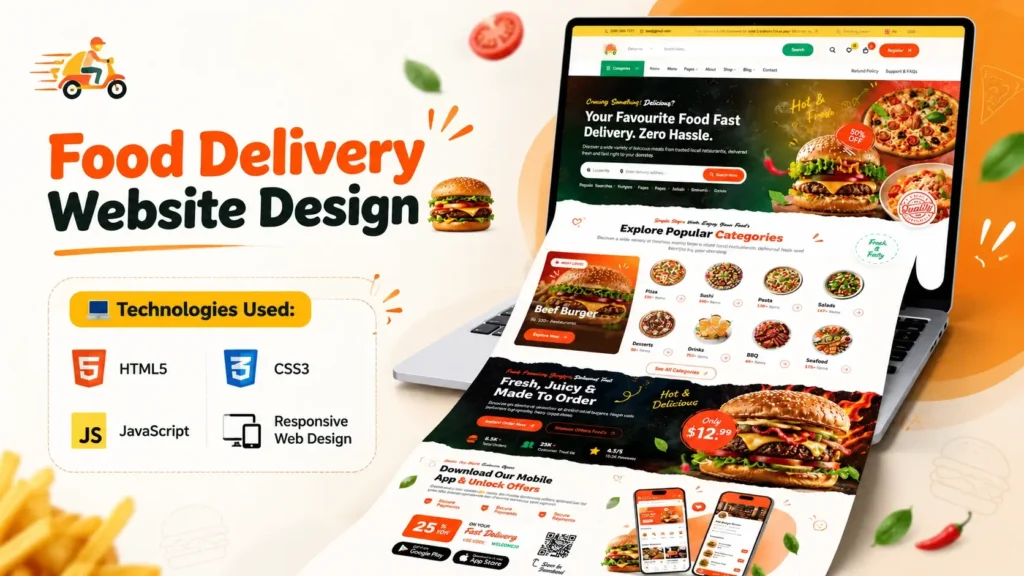
The way Americans order food has changed significantly over the past decade. Customers can discover local restaurants, compare menus, and place orders from their computers or smartphones. For restaurants, cafés, pizzerias, and independent food businesses, a well-designed website can make that experience easier and help establish a recognizable online presence.
A modern food delivery website design brings together attractive food photography, intuitive navigation, organized menu sections, and clear calls to action. Whether you are learning frontend development, building a portfolio project, or planning a website for a restaurant in the United States, a well-structured HTML, CSS, and JavaScript template provides a useful starting point.
The US market offers a strong reason to pay attention to online food ordering. According to the US Department of Agriculture’s Economic Research Service, Americans spent approximately $1.5 trillion on food away from home in 2024, reflecting the importance of restaurants and other food-service businesses in the American food economy. This category includes more than delivery alone, but it illustrates the scale of the broader market in which online ordering operates.
In this guide, you will explore the key features of a food delivery website, the technologies used to build its frontend, how to customize the homepage, and what is needed to turn a visual template into a functioning ordering platform.
What Is a Food Delivery Website Design?
A food delivery website design is the visual layout and user interface that allows customers to explore restaurant offerings and interact with online ordering features. Depending on the project, it can be a simple restaurant homepage or part of a larger ordering system.
A typical restaurant website may include:
- A branded header with clear navigation
- A homepage banner featuring food or restaurant photography
- Menu categories such as burgers, pizza, salads, and desserts
- Food cards with descriptions and prices in US dollars
- Buttons for viewing menus or starting an order
- Restaurant hours, contact details, and location information
- Mobile-friendly navigation and layouts
A more advanced platform may also include customer accounts, a shopping cart, checkout, payment processing, order status updates, and delivery management.
It is important to understand that a frontend template does not automatically provide these advanced functions. HTML, CSS, and JavaScript can create the interface, but features such as secure payments and persistent order management generally require additional application logic and backend services.
Explore the Food Delivery Website Homepage
The homepage is often the first impression a potential customer has of a restaurant. It should communicate the brand quickly and help visitors discover the food they want without unnecessary steps.
A food delivery website template can help developers study the layout, visual hierarchy, and interactive elements that make up a restaurant-style homepage.
1. A Clear Header and Navigation Menu
The header should make essential information easy to find. It may contain the restaurant logo, menu links, account options, and a cart icon, depending on the project.
For an American restaurant website, useful navigation labels might include Home, Menu, Locations, About Us, and Contact. A prominent Order Online button can help visitors understand the next step.
On mobile devices, a compact navigation menu can keep the interface organized. Make sure buttons have clear labels, sufficient spacing, and accessible keyboard behavior.
2. An Attractive Hero Section
A hero section introduces the restaurant and highlights its main offering. A neighborhood pizzeria might feature a close-up image of a freshly baked pizza, while a burger restaurant might focus on its signature burger and sides.
Use high-quality images that match the brand and the food being sold. Keep the headline specific and the main call to action easy to identify.
For example, a headline such as “Your Neighborhood Burger Spot” may communicate a local brand more naturally than a generic promotional message.
3. Food Categories and Menu Cards
Menu categories make it easier for customers to browse a restaurant’s offerings. Depending on the business, categories could include:
- Burgers and sandwiches
- Pizza and pasta
- Salads and bowls
- Sides and appetizers
- Desserts
- Coffee and beverages
Each food card can display a product image, dish name, short description, price, and an action button.
For a US audience, use familiar currency formatting, such as $12.99, when displaying example prices. These should be replaced with the restaurant’s actual prices before launch.
Do not rely on imagery alone to communicate important product details. Include readable text, and make information about ingredients or common allergens available where appropriate.
4. Location and Restaurant Information
Many customers want to know whether a restaurant serves their neighborhood before exploring its full menu.
A restaurant website can provide its street address, business hours, phone number, service area, and directions. If the business serves multiple cities or locations, make each location easy to identify.
Avoid suggesting that delivery is available throughout the United States unless the business genuinely operates at that scale. Delivery availability often depends on the restaurant’s location, staffing, and delivery arrangements.
5. Clear Calls to Action
Calls to action guide visitors toward a specific next step. Examples include View Menu, Order Online, Find a Location, and Contact Us.
Every visible button should lead somewhere meaningful or trigger the expected interaction. A button that looks functional but does nothing can damage the user experience.
When customizing a template, test the destination of every navigation link and the behavior of every interactive control.
Technologies Used in a Food Delivery Website Template
A frontend food delivery website typically relies on HTML, CSS, and JavaScript, supported by images, icons, fonts, and other assets.
| Technology | How it is used |
|---|---|
| HTML5 | Organizes page content, headings, navigation, links, and images. |
| CSS3 | Controls typography, colors, spacing, responsive layouts, and visual states. |
| JavaScript | Adds interface interactions and dynamic behavior where implemented. |
| Images and SVG assets | Provide food photography, logos, and interface icons. |
HTML: Building the Website Structure
HTML defines the content and organization of the page. It identifies the main sections, navigation links, headings, product cards, and other elements.
When exploring a project, start with the main HTML file, commonly named index.html. Identify the main sections and see how the page connects to its CSS stylesheets and JavaScript files.
Use semantic HTML elements such as <header>, <nav>, <main>, <section>, and <footer> wherever they fit the content. A logical structure improves maintainability and helps assistive technologies interpret the page.
CSS: Styling the Restaurant Website
CSS gives the website its visual identity. It controls the color palette, font choices, page width, menu grid, image dimensions, and responsive behavior.
For a US restaurant brand, the design should reflect the business rather than follow a generic restaurant aesthetic. A family-owned diner, a New York-style pizza shop, and a modern salad bar may all need different visual approaches.
Start by updating the brand colors, typography, and main images. Then check spacing, navigation, and menu cards at different screen widths.
JavaScript: Adding Interactive Elements
JavaScript can support mobile navigation, popups, animated elements, and other frontend interactions.
However, the presence of JavaScript files does not prove that a complete ordering system is implemented. A cart icon, for example, might be only a visual element until it is connected to code that stores selected products and calculates totals.
Review the actual code and test the interface in a browser before relying on any feature.
How to Set Up the Food Delivery Website Source Code
A structured template can make it easier to understand the relationship between the HTML, CSS, JavaScript, and image files.
Step 1: Access the Project Files
Open the project page and review the description, preview, included technologies, and available assets. Check the license and usage terms before adapting the project for a commercial restaurant website.
Step 2: Extract the Project Archive
If the source code is provided as a ZIP archive, extract it into a folder on your computer.
Keep the existing folder structure intact. HTML files may reference stylesheets, scripts, fonts, and images through relative paths. Moving files without updating those references can cause broken layouts or missing assets.
Step 3: Open the Main HTML File
Find index.html and open it in a modern browser to preview the homepage.
Use a code editor such as Visual Studio Code to inspect and edit the files. Start with the HTML structure, then locate the relevant CSS and JavaScript files.
If the project relies on local server features or external libraries, follow its setup instructions rather than assuming that opening the HTML file is sufficient.
Step 4: Review the Assets
Inspect the image, CSS, and JavaScript folders to identify which files are used by the homepage.
Check image paths and filenames if resources fail to load. Some hosting environments distinguish between uppercase and lowercase filenames, so a path that works on one computer may fail on another server.
Step 5: Customize the Design
Replace placeholder branding, sample text, and food images with accurate content for the intended restaurant.
Update the navigation, colors, typography, and menu cards. If the website will serve customers in a specific American city, include relevant location information and the correct service area.
Make changes in small groups and preview the page after each set of edits.
Step 6: Test the Website
Check the design on desktop, tablet, and mobile screen sizes. Test navigation, links, buttons, and interactive components.
Use your browser’s developer tools to look for JavaScript errors, missing assets, and layout issues. Verify the site’s performance and accessibility before publishing it.
Is a Frontend Template Enough to Launch a Food Delivery Business?
Not necessarily. A frontend template provides the visual foundation, but a live food ordering business needs more than a homepage.
The additional requirements depend on whether the website simply displays a menu, accepts pickup orders, or manages deliveries.
| Feature | Frontend template | Additional requirements for a live service |
|---|---|---|
| Homepage and menu layout | Usually included if supplied | Accurate, current business content |
| Menu browsing | May be visual or interactive | Product data management when needed |
| Shopping cart | May be a visual element or demo | Cart logic and persistent state |
| Checkout | Not guaranteed | Order validation and checkout workflow |
| Online payments | Not implied by the design | Secure payment processor integration |
| Order management | Usually not included | Backend services and order database |
| Delivery tracking | Not implied by the design | Delivery provider or tracking integration |
| Customer accounts | Not guaranteed | Authentication and account management |
For an actual US restaurant, payment integration should use an established payment provider and follow its security requirements. Do not collect or store sensitive card details directly in an unprotected custom form.
A business should also decide how it will handle order confirmation, refunds, cancellations, customer support, and failed payments before accepting real orders.
How to Customize the Website for the US Market
A successful restaurant website should reflect the people and area it serves. These adjustments can make a generic template more relevant to an American audience.
Use Accurate US Currency and Measurements
Display menu prices in US dollars, such as $9.99 or $14.50. If portion sizes or weights are relevant, use familiar US measurements where appropriate, while keeping product information accurate.
Clearly explain taxes, delivery fees, service charges, and minimum order requirements before checkout. Applicable rules vary by jurisdiction and business model.
Add Local Restaurant Details
Include the restaurant’s actual address, opening hours, phone number, and delivery area. For businesses serving several neighborhoods, provide clear location information instead of relying on vague nationwide claims.
Accurate business details also help customers distinguish the official restaurant website from third-party ordering services.
Make Mobile Ordering Convenient
Customers may visit a restaurant website from a phone while traveling, commuting, or deciding what to eat. Use responsive layouts, readable text, and touch-friendly buttons.
Keep the ordering process as straightforward as possible. Avoid unnecessary form fields and make errors easy to understand and correct.
Consider Accessibility
Use sufficient color contrast, descriptive links, meaningful image alternatives, and clear form labels. Ensure that visitors can navigate the interface with a keyboard.
Accessibility should be considered during development rather than added as a last-minute visual adjustment.
Review Privacy and Consumer Requirements
If the website collects customer details, addresses, or payment information, determine which privacy and consumer protection requirements apply to the business and its customers.
Requirements can vary by state and by the type of information collected. Use an appropriate privacy notice, explain how customer data is handled, and obtain professional advice when necessary.
SEO Tips for a Food Delivery Website in the United States
A visually appealing website needs useful content and a clear structure to help search engines understand its purpose.
Write Descriptive Page Titles and Headings
Use a page title that accurately describes the restaurant, service, or template. A local restaurant might include its name and city when relevant.
Keep the H1 heading clear and use H2 and H3 headings to organize supporting content. Avoid repeating the same keyword in every heading.
Create Useful Menu Content
Provide accurate descriptions, ingredient details where appropriate, current prices, and relevant dietary information. Original descriptions help customers understand the food and make the menu more useful.
Do not create dozens of nearly identical pages just to target different locations. A location page should contain genuine, useful information about that branch or service area.
Optimize Images and Page Speed
Compress images and use appropriate formats such as WebP where supported. Provide descriptive alt text and set image dimensions to reduce unexpected layout shifts.
Avoid loading scripts and visual assets that the page does not need. Test the website with tools such as Google PageSpeed Insights and address significant performance issues.
Use Local SEO Where Relevant
For a restaurant serving a specific city, accurate business information and a complete Google Business Profile can support local discovery.
Use consistent name, address, and phone details across relevant business listings. Include location information naturally on the website and ensure that opening hours remain current.
Add Structured Data Correctly
A real restaurant website may qualify for relevant Restaurant or LocalBusiness structured data when the markup accurately reflects visible information on the page.
Follow Google’s current structured data guidelines. Markup does not guarantee enhanced search results or better rankings, and a template directory should not describe a demo project as an operating restaurant.
Who Can Benefit From This Food Delivery Website Design?
Students and beginners can use the project to practice HTML, CSS, JavaScript, and responsive layouts.
Frontend developers can study the structure of a restaurant homepage, asset organization, and styling patterns.
Freelancers and web design agencies can use a suitable template as a starting reference when planning a restaurant website, subject to its license and technical limitations.
Restaurant owners can explore homepage layouts and identify features they may need when commissioning a custom website.
UI designers can examine how typography, food photography, spacing, and calls to action work together to create a consistent interface.
Before using the project commercially, verify the license for the template and its bundled images, fonts, icons, and third-party libraries.
Frequently Asked Questions
What is a food delivery website design?
A food delivery website design is the visual interface used to present restaurant information, menus, food items, and ordering-related actions. It can be a simple homepage or part of a larger ordering platform.
Which technologies are used in a food delivery website template?
HTML structures the page, CSS controls its appearance, and JavaScript supports interactive behavior. Additional technologies may be needed for databases, payments, and order management.
Can beginners customize a food delivery website template?
Yes. Beginners can start by editing text, changing colors, replacing images, and adjusting the layout. Test the website after each change to catch broken paths and styling errors early.
Does the source code include an online ordering system?
Not necessarily. A frontend template may contain visual menu cards and buttons without implementing real orders, payments, or delivery tracking. Review and test the actual functionality before using it in a business.
Can I use this design for a US restaurant?
You can adapt it for a US restaurant if the license permits your intended use. Update the branding, menu, prices, location information, and business policies, and make sure all included assets are properly licensed.
How do I display US restaurant menu prices?
Use clear US dollar formatting, such as $10.99. Display accurate prices and explain applicable taxes, fees, and order requirements before the customer completes an order.
Is a responsive design important for a food delivery website?
Yes. A responsive layout helps customers use the website on phones, tablets, and desktop computers. Test the actual template across screen sizes to confirm that menus, images, navigation, and buttons work properly.
How can I improve the SEO of a food delivery website?
Use descriptive page titles, helpful menu content, optimized images, clear internal links, fast-loading pages, and accurate business details. Local restaurants should also maintain their relevant business listings and use structured data appropriately.
Conclusion
A well-designed food delivery website combines an appealing restaurant homepage with clear navigation, useful menu information, and an experience that works across devices. For developers, students, and designers, an HTML, CSS, and JavaScript template offers a practical way to learn these principles and build a stronger frontend project.
For US restaurant businesses, customization should go beyond changing colors and images. Accurate prices, location details, accessible controls, clear fees, and reliable ordering workflows all contribute to a more useful customer experience.
Start by reviewing the project files, understanding what the template actually includes, and adapting the interface to your needs. If you plan to accept real orders, treat the frontend as one part of a broader system that must also address payments, customer data, order management, and operational requirements.
Food Delivery Website Video Preview
A video can help visitors understand the homepage layout before examining the source code. Embed a short demonstration showing the finished design, its major sections, and a brief walkthrough of the relevant HTML, CSS, or JavaScript.
Keep the video focused on the actual project. If you show only the homepage and a short code excerpt, describe it as a frontend preview rather than a full ordering-system demonstration.
Related Templates You May Like
- Fashion E-Commerce Website Design
- Admin Dashboard Template
- Shopping eCommerce Website Design
- Jewelry and Cosmetics eCommerce Website
🔥 5+ People Have Already Bought This
Grab it Now for Just 4999 ₹9999


