
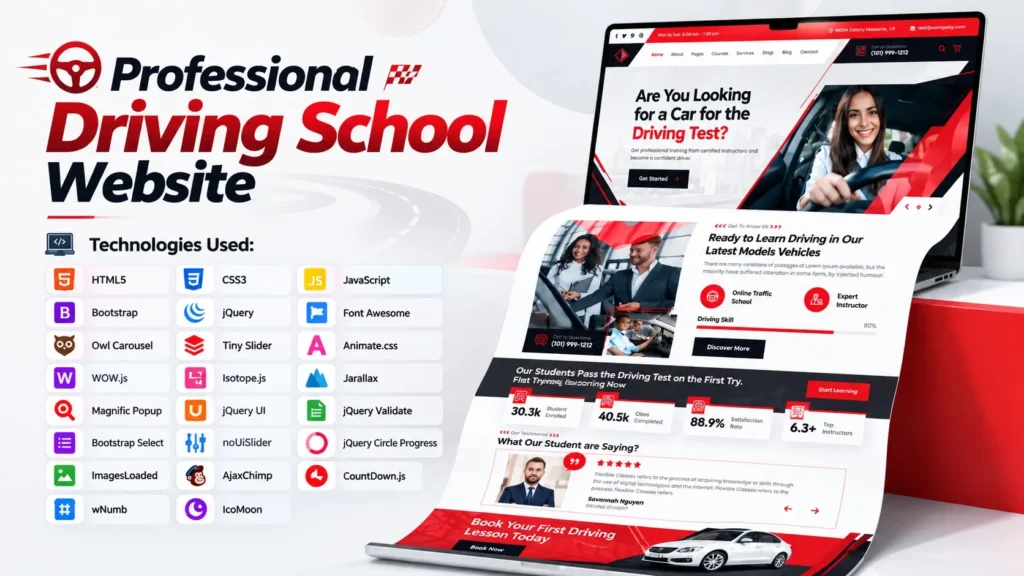
A professional website is one of the first places people look when they want to learn about a driving school, compare courses, check services, or contact an instructor. A clean and responsive website can make that first impression much stronger. If you are a web developer, student, freelancer, agency, or business owner working on a driving school project, choosing the right Driving School HTML Template can save development time while giving you a strong visual foundation.
This Driving School HTML Template is designed around the needs of driving schools, driving instructors, training centers, and similar education-based businesses. It combines a modern interface with commonly used front-end technologies such as HTML5, CSS3, Bootstrap, JavaScript, and jQuery.
Mobile responsiveness is especially important for this type of website. According to StatCounter data for August 2026, mobile devices accounted for about 49.34% of worldwide web traffic, while desktop accounted for 49.09%. That means a website template should not be judged only by how it looks on a large monitor. Its mobile layout, navigation, buttons, images, and content spacing also matter.
In this article, we will explore the Driving School HTML Template, its design structure, technologies, important sections, customization possibilities, SEO considerations, and practical points to check before using the source code in a real project.
What Is a Driving School HTML Template?
A Driving School HTML Template is a pre-designed website interface created specifically for driving schools, driving academies, instructors, and vehicle training businesses.
Instead of creating every page section from the beginning, developers can start with an existing front-end structure and customize it according to the project requirements.
The template provides the visual and structural foundation of a website. This can include:
- Header and navigation
- Hero section
- Driving courses
- Services
- Instructor or team sections
- Pricing areas
- Testimonials
- Gallery
- Blog sections
- Contact forms
- Call-to-action sections
- Footer
- Responsive layouts
- Interactive sliders and animations
The source code can then be edited to change the text, images, colors, typography, links, sections, and other elements.
It is important to understand that an HTML template is primarily a front-end project. Features such as user registration, online payments, appointment management, database storage, student dashboards, or automated booking systems require additional backend development or third-party integrations.
Why Use a Driving School Website Template?
Building a website from an empty HTML file can take considerable time. You need to plan the layout, create responsive sections, style buttons, build navigation, add animations, arrange images, and test everything across different screen sizes.
A well-structured template gives developers a starting point.
For beginners, this is also a useful way to learn how a professional website is organized. Instead of looking at isolated HTML examples, you can examine how HTML, CSS, JavaScript, libraries, images, and components work together in a complete project.
For agencies and freelancers, an organized template can also make the initial development stage more efficient.
Faster Front-End Development
The basic page structure is already available, so you can concentrate on customization instead of starting every component from scratch.
Professional Visual Structure
The template follows a business-oriented layout suitable for a driving school or training center.
Responsive Design
A responsive layout helps the website adapt to desktop, tablet, and mobile screens.
Easier Customization
Developers can modify the HTML markup and CSS styles to match a brand’s colors, content, logo, services, and business information.
Useful for Learning
Beginners can study the source code to understand practical implementation of common front-end elements.
Key Features of This Driving School HTML Template
The template contains a modern front page designed around a driving school business.
Some of the key interface elements include:
- Professional navigation menu
- Large hero/banner area
- Service and course presentation
- Image-based sections
- Team or instructor presentation
- Interactive content areas
- Responsive layouts
- Sliders and carousels
- Animated elements
- Gallery components
- Blog-related layouts
- Contact interface
- Newsletter section
- Call-to-action areas
- Structured footer
The combination of these elements makes the template suitable for creating a website for a local driving school, driving instructor, vehicle training center, or similar service.
Technologies Used in the Driving School HTML Template
One of the useful aspects of this project is that it is not dependent on a single technology.
The main front-end technologies include:
| Technology | Purpose |
|---|---|
| HTML5 | Page structure and content |
| CSS3 | Styling, layouts, spacing, and visual design |
| Bootstrap | Responsive grid and UI structure |
| JavaScript | Interactive functionality |
| jQuery | DOM manipulation and JavaScript-based features |
| Font Awesome | Icons |
| Owl Carousel | Carousel and slider functionality |
| Tiny Slider | Responsive sliders |
| WOW.js | Scroll-based animation effects |
| Isotope | Filtering and grid layouts |
| Jarallax | Parallax effects |
| Magnific Popup | Popup and lightbox functionality |
| jQuery UI | Interactive UI components |
| jQuery Validate | Form validation |
| noUiSlider | Range slider functionality |
The project also includes supporting libraries and plugins such as ImagesLoaded, CountDown.js, AjaxChimp, wNumb, Bootstrap Select, jQuery Circle Progress, and icon/font resources.
This combination gives developers several ready-made components that can be customized instead of manually rebuilding each interaction.
HTML5 and CSS3 Structure
HTML5 is responsible for the core structure of the website.
Developers can use the HTML markup to modify:
- Headings
- Paragraphs
- Navigation links
- Buttons
- Images
- Forms
- Service information
- Course details
- Contact information
- Footer content
CSS3 controls how these elements look.
For example, you can change the:
- Brand colors
- Font sizes
- Section spacing
- Button styles
- Background images
- Border styles
- Responsive behavior
- Hover effects
- Animation appearance
This separation between structure and presentation makes the template easier to customize.
Bootstrap for Responsive Website Design
Bootstrap is another important part of the project.
Its responsive grid system helps developers create layouts that work across different screen sizes. This is particularly useful for driving school websites because visitors may access the website from phones while searching for courses, locations, contact information, or instructors.
However, using Bootstrap does not automatically guarantee perfect performance on every device.
The finished website should still be tested on:
- Mobile phones
- Tablets
- Laptops
- Desktop monitors
- Different browsers
According to current StatCounter data, mobile and desktop usage are almost evenly split worldwide, reinforcing why responsive design should be treated as a core requirement rather than an optional feature.
JavaScript and jQuery Features
JavaScript adds interactive behavior to the website.
The template uses JavaScript and jQuery-based libraries for features such as sliders, menus, animations, popups, form validation, counters, and other UI interactions.
This makes the front page feel more dynamic than a completely static HTML page.
However, developers should avoid keeping unnecessary scripts simply because they are included in the original template.
A practical optimization step is to identify which plugins are actually being used on the final website and remove unused assets where possible.
This can help reduce page weight and unnecessary browser processing.
Driving School Courses and Services
One of the most important sections of a driving school website is the course or service presentation.
Instead of simply listing services, the content should explain what a visitor actually gets.
For example, a driving school may offer:
- Beginner driving lessons
- Refresher driving lessons
- Manual driving training
- Automatic driving training
- Highway driving lessons
- Defensive driving
- Test preparation
- Individual instructor sessions
Each service can have its own description, duration, pricing information, eligibility details, and call-to-action.
This is also an important SEO opportunity.
Rather than repeatedly using the keyword “Driving School HTML Template,” the finished business website should target relevant service terms that match the actual business.
Customizing the Driving School Website
The template should be treated as a starting point rather than a finished business website.
Before publishing, customize the major visual and informational elements.
1. Replace the Logo
Add the actual driving school’s logo and make sure the logo has appropriate alternative text where relevant.
2. Update Business Information
Replace placeholder content with real:
- Business name
- Address
- Phone number
- Opening hours
- Service areas
Consistency is especially important for local businesses.
3. Replace Images
Use original or properly licensed images that represent the actual driving school, instructors, vehicles, and training environment.
4. Update Courses
Make the course names and descriptions match the services genuinely offered by the business.
5. Customize Colors
Use the company’s brand colors rather than keeping the template’s original visual identity.
6. Review Every Link
Template navigation can contain links to pages that are not included in the source package.
Before launch, verify every menu item, button, image link, social link, and form action.
An Important Point About the Source Code
A common mistake is assuming that every page shown in a template’s navigation is included in the source package.
This particular project contains the main front page and its supporting assets, while some navigation links point toward additional pages that are not included in the package.
That means developers should check the complete folder structure before publishing the website.
If a link points to a missing page, it should either be connected to a newly created page or removed until the page exists.
This small check can prevent broken navigation and poor user experience.
Contact Forms and Backend Integration
Another point beginners often overlook is the difference between a front-end form and a working form system.
HTML can create the visible form interface, but sending messages securely requires backend processing or an external form service.
The project references a PHP email-processing endpoint for its contact form. If that backend file is not available in the project, the form will require additional configuration before it can send messages.
The same principle applies to newsletter functionality.
A newsletter form needs to be connected to a real email marketing service before it can collect subscribers.
Never assume that a visible form automatically stores or sends submitted information.
SEO Tips for a Driving School Website
A visually attractive template is only one part of a successful website.
You also need useful content and a technically sound SEO setup.
Use One Clear H1
The main page should have one primary H1 that clearly describes the page’s purpose.
For example:
Professional Driving School in [Location]
The exact wording should reflect the real business rather than simply inserting keywords.
Create Useful Page Titles
Every important page should have a unique title.
Examples include:
- Driving Lessons in [City]
- Beginner Driving Courses
- Manual Driving Lessons
- About Our Driving Instructors
- Contact [Driving School Name]
Optimize Images
Large images can significantly affect page performance.
Compress images before publishing and use appropriate dimensions and formats.
Google’s web performance guidance highlights the importance of image optimization because images frequently contribute to the largest visible element on a page.
Improve Internal Linking
Connect related pages naturally.
For example:
Driving School → Driving Courses → Beginner Driving Lessons → Contact
This helps visitors move through the website and gives search engines additional context about the relationship between pages.
Add Local SEO Information
For a local driving school, include accurate information about:
- Service area
- Location
- Contact details
- Opening hours
- Driving lesson locations
- Course availability
Where appropriate, structured data can also help search engines understand business information.
Performance Optimization Tips
A template can look excellent while still needing optimization before launch.
Start by checking the website using performance tools and look at:
- Largest Contentful Paint
- Interaction to Next Paint
- Cumulative Layout Shift
- Total page weight
- Image sizes
- JavaScript execution
- CSS size
- Server response time
Google’s web.dev documentation identifies INP as a Core Web Vital for measuring page responsiveness and recommends a good INP value of 200 milliseconds or less.
Practical Optimization Checklist
Before publishing the website:
- Compress large images.
- Remove unused CSS where practical.
- Remove unnecessary JavaScript plugins.
- Minify production CSS and JavaScript.
- Use modern image formats where appropriate.
- Enable browser caching.
- Use a reliable hosting environment.
- Test mobile performance separately.
- Check layout shifts.
- Test forms and interactive components.
Performance should be checked after customization, not only before customization.
Adding new images, scripts, tracking tools, maps, chat widgets, and third-party services can significantly change the final page experience.
A Useful Insight: Don’t Optimize Only the Homepage
The homepage usually receives significant attention because it is visually important.
However, a driving school website’s conversion path may involve several pages.
A visitor could arrive on a course page from Google, read the information, visit the instructor page, and then contact the business.
Therefore, SEO and performance work should also cover important internal pages.
Check:
- Course pages
- Service pages
- Contact page
- About page
- Blog articles
- Location pages
A beautiful homepage cannot compensate for poor information architecture elsewhere on the website.
Who Can Use This Driving School HTML Template?
This template can be useful for:
- Driving schools
- Driving academies
- Driving instructors
- Vehicle training centers
- Road safety training businesses
- Web development agencies
- Freelance developers
- Front-end development students
- Website design projects
Developers can also adapt the visual structure for related education or training businesses by changing the content, imagery, navigation, and branding.
How Beginners Can Learn From the Source Code
If you are learning front-end development, don’t simply replace the text and images.
Spend some time exploring the project structure.
Start with index.html and identify the main sections.
Then open the CSS file and find the classes controlling those sections.
After that, inspect the JavaScript file and determine which interactions are handled there.
You can learn a lot by changing one element at a time and refreshing the browser.
For example:
- Change a heading.
- Change a button color.
- Adjust section spacing.
- Replace an image.
- Modify a responsive breakpoint.
- Change a slider setting.
- Remove an animation.
- Add a new section.
This approach helps you understand how HTML, CSS, and JavaScript work together in a real project.
Driving School HTML Template: What to Check Before Publishing
Use this checklist before deploying your customized project:
| Area | What to Check |
|---|---|
| Design | Logo, colors, typography, spacing |
| Content | Real business information and course details |
| Mobile | Navigation, buttons, forms, images |
| SEO | Titles, H1, meta description, URLs |
| Images | Compression, dimensions, alt text |
| Links | No broken or placeholder URLs |
| Forms | Backend or external integration |
| Performance | Core Web Vitals and page weight |
| Security | HTTPS and secure form processing |
| Analytics | Appropriate tracking configuration |
| Social | Correct social profile links |
| Legal | Privacy and other required business pages |
Final Thoughts
A well-designed Driving School HTML Template can provide a strong starting point for building a professional driving school website. Its combination of HTML5, CSS3, Bootstrap, JavaScript, jQuery, sliders, animation libraries, popup functionality, and responsive components gives developers a practical front-end foundation.
But the real value comes from customization.
Replace placeholder information with genuine business details, use relevant content, optimize images, check every link, configure forms correctly, and test the finished website on mobile and desktop devices.
Most importantly, don’t treat the template itself as the complete SEO strategy. Search visibility depends on the quality and relevance of the finished website, its technical implementation, useful content, internal linking, local information, performance, and overall user experience.
For developers and beginners, the source code can also serve as a practical learning project. By studying the relationship between the HTML structure, CSS styling, JavaScript interactions, and third-party libraries, you can understand how a modern business website is assembled from the front end.
Whether you’re creating a website for a driving academy, building a client project, or studying responsive web development, this Driving School HTML Template offers a useful foundation that can be adapted to different project requirements.
Frequently Asked Questions
What is a Driving School HTML Template?
A Driving School HTML Template is a pre-designed front-end website project created for driving schools, instructors, academies, and vehicle training businesses. It generally includes HTML, CSS, JavaScript, responsive layouts, images, and supporting libraries.
Which technologies are used in this Driving School HTML Template?
The main technologies include HTML5, CSS3, Bootstrap, JavaScript, and jQuery. The project also uses libraries and plugins such as Font Awesome, Owl Carousel, Tiny Slider, WOW.js, Isotope, Jarallax, Magnific Popup, jQuery UI, jQuery Validate, and noUiSlider.
Is this Driving School HTML Template responsive?
Yes. The template uses responsive front-end techniques and Bootstrap-based layouts to support different screen sizes. However, the customized final website should still be tested across actual mobile, tablet, and desktop devices.
Can beginners customize this HTML template?
Yes. Beginners with basic HTML and CSS knowledge can start by changing text, images, colors, links, and simple layout elements. JavaScript-based features may require additional knowledge when deeper customization is needed.
Can I add online driving lesson booking?
The HTML template provides the front-end foundation, but a complete booking system requires additional backend functionality or integration with a suitable appointment or booking service.
Does the contact form work automatically?
A visible HTML contact form does not automatically provide complete email-processing functionality. Backend processing or an external form service must be correctly configured before the form can handle submissions.
Can I customize the colors and branding?
Yes. CSS files can be modified to change colors, typography, spacing, buttons, backgrounds, and other visual elements. You can also replace the logo and imagery with your project’s branding.
Is this template suitable for a driving instructor website?
Yes. The layout can be adapted for individual driving instructors as well as larger driving schools. Sections such as services, courses, instructor information, testimonials, and contact areas can be customized according to the business.
What should I check before publishing the template?
Check the page content, navigation links, images, forms, responsive behavior, SEO metadata, performance, security, analytics, and third-party integrations. Also make sure that any referenced pages or backend files actually exist and work correctly.
Video Preview of the Template
If you want to see the actual front-page design and a short look at its source code, you can embed the related video here.
A video preview can be useful for users who want to evaluate the overall interface before examining the source code in detail.
Related Templates You May Like
1 people bought this
Grab it Now for Just 499 ₹999


