
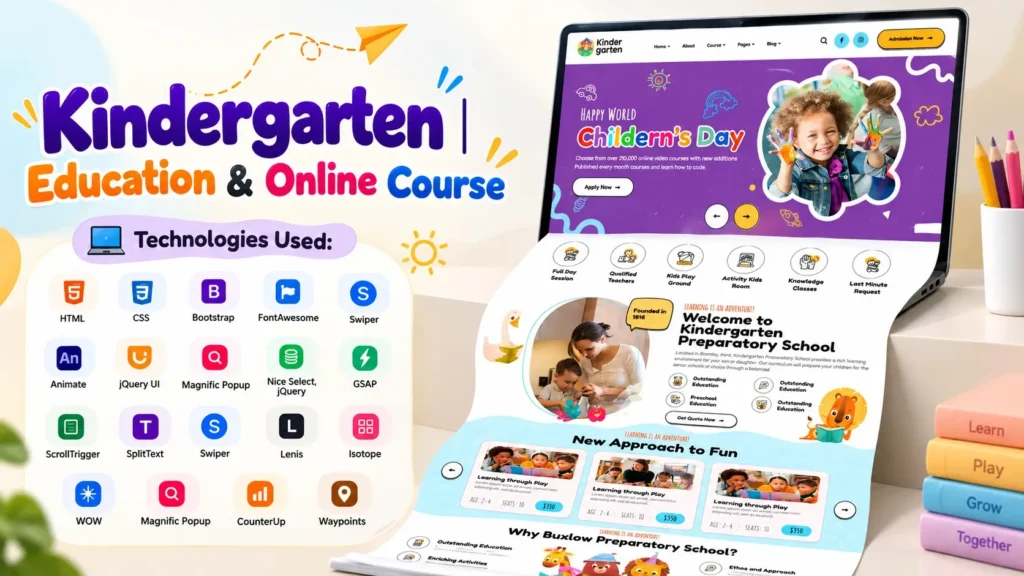
A well-designed website can help a kindergarten, preschool, school, coaching institute, or online learning platform create a strong first impression. Parents and students often visit an education website before deciding whether they want to learn more about an institution. This makes Kindergarten Website Design more than just an attractive homepage. It needs to combine clear information, friendly visuals, responsive layouts, easy navigation, and a smooth browsing experience.
The kindergarten website project featured on this page follows that approach with a modern education-focused interface built using HTML, CSS, and JavaScript. The homepage combines sections for courses, activities, information about the institution, testimonials, blogs, contact details, and other important content.
The project is also useful for developers and students who want to understand how a modern education website design is structured. Instead of looking at a single static section, you can explore how different frontend technologies work together to create the complete user interface.
Mobile usability is particularly important for an education website. According to Statista data based on StatCounter measurements, mobile devices accounted for 51.48% of global website traffic in Q2 2026, excluding tablets. Google also recommends responsive web design as a practical approach for mobile-first websites.
That makes responsive design an important consideration when building a modern kindergarten website.
What Is a Kindergarten Website Design?
A kindergarten website design is a website interface created specifically for preschools, kindergartens, early learning centers, daycare organizations, and similar educational institutions.
Unlike a generic business website, an education website usually needs to communicate several types of information at once. Parents may want to learn about the institution, courses, activities, teachers, facilities, admission process, events, and contact information.
A successful kindergarten website design should therefore make important information easy to discover while maintaining a welcoming visual style.
Typical sections include:
- Homepage or hero section
- About the kindergarten
- Courses or programs
- Learning activities
- Teachers or staff
- Testimonials
- Events or announcements
- Blog or news
- Gallery
- Contact information
- Admission or enquiry section
The project featured here follows many of these common education website patterns while adding modern frontend interactions and visual effects.
Modern Kindergarten Website Design Features
The homepage is designed as a complete visual presentation rather than a simple collection of text and images.
Here are some of the key areas included in the project.
Attractive Hero Section
The hero section is one of the first elements visitors see when they open the website.
For a kindergarten website, this area should immediately communicate the purpose of the institution. Strong visual elements, a clear heading, supporting content, and an appropriate call to action can help visitors understand the website within seconds.
A good hero section can be particularly useful for highlighting:
- Kindergarten programs
- Early childhood education
- Online courses
- Admission information
- Learning activities
- Parent enquiries
The design can also be customized with different images, colors, headings, and call-to-action buttons depending on the institution.
Courses and Education Programs
An education website should make its available programs easy to understand.
The project includes course-related sections that can be adapted for different age groups or learning programs.
For example, a kindergarten could organize programs around:
| Program Type | Suitable Information |
|---|---|
| Preschool | Early learning and basic classroom activities |
| Nursery | Foundational learning and social development |
| Kindergarten | Preparation for primary education |
| Online Course | Digital learning resources and activities |
| Creative Learning | Art, music, storytelling and practical activities |
This type of structure makes the homepage more informative without requiring visitors to navigate through several pages before finding basic information.
Interactive Activities Section
Children’s education websites often benefit from visual storytelling.
An activities section can be used to showcase learning through:
- Drawing
- Music
- Storytelling
- Outdoor activities
- Games
- Creative projects
- Group learning
- Educational exercises
For a kindergarten, this section is also useful for parents because it provides a quick understanding of what children can experience beyond traditional classroom lessons.
The content can be changed according to the institution’s actual curriculum and activities.
About Section for Building Trust
The About section gives an institution an opportunity to explain its educational approach.
Instead of using generic statements, a real kindergarten website should provide useful information such as:
- When the institution was established
- Teaching philosophy
- Learning environment
- Age groups served
- Educational approach
- Safety practices
- Facilities
- Teacher experience
This is also where a website can demonstrate first-hand information and institutional credibility.
Google’s guidance on people-first content emphasizes demonstrating experience and depth of knowledge rather than creating content primarily for search engines.
For that reason, replacing placeholder content with genuine information is an important step when adapting this kindergarten website template for a real organization.
Testimonials and Social Proof
Testimonials can help make an education website feel more trustworthy.
Parents considering a kindergarten may naturally want to know what other families think about their experience.
A testimonial section can include:
- Parent name
- Short review
- Student relationship
- Optional photograph
- Rating or visual indicator
However, testimonials should represent real experiences. Placeholder reviews should be replaced before publishing a production website.
Blog and Education Content
The blog section provides space for publishing useful educational content.
A kindergarten could use the blog to publish articles about:
- Early childhood education
- Parenting tips
- Learning activities
- School events
- Child development
- Classroom activities
- Educational games
- Seasonal activities
- Admission announcements
A regularly maintained blog can also create opportunities to target long-tail search queries related to preschool and kindergarten education.
For SEO, each article should have a clear search intent, useful information, descriptive headings, optimized images, and appropriate internal links.
Technology Stack Used in This Website
One of the useful aspects of this project is its frontend technology structure.
The main page uses HTML, CSS, and JavaScript, while several established frontend libraries support layout, interaction, animation, and UI components.
HTML
HTML provides the structural foundation of the website.
It defines elements such as:
- Navigation
- Headings
- Paragraphs
- Sections
- Buttons
- Images
- Links
- Forms
- Footer content
For beginners, examining the HTML structure is a useful way to understand how a large homepage is divided into logical sections.
CSS
CSS controls the visual presentation of the website.
The project includes a main stylesheet along with supporting styles associated with several frontend libraries.
CSS is responsible for areas such as:
- Typography
- Spacing
- Colors
- Layout
- Buttons
- Responsive behavior
- Animations
- Cards
- Navigation
- Section styling
When customizing the project, the main stylesheet should be reviewed carefully before making major changes because a large CSS file can contain styles affecting multiple components.
JavaScript
JavaScript adds interaction and animation to the website.
The project uses JavaScript for different frontend behaviors, including elements such as:
- Mobile navigation
- Sliders
- Counters
- Popups
- Scroll effects
- Interactive components
- Animation triggers
- Section transitions
The project also includes libraries such as GSAP, ScrollTrigger, Swiper, jQuery, Isotope, WOW, Magnific Popup, CounterUp, and Waypoints.
These libraries can make a website feel more dynamic while reducing the amount of custom interaction code developers need to write from scratch.
Responsive Education Website Design
Responsive design is one of the most important parts of a modern website.
A website may look excellent on a desktop monitor but still provide a poor experience on a smartphone if its layout is not properly adapted.
Google states that it uses the mobile version of a site’s content for indexing and recommends responsive web design as a practical implementation approach.
For this reason, a responsive kindergarten website design should be checked on:
- Desktop computers
- Laptops
- Tablets
- Android smartphones
- iPhones
- Different screen orientations
Important elements to test include the navigation menu, hero section, image sizes, text spacing, buttons, cards, sliders, forms, and footer.
Mobile testing is not simply about making everything smaller. Content hierarchy should remain clear and interactive elements should remain easy to use.
Why the Source Code Structure Matters
When selecting a website project, visual appearance is only one part of the decision.
Developers should also examine the source code structure.
A visually impressive website can become difficult to customize if the files are poorly organized or heavily dependent on unnecessary components.
This project provides a useful frontend structure containing:
- HTML page structure
- Main CSS
- JavaScript functionality
- Image assets
- Font assets
- Frontend libraries
- Animation libraries
- UI plugins
Before using a project for commercial development, developers should inspect the included files and understand which dependencies are required.
This is one area that is often overlooked when selecting an HTML CSS JavaScript website project.
Important Things to Check Before Customizing the Template
A template should not simply be uploaded to a server and considered production-ready.
Here are several checks worth completing first.
1. Replace Placeholder Content
Change template names, headings, descriptions, images, contact details, testimonials, and other sample information.
Real content makes the website more useful and credible.
2. Check Every Navigation Link
The inspected project contains homepage navigation pointing toward additional pages such as About, Courses, Blog, Contact, Team, FAQ, and other template pages.
If those pages are not included in your project package, the links should be updated or the required pages should be created.
Broken navigation can create a poor user experience.
3. Review Image References
Developers should check that every image referenced in HTML and CSS exists in the correct location.
Missing images can affect:
- Visual appearance
- Layout
- Branding
- User experience
- Page performance
4. Optimize Images
Large images can increase page weight and slow down loading.
Before deploying the website, resize oversized images and use modern image formats where appropriate.
Also add descriptive alt attributes to meaningful images.
5. Test JavaScript Dependencies
Interactive components may depend on external libraries.
If a library is removed or its path is changed, sliders, animations, popups, counters, or menus may stop working.
Check the browser console after customization to identify JavaScript errors.
SEO Tips for a Kindergarten Website
A beautiful website still needs a strong SEO foundation if the goal is organic visibility.
Start with a clear page title and meta description.
For example:
Primary Keyword: Kindergarten Website Design
Related terms can naturally appear in the content, such as:
- Kindergarten website
- Preschool website design
- Education website design
- School website design
- Responsive education website
- HTML CSS JavaScript website
- Kindergarten website template
- Education website UI
- Online course website
Avoid inserting the same keyword repeatedly. Search engines are designed to understand topics and context, so useful content should be the priority.
Google’s Search Essentials recommends creating content that is accessible, useful, technically crawlable, and aligned with searcher needs.
Improve Page Speed
Page speed matters for both visitors and the overall website experience.
Google’s page experience guidance highlights Core Web Vitals, mobile display, secure delivery, and avoiding intrusive elements as important considerations for a good page experience.
For this project, developers can improve performance by:
- Compressing images
- Removing unused assets
- Minifying production CSS and JavaScript
- Loading scripts efficiently
- Reviewing third-party libraries
- Using browser caching
- Enabling HTTPS
- Testing with Lighthouse and PageSpeed Insights
Use Descriptive Headings
Use one clear H1 for the main page topic and organize supporting sections with H2 and H3 headings.
For example:
H1: Kindergarten Website Design
H2: About Our Kindergarten
H2: Our Education Programs
H2: Learning Activities
H2: Why Choose Our Kindergarten
This creates a logical structure for both visitors and search engines.
What Makes This Kindergarten Website Project Useful for Beginners?
Beginners often learn frontend development more effectively when they can study a complete interface instead of isolated code examples.
This project gives learners the opportunity to see how different pieces work together.
You can study the project in this order:
Step 1: Open index.html and identify the main sections.
Step 2: Follow the CSS classes used by each section.
Step 3: Check how responsive styles are implemented.
Step 4: Open script.js and identify interactive features.
Step 5: Review the external libraries and determine what each one does.
Step 6: Replace images and sample text with your own content.
Step 7: Test the layout on different screen sizes.
This approach is especially useful for students who already understand basic HTML and CSS but want to understand how a complete modern website is assembled.
Who Can Use This Education Website Design?
This kindergarten website design can serve as a starting point for several types of education projects.
Kindergartens
Use the structure to showcase programs, activities, teachers, facilities, admission information, and parent resources.
Preschools
The colorful and activity-focused layout can be adapted for preschool learning environments.
Schools
The structure can be expanded with additional pages for departments, academics, events, faculty, admissions, and news.
Online Course Platforms
Course sections can be modified to highlight digital classes, learning programs, instructors, pricing information, and student resources.
Web Developers
Developers can use the project as a frontend reference while creating customized education websites for clients.
Students and Beginners
The project can also be useful for learning how a larger HTML, CSS, and JavaScript interface is organized.
A Practical Customization Checklist
Before publishing a customized kindergarten website, go through this checklist:
| Area | What to Check |
|---|---|
| Branding | Logo, colors, fonts and institution name |
| Content | Replace all sample text |
| Images | Use relevant, optimized images |
| Navigation | Check every menu and internal link |
| Mobile | Test smartphones and tablets |
| Forms | Connect forms to a working backend or service |
| SEO | Title, meta description, headings and image alt text |
| Performance | Optimize images, scripts and CSS |
| Security | Enable HTTPS and review integrations |
| Accessibility | Check contrast, keyboard navigation and labels |
| Analytics | Add appropriate analytics and Search Console setup |
| Testing | Check major browsers and screen sizes |
This final testing stage is important because a template is a starting point, not automatically a finished business website.
Final Thoughts on Kindergarten Website Design
A modern Kindergarten Website Design should balance visual appeal with usability, performance, responsive behavior, and meaningful content.
The project featured here provides a strong frontend starting point for developers interested in creating kindergarten, preschool, school, and online education websites. Its combination of HTML, CSS, JavaScript, responsive layouts, animation libraries, sliders, interactive components, and education-focused sections makes it useful for both customization and learning.
The most important step after obtaining a website project is personalization. Replace placeholder information, verify all assets, check navigation, test responsive behavior, optimize performance, and add genuine information about the educational institution.
For developers, the project can also be treated as a learning reference. By studying the relationship between the HTML structure, CSS styling, JavaScript interactions, and supporting libraries, beginners can gain a clearer understanding of how modern frontend websites are assembled.
Whether your goal is to build a kindergarten homepage, redesign a preschool website, create an education platform, or study a complete HTML CSS JavaScript website, starting with a well-structured project can save development time and provide a practical foundation for further customization.
Frequently Asked Questions
What is a Kindergarten Website Design?
A Kindergarten Website Design is a website interface created for kindergartens, preschools, early learning centers, and similar educational organizations. It commonly includes sections for programs, activities, teachers, testimonials, blogs, contact information, and admissions.
Which technologies are used in this Kindergarten Website Design?
The project uses HTML, CSS, and JavaScript as its primary frontend technologies. It also includes supporting libraries such as Bootstrap, jQuery, Swiper, GSAP, ScrollTrigger, Isotope, WOW, Magnific Popup, CounterUp, and Waypoints.
Is this Kindergarten Website Design responsive?
The project is structured as a responsive frontend design and should be tested across desktop, tablet, and mobile screen sizes after customization. Responsive behavior should always be verified on actual target devices before production deployment.
Can developers customize this kindergarten website template?
Yes. Developers can customize the HTML content, CSS styling, images, branding, navigation, sections, animations, and JavaScript functionality according to project requirements.
Can this design be used for a preschool website?
Yes. The layout can be adapted for preschool websites by changing the branding, content, imagery, programs, activities, and other institution-specific information.
Can this website design be used for an online education platform?
The frontend structure can be adapted for an online education project. Course sections, instructor information, learning resources, registration flows, and other required features can be added according to the project’s needs.
What should I check before using the website source code?
Check the file structure, dependencies, image references, navigation links, responsive layout, JavaScript functionality, forms, content, licensing terms, SEO elements, and performance before deploying the project.
How can I optimize a kindergarten website for Google?
Start with helpful original content, clear page structure, descriptive titles and headings, optimized images, responsive design, fast loading times, internal linking, HTTPS, accessible content, and technically crawlable pages. Google recommends focusing on people-first content and overall page experience rather than creating content primarily for search engines.
Why is responsive design important for an education website?
A large amount of web traffic comes from mobile devices, and Google uses mobile-first indexing. A responsive layout helps ensure that parents, students, and other visitors can use the website comfortably across different screen sizes.
Where can I use this Kindergarten Website Design?
The design can be adapted for kindergartens, preschools, schools, daycare centers, coaching institutes, online learning platforms, education startups, and frontend development projects.
Watch the Kindergarten Website Design in Action
If you want to see how the finished interface looks, watch the project demonstration video before working with the source files.
The video focuses on the homepage design and gives a short look at the underlying code used to create the page.
Watching the visual result first can make it easier to understand how the HTML structure, CSS styling, JavaScript interactions, images, and frontend libraries work together.
Related Templates You May Like
6 people bought this
Grab it Now for Just 499 ₹999


