
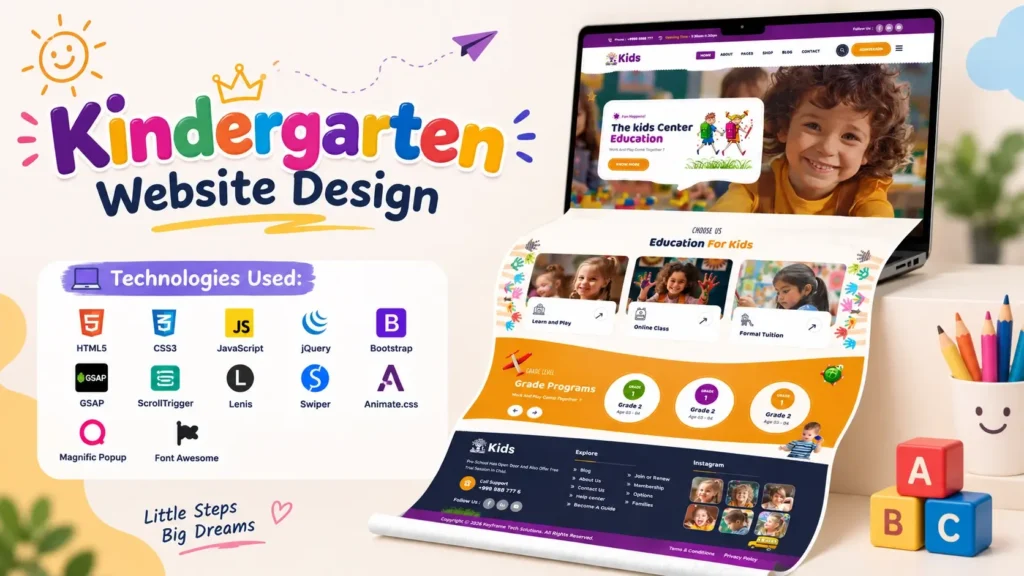
A well-designed kindergarten website is more than a colorful homepage. It is often the first digital impression parents get of a preschool, daycare, nursery, or early-learning center. A good Kindergarten Website Design should feel welcoming, trustworthy, easy to navigate, visually engaging, and responsive across phones, tablets, and desktops.
For developers, students, designers, and agencies, starting with a professionally structured website project can significantly reduce the time required to build a complete education website from scratch. A well-organized kindergarten website template can provide the visual foundation, page structure, responsive layout, animations, navigation, sliders, and reusable frontend components needed to create a polished project.
This kindergarten website project combines a playful visual style with modern frontend technologies such as HTML5, CSS3, JavaScript, jQuery, Bootstrap, GSAP, ScrollTrigger, Lenis, Swiper, Animate.css, Magnific Popup, and Font Awesome.
It is particularly suitable for developers looking for a preschool website design, school website UI, daycare website template, education website project, or responsive kindergarten website source code.
One important consideration is mobile usability. According to StatCounter’s August 2026 worldwide data, mobile devices accounted for approximately 49.36% of web usage, compared with 49.11% for desktop and 1.54% for tablets. That makes responsive design an essential part of any modern kindergarten or education website.
What Makes a Good Kindergarten Website Design?
A kindergarten website has a different visual requirement from a corporate or technology website. It should communicate warmth and creativity while still looking professional enough to build confidence among parents.
The strongest designs generally combine:
- Bright but balanced colors
- Friendly typography
- Large visual sections
- Simple navigation
- Clear calls to action
- Responsive layouts
- Interactive elements
- Attractive illustrations or photographs
- Easy-to-understand content
- Fast and intuitive user interactions
The goal is not to add animation everywhere. Instead, every design element should support the visitor’s journey.
For example, a parent visiting a preschool website may immediately want to know:
- What does the school offer?
- What age groups are supported?
- What does the learning environment look like?
- Who are the teachers?
- Where is the school located?
- How can they contact the school?
- Can they schedule a visit or ask a question?
A strong kindergarten website design should make these answers easy to find.
Kindergarten Website Template: A Strong Starting Point for Developers
Building a website from a blank HTML file can take considerable time. Developers need to create the navigation, hero section, responsive grid, content sections, animations, forms, sliders, and supporting interactions before they can concentrate on the actual content.
A structured kindergarten website template provides a starting point for this process.
Instead of treating a template as a finished website that should be copied without changes, developers can use the source structure as a foundation and customize:
- School branding
- Colors
- Typography
- Images
- Content
- Courses
- Teacher profiles
- Events
- Gallery sections
- Contact information
- Testimonials
- Calls to action
This approach is especially useful for students and beginner frontend developers who want to understand how a complete website is organized.
Technologies Used in This Kindergarten Website Project
The project uses a combination of established frontend technologies and animation libraries.
| Technology | Purpose |
|---|---|
| HTML5 | Website structure and semantic markup |
| CSS3 | Layout, styling, colors, spacing and responsive presentation |
| JavaScript | Interactive website functionality |
| jQuery | DOM manipulation and frontend interactions |
| Bootstrap | Responsive grid and reusable UI components |
| GSAP | Advanced website animations |
| ScrollTrigger | Scroll-based animation control |
| Lenis | Smooth scrolling experience |
| Swiper | Responsive sliders and carousels |
| Animate.css | Ready-to-use CSS animations |
| Magnific Popup | Popup and media viewing functionality |
| Font Awesome | Icons and visual interface elements |
This technology combination makes the project useful not only as a visual reference but also as a practical HTML CSS JavaScript website project for learning frontend development.
Why Responsive Design Matters for a Preschool Website
Parents may discover a school website while searching from a smartphone, checking information during a commute, or sharing the website through a messaging application.
That means the website should not simply shrink its desktop layout.
A genuinely responsive kindergarten website design should adapt:
- Navigation menus
- Text sizes
- Images
- Buttons
- Cards
- Sliders
- Section spacing
- Columns
- Forms
- Interactive elements
to different screen sizes.
The important distinction is between a website that technically fits on a mobile screen and one that actually feels comfortable to use.
For example, a desktop design may place three or four cards beside each other. On a smartphone, those cards may need to become a single-column layout with sufficient spacing and readable text.
W3C also highlights the relationship between mobile accessibility and broader accessibility requirements, making responsive and accessible design important considerations when developing modern websites.
Visual Design Ideas for a Kindergarten Website
Children’s websites can be visually expressive, but excessive decoration can make the interface difficult to use.
A better approach is to create a visual hierarchy.
1. Use a Friendly Color Palette
Kindergarten websites often work well with playful combinations of colors such as purple, orange, yellow, pink, green, and cream.
However, using too many strong colors at the same time can make the interface visually noisy.
Choose a primary color, one or two supporting colors, and neutral backgrounds.
2. Choose Approachable Typography
Typography has a significant impact on the personality of an education website.
Rounded or playful heading fonts can make a kindergarten website feel more welcoming, while a clean body font keeps longer text readable.
The project uses Baloo 2 for prominent headings and Roboto for general content, creating a balance between personality and readability.
3. Use Large Visual Sections
The hero section is usually the most important visual area of the homepage.
It should immediately communicate:
- What the organization is
- Who it serves
- Why visitors should explore further
- What action they can take next
A strong hero section can combine a large headline, supporting copy, an illustration or photograph, and a clear call-to-action button.
Animation in Kindergarten Website Design
Animation can make an education website feel energetic and interactive.
However, there is an important difference between useful animation and decorative animation.
Useful animation can:
- Guide attention
- Reveal content gradually
- Explain transitions
- Make navigation feel smoother
- Highlight important sections
- Improve perceived interaction quality
The project uses GSAP, ScrollTrigger, Lenis, Animate.css, and other animation-related functionality to create movement throughout the interface.
GSAP is particularly useful when developers need more control over timing, sequencing, easing, and scroll-based interactions.
Avoid Animation Overload
One common mistake beginners make is adding animations to every element.
That can result in:
- Distracting movement
- Poor readability
- Slower rendering
- Difficult navigation
- Uncomfortable mobile experiences
A better strategy is to establish a visual hierarchy first and then use animation to support it.
Using Swiper for Interactive Website Sections
Sliders are common in modern school and kindergarten websites.
They can be used for:
- Testimonials
- Events
- Classes
- Teacher profiles
- Gallery images
- Promotional sections
- Featured content
The project uses Swiper, a responsive slider library that can help create touch-friendly carousel experiences.
For mobile users, touch interaction is especially useful because visitors can swipe through content naturally rather than relying on small navigation controls.
How the Source Code Can Help Beginners Learn Web Development
A complete frontend project is often more educational than isolated code examples.
Beginners can examine how different components work together:
HTML Structure
Start by identifying the major page sections.
Look for:
- Header
- Navigation
- Hero section
- About section
- Services or classes
- Testimonials
- Gallery
- Footer
This helps beginners understand how a real webpage is divided into logical sections.
CSS Organization
Next, examine how styling is applied.
Pay attention to:
- Container widths
- Flexbox
- Grid layouts
- Media queries
- Typography
- Colors
- Spacing
- Hover effects
- Responsive breakpoints
Understanding these patterns helps developers create their own layouts rather than relying entirely on copied components.
JavaScript Functionality
The JavaScript portion shows how a static HTML page can become interactive.
Depending on the component, developers can study:
- Slider initialization
- Menu interactions
- Scroll effects
- Popup functionality
- Counters
- Form behavior
- Animation triggers
- Sticky navigation
- Smooth scrolling
This makes the project a useful reference for anyone learning frontend website development.
Kindergarten Website Design and User Experience
A beautiful interface is useful only when visitors can easily accomplish their goals.
For a kindergarten website, UX should focus heavily on parents and guardians.
Make Contact Information Easy to Find
Phone numbers, email addresses, location details, and inquiry buttons should not be hidden.
A parent who wants to ask about admission should be able to find a contact option quickly.
Keep Navigation Simple
Avoid overwhelming visitors with too many menu items.
A practical structure could include:
- Home
- About
- Programs
- Teachers
- Gallery
- Events
- Blog
- Contact
The exact navigation should depend on the school’s content.
Use Clear Calls to Action
Instead of generic buttons everywhere, use action-oriented labels such as:
- Explore Programs
- Meet Our Teachers
- View Gallery
- Contact Us
- Schedule a Visit
- Enquire Now
This gives users a clearer understanding of what will happen after clicking.
SEO Considerations for a Kindergarten Website
A visually impressive website still needs search-friendly structure.
Developers should consider SEO from the beginning rather than adding it after the website is completed.
Use a Clear Heading Structure
Every page should have a logical heading hierarchy.
The main topic should normally be represented by one primary H1, followed by H2 and H3 sections where appropriate.
Optimize Page Titles and Meta Descriptions
The title should clearly describe the page and its purpose.
For example:
Kindergarten Website Design | Preschool & Early Learning
The meta description should explain what visitors can expect from the page without stuffing keywords.
Optimize Images
Kindergarten websites often contain many images.
Use:
- Descriptive filenames
- Appropriate image dimensions
- Modern image formats where suitable
- Meaningful alt text
- Lazy loading where appropriate
This can improve both usability and performance.
Create Useful Content
A school website should answer genuine parent questions rather than simply repeating keywords.
Useful content could include:
- Admission process
- Curriculum information
- Age requirements
- Daily activities
- Teacher information
- School facilities
- Safety information
- Events
- Frequently asked questions
This is where a good education website design can become a useful information resource rather than just a digital brochure.
A Common Mistake: Designing Only for the Homepage
One of the biggest mistakes in website projects is spending almost all development time on the homepage.
The homepage is important, but supporting pages also contribute to the overall user experience and SEO structure.
A complete kindergarten website may eventually need pages such as:
- About Us
- Programs
- Classes
- Teachers
- Gallery
- Events
- Blog
- Contact
- Admission
Each page should maintain consistent branding while serving a specific user intent.
Performance: The Part Many Website Templates Overlook
A visually impressive website can still perform poorly if it loads too many large images, scripts, fonts, or animations.
Before publishing a customized kindergarten website, check:
- Image file sizes
- JavaScript loading
- CSS size
- Font loading
- Third-party libraries
- Animation performance
- Mobile rendering
- Unused assets
- Browser console errors
This is particularly important when the project uses several frontend libraries.
A useful development habit is to first make the page work correctly, then optimize the assets and interactions that have the biggest performance impact.
Accessibility Should Be Part of the Design
Accessibility is often overlooked when designing colorful children’s websites.
However, accessibility benefits a much wider audience.
Check for:
- Sufficient color contrast
- Keyboard-friendly navigation
- Readable font sizes
- Meaningful link text
- Alternative text for important images
- Clear form labels
- Visible focus states
- Logical heading structure
W3C notes that accessibility improvements such as sufficient contrast can also improve usability for people using mobile devices in challenging viewing conditions.
For an education website, this is particularly valuable because the website may be accessed by parents, grandparents, teachers, administrators, and users with different accessibility needs.
How to Customize This Kindergarten Website Project
Once you have the source structure, customization can be approached systematically.
Step 1: Replace Branding
Change:
- Logo
- School name
- Brand colors
- Contact details
- Social media links
Step 2: Update Content
Replace placeholder content with real information about:
- Programs
- Teachers
- Activities
- Facilities
- Events
- Admission
- School policies
Step 3: Replace Images
Use authentic photographs or properly licensed visuals that represent the school.
Real classroom, activity, facility, and teacher images can make the website considerably more trustworthy.
Step 4: Review Responsive Layouts
Test the customized website on:
- Desktop
- Laptop
- Tablet
- Android phones
- iPhones
Do not assume that a desktop-perfect layout will automatically look good on mobile.
Step 5: Test Every Interaction
Check:
- Navigation
- Sliders
- Buttons
- Forms
- Popups
- Links
- Animations
- Mobile menu
- Scroll behavior
This final testing stage is important before deploying the project.
Who Can Use This Kindergarten Website Template?
This type of website project can be useful for several audiences.
Frontend Developers
Developers can use it as a reference for building modern education websites with HTML, CSS, JavaScript, Bootstrap, and animation libraries.
Students
Students can study the structure of a real-world frontend project and understand how multiple files and libraries work together.
Freelancers
Freelancers can use the design approach as inspiration when developing customized websites for preschools, nurseries, daycare centers, and educational organizations.
Digital Agencies
Agencies can use the project structure as a starting reference when creating branded education websites for clients.
Designers
UI designers can study the color combinations, section hierarchy, typography, cards, sliders, and interactive components for future projects.
What to Check Before Using Any Website Source Code
Before incorporating a source-code project into your own website, always review its licensing terms and the licenses of third-party libraries and assets.
Also check whether:
- Images are licensed for your intended use
- Fonts permit your intended usage
- Plugins have compatible licenses
- External libraries are properly attributed where required
- Third-party assets have redistribution restrictions
This step is easy to overlook but important for professional website development.
Video Preview of the Kindergarten Website Design
Want to see the interface before working with the project?
The video preview showcases the kindergarten website homepage, its visual sections, responsive design approach, and a short look at the underlying source code.
Watching the frontend preview first can help developers understand the overall design direction before exploring individual HTML, CSS, and JavaScript files.
Why This Project Is Useful for Learning
The biggest value of a complete kindergarten website design project is that it connects individual frontend concepts into one practical implementation.
Instead of learning HTML, CSS, JavaScript, Bootstrap, sliders, animations, and responsive design separately, developers can see how those technologies interact within a complete website.
For beginners, a useful learning approach is:
Understand → Modify → Test → Rebuild
First understand what a section does. Then modify a small part of it. Test the result in the browser. Finally, try rebuilding a similar component independently.
That process builds considerably more practical knowledge than simply changing colors or text.
Final Thoughts
A modern Kindergarten Website Design needs to balance creativity, usability, responsiveness, performance, accessibility, and clear communication.
The project discussed in this guide provides a strong frontend foundation for developers working on kindergarten, preschool, daycare, nursery, and education-related websites. With technologies such as HTML5, CSS3, JavaScript, Bootstrap, GSAP, ScrollTrigger, Lenis, Swiper, Animate.css, Magnific Popup, and Font Awesome, it also provides plenty of opportunities for developers to study modern frontend techniques.
The most important lesson is that a successful school website should not be designed only to look attractive. It should help parents find information quickly, work comfortably across devices, load efficiently, and provide a trustworthy experience.
Use the source code as a learning and development foundation, customize the visual identity and content for your project, test every component carefully, and keep the final website focused on the people who will actually use it.
Frequently Asked Questions
What is a kindergarten website design?
A kindergarten website design is a website interface created specifically for preschools, nurseries, daycare centers, and early-learning organizations. It generally combines playful visuals with clear navigation, responsive layouts, educational content, teacher information, galleries, events, and contact options.
Which technologies are used for this kindergarten website project?
This project uses HTML5, CSS3, JavaScript, jQuery, Bootstrap, GSAP, ScrollTrigger, Lenis, Swiper, Animate.css, Magnific Popup, and Font Awesome.
Can beginners learn frontend development from a kindergarten website source code project?
Yes. A complete source-code project can help beginners understand how HTML structure, CSS styling, JavaScript interactions, responsive design, sliders, animations, and third-party libraries work together.
Is a kindergarten website template responsive?
A properly developed modern kindergarten website template should be responsive across desktop, tablet, and mobile devices. However, developers should always test the customized version on multiple screen sizes before publishing it.
Can I customize the kindergarten website design?
Yes. Developers can customize the logo, colors, typography, images, text, classes, teacher profiles, events, gallery, contact information, buttons, and other sections according to the requirements of the project.
Can this design be used for a preschool or daycare website?
Yes. The visual approach can be adapted for preschool, nursery, daycare, early-learning center, child-care center, or other education-related websites.
What should I check before using website source code?
Check the source-code license and the licensing requirements of third-party libraries, fonts, images, icons, plugins, and other assets included in the project. Also test the code for responsiveness, browser compatibility, performance, accessibility, and functionality.
Why is responsive design important for a kindergarten website?
Parents and other visitors may access the website from smartphones, tablets, or desktop computers. A responsive layout ensures that navigation, text, images, forms, and interactive elements remain usable across different screen sizes.
How can I improve the SEO of a kindergarten website?
Use descriptive page titles, logical headings, useful content, optimized images, descriptive alt text, internal links, responsive design, fast-loading pages, clear URLs, and content that answers genuine questions parents and visitors search for.
What makes a good preschool website UI?
A good preschool website UI combines friendly visual design with simple navigation, readable typography, strong content hierarchy, responsive layouts, clear calls to action, accessible interactions, and authentic information about the school.
Related Templates You May Like
11 people bought this
Grab it Now for Just 499 ₹999


