
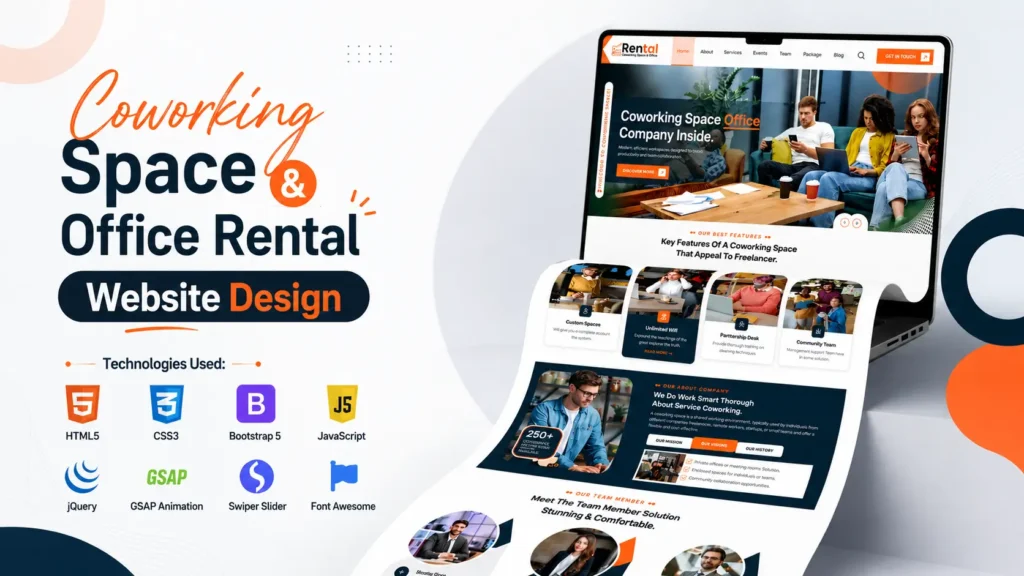
Creating a modern coworking space website design is no longer just about adding attractive images and colorful buttons. Today, businesses need websites that load quickly, look professional on every device, and provide visitors with an engaging browsing experience. Whether you’re developing a website for a shared office business, startup hub, creative workspace, or commercial office rental company, your landing page plays a crucial role in building trust and generating inquiries.
A modern coworking space website design helps businesses attract startups, freelancers, and remote teams through an engaging online presence.
According to Statista, there are now hundreds of millions of remote workers worldwide, and the demand for flexible workspaces continues to grow every year. At the same time, Google’s mobile-first indexing means responsive websites have become essential for both user experience and search visibility. A slow or outdated website can result in visitors leaving before exploring your services.
This coworking space website design project is built using HTML5, CSS3, Bootstrap 5, JavaScript, jQuery, GSAP Animation, Swiper Slider, and Font Awesome. It combines modern UI design, responsive layouts, smooth animations, and well-structured source code, making it suitable for developers, students, freelancers, agencies, and businesses looking to create a professional office rental website.
If you’re searching for inspiration from the coolest website designs coworking spaces use today, this project showcases many of the design principles that help create an engaging and conversion-focused user experience. From a visually appealing hero section to responsive pricing cards and animated content blocks, every section is designed with usability in mind.
Table of Contents
- Why a Modern Coworking Space Website Design Matters
- Project Overview
- Technologies Used
- Key Features
- Homepage Sections
- Responsive UI Design
- Why Bootstrap 5 is the Perfect Choice
- Modern Animation Using GSAP
- Swiper Slider Integration
- Benefits of This Website Design
- Conclusion
- FAQs
Why a Modern Coworking Space Website Design Matters
The coworking industry has evolved rapidly over the past few years. Entrepreneurs, startups, digital nomads, remote employees, and freelancers are constantly searching for flexible office spaces that offer comfort, productivity, and networking opportunities. Before they visit a workspace, however, they usually visit its website.
A professionally designed website acts as the digital front door of your business. It should communicate professionalism, showcase available workspaces, and guide visitors toward booking an office or contacting your team.
A high-quality coworking space website design helps businesses:
- Build trust with potential customers
- Improve online visibility
- Increase inquiry submissions
- Showcase office amenities professionally
- Display membership plans clearly
- Improve mobile browsing experience
- Create a memorable first impression
- Strengthen brand identity
Many of the coolest website designs coworking spaces use today follow a simple principle: they focus on clarity, speed, and user experience rather than overwhelming visitors with unnecessary content. This project follows the same philosophy.
Project Overview
This project is a modern and responsive landing page developed specifically for coworking spaces and office rental businesses. It features a clean design, organized source code, and reusable frontend components that make customization easy.
Whether you’re building a portfolio project, creating a client website, or learning frontend development, this template provides an excellent starting point.
The layout is designed to be both visually appealing and highly functional, allowing businesses to present their services, office spaces, pricing plans, testimonials, and contact information in a professional manner.
One of the biggest strengths of this project is its balanced design. Instead of relying on heavy visual effects, it uses clean typography, thoughtful spacing, attractive imagery, and subtle animations to create a polished user experience.
Technologies Used
This project combines several modern frontend technologies that are widely used in professional web development.
| Technology | Purpose |
|---|---|
| HTML5 | Creates the semantic structure of the website |
| CSS3 | Handles styling, layout, and responsiveness |
| Bootstrap 5 | Provides a responsive grid system and reusable UI components |
| JavaScript | Adds dynamic interactions and functionality |
| jQuery | Simplifies DOM manipulation and interactive effects |
| GSAP Animation | Creates smooth animations and transitions |
| Swiper Slider | Builds responsive sliders and carousels |
| Font Awesome | Adds scalable icons throughout the website |
These technologies work together to deliver a fast, responsive, and visually engaging landing page suitable for modern businesses.
This coworking space website design is developed using industry-standard frontend technologies that simplify customization and improve performance.
Key Features of This Coworking Space Website Design
A successful website is much more than an attractive homepage. It needs features that improve usability, engagement, and conversions.
This project includes:
- Fully responsive layout
- Clean and modern UI
- Bootstrap 5 framework
- Professional typography
- Sticky navigation
- Smooth scrolling
- Animated page sections
- Responsive Swiper Slider
- Beautiful icon integration
- Well-organized source code
- Mobile-friendly navigation
- Reusable components
- Modern button styles
- SEO-friendly HTML structure
- Easy customization
Every section has been carefully designed to provide an intuitive browsing experience while maintaining excellent visual consistency.
Developers prefer this coworking space website design because it combines responsive layouts, reusable components, and clean code organization.
Homepage Sections Included
The homepage includes all the essential sections expected in a professional office rental website.
Hero Section
The hero banner is the first thing visitors notice.
It includes:
- Attractive headline
- Supporting description
- Primary call-to-action button
- Workspace imagery
- Smooth entrance animations
A strong hero section encourages users to continue exploring the website.
About Section
The About section introduces the company and explains its mission, workspace philosophy, and business values.
Instead of long paragraphs, concise and engaging content keeps visitors interested while building credibility.
Workspace Services
Visitors can quickly understand what the business offers through clearly organized service cards.
Typical services include:
- Private Offices
- Shared Workspaces
- Meeting Rooms
- Conference Halls
- Virtual Offices
- Business Lounge
- High-Speed Internet
- Event Spaces
Each service is presented using modern cards with icons, creating an organized and professional appearance.
Featured Workspace Gallery
Images are one of the most powerful elements on any coworking website.
A responsive gallery allows businesses to showcase:
- Office interiors
- Open workspaces
- Meeting rooms
- Reception areas
- Conference facilities
- Cafeteria
- Community events
High-quality visuals help visitors imagine themselves working in the space, increasing engagement and inquiries.
Pricing Plans
A clean pricing section allows businesses to compare available office packages without confusing visitors.
Pricing cards typically include:
- Workspace type
- Monthly plans
- Included amenities
- Call-to-action buttons
Modern hover effects make the pricing section more interactive while maintaining readability.
Testimonials
Trust is essential in the coworking industry.
Displaying testimonials from satisfied clients helps reassure new visitors and demonstrates the quality of your workspace and services.
Adding profile images, company names, and ratings further increases credibility.
Responsive UI Design
One of the biggest advantages of this coworking space website design is its responsive layout.
Instead of creating separate desktop and mobile versions, Bootstrap 5 automatically adapts the interface to different screen sizes.
The layout remains visually balanced across:
- Desktop computers
- Laptops
- Tablets
- Android phones
- iPhones
- Large displays
Buttons stay clickable, text remains readable, and images resize proportionally, ensuring a consistent experience regardless of the device.
This responsive approach reflects the standards followed by many of the coolest website designs coworking spaces use to serve modern users who frequently browse on mobile devices.
Every section of this coworking space website design automatically adjusts to different screen sizes without affecting usability.
Clean UI Design Improves User Experience
Good UI design isn’t about adding more elements—it’s about presenting the right information in the right way.
This project follows several modern design principles:
- Consistent spacing
- Clear typography
- Balanced color palette
- High-quality visuals
- Readable content hierarchy
- Well-defined sections
- Modern card layouts
- Minimal visual clutter
These small design decisions create a more enjoyable browsing experience and help visitors find the information they need quickly.
Why Bootstrap 5 Is the Perfect Choice
Bootstrap 5 continues to be one of the most popular frontend frameworks because it simplifies responsive web development while maintaining flexibility.
Some of its key advantages include:
- Mobile-first grid system
- Ready-to-use UI components
- Responsive utility classes
- Faster development workflow
- Cross-browser compatibility
- Clean documentation
- Easy customization
- Lightweight implementation
By using Bootstrap 5, developers can focus more on design and functionality instead of writing repetitive CSS from scratch.
Modern Animations with GSAP
Animation can significantly improve user engagement when it enhances the browsing experience without becoming distracting. This project uses GSAP (GreenSock Animation Platform) to create smooth, high-performance animations that feel natural and professional.
Unlike traditional CSS animations, GSAP offers better control over timing, sequencing, and performance. It ensures animations remain fluid even on modern, content-rich websites.
This coworking space website design includes subtle animation effects such as:
- Hero content fade-in
- Smooth section reveal on scroll
- Animated counters
- Button hover transitions
- Image entrance effects
- Text slide animations
- Card appearance effects
These interactions make the landing page feel modern while maintaining fast performance.
Swiper Slider Integration
Visual storytelling is an important part of every professional website. Instead of displaying static images, this project uses Swiper Slider to create interactive carousels that work beautifully across all screen sizes.
Swiper is lightweight, responsive, and optimized for touch devices, making it an excellent choice for modern frontend development.
It can be used for displaying:
- Workspace galleries
- Customer testimonials
- Featured office spaces
- Team members
- Client logos
- Partner companies
Since Swiper supports swipe gestures, visitors on smartphones and tablets enjoy a much smoother browsing experience.
JavaScript Features Included
JavaScript brings the website to life by adding dynamic functionality that improves usability.
Some of the interactive features include:
- Sticky navigation bar
- Mobile navigation menu
- Smooth scrolling
- Back-to-top button
- Scroll-triggered animations
- Interactive buttons
- Dynamic sliders
- Responsive navigation behavior
These enhancements create a polished experience without overwhelming the visitor.
SEO-Friendly Website Structure
Even though this is a frontend project, its structure follows several modern SEO best practices.
A properly organized coworking space website design helps search engines understand the content while also improving accessibility for users.
The project includes:
- Semantic HTML5 tags
- Proper heading hierarchy
- Responsive layout
- Optimized navigation
- Readable typography
- Clean code structure
- Organized sections
Developers can further enhance SEO by adding:
- Meta titles
- Meta descriptions
- Open Graph tags
- Twitter Cards
- Structured data
- XML Sitemap
- Robots.txt
- Canonical URLs
These improvements increase the website’s chances of ranking higher in search results.
Website Performance Optimization
Website speed directly affects user satisfaction and conversion rates.
According to Google, 53% of mobile users leave a website if it takes longer than three seconds to load. Optimizing performance is therefore essential for both SEO and user experience.
This project follows several performance best practices:
- Lightweight frontend architecture
- Responsive image layout
- Organized CSS
- Optimized JavaScript loading
- Minimal unnecessary effects
- Modern Bootstrap components
- Efficient animation libraries
For production websites, you can further improve performance by:
- Compressing images
- Using WebP image format
- Minifying CSS and JavaScript
- Enabling browser caching
- Using a Content Delivery Network (CDN)
- Lazy loading large images
These optimizations help improve Core Web Vitals and overall page performance.
Clean Source Code Structure
One aspect that many template websites overlook is code organization. A visually appealing design is valuable, but well-structured source code is equally important for long-term maintenance.
This project uses a logical folder structure that keeps HTML, CSS, JavaScript, fonts, images, and vendor libraries organized. Developers can quickly locate and edit files without spending unnecessary time searching through the project.
Benefits include:
- Faster customization
- Easier debugging
- Better scalability
- Cleaner collaboration
- Improved maintainability
Whether you’re learning frontend development or working on client projects, an organized codebase saves valuable time.
Easy Customization
Every business has its own branding requirements. That’s why this template has been designed for easy customization.
You can easily modify:
- Brand colors
- Fonts
- Icons
- Images
- Buttons
- Sections
- Pricing plans
- Testimonials
- Contact details
- Navigation menu
- Footer content
- Animations
Because the code follows modern development practices, making changes requires minimal effort.
Who Can Use This Coworking Space Website Design?
This project is suitable for a wide range of users, including:
- Frontend developers
- Web development students
- UI/UX designers
- Freelancers
- Digital agencies
- Startup founders
- Small businesses
- Office rental companies
- Commercial real estate firms
- Portfolio creators
If you’re looking for inspiration from the coolest website designs coworking spaces showcase online, this template provides a solid foundation that can be customized for almost any workspace business.
Real-World Use Cases
Although designed for coworking spaces, the layout can easily be adapted for other industries.
Examples include:
- Shared office businesses
- Startup incubators
- Innovation hubs
- Business consulting firms
- Commercial office leasing
- Creative agencies
- Event venues
- Corporate offices
- Technology companies
- Real estate businesses
This flexibility makes the project useful beyond its original purpose.
Why This Project Stands Out
Many landing page templates focus only on aesthetics. This project combines attractive design with practical development techniques that benefit both developers and businesses.
Some standout qualities include:
- Modern UI inspired by current design trends
- Fully responsive Bootstrap 5 layout
- Smooth GSAP animations
- Swiper Slider integration
- Mobile-friendly navigation
- Professional typography
- Organized source code
- SEO-friendly HTML structure
- Easy customization
- Cross-browser compatibility
These features make it a reliable starting point for professional web development projects.
Feature Comparison
| Feature | This Project | Typical Basic Template |
|---|---|---|
| Responsive Layout | ✅ | ✅ |
| Bootstrap 5 | ✅ | Sometimes |
| GSAP Animation | ✅ | ❌ |
| Swiper Slider | ✅ | ❌ |
| Modern UI Design | ✅ | Limited |
| Organized Source Code | ✅ | Varies |
| Mobile Optimization | ✅ | Basic |
| Easy Customization | ✅ | Moderate |
| Professional Sections | ✅ | Limited |
| SEO-Friendly Structure | ✅ | Basic |
Best Practices Before Launching
Before using this project for a live website, consider these recommendations:
- Replace placeholder images with original, high-quality photos.
- Add meaningful and keyword-focused content.
- Optimize all images for faster loading.
- Configure the contact form with a backend service.
- Add Google Maps for location visibility.
- Include social media links.
- Implement structured data markup.
- Test responsiveness on multiple devices.
- Compress CSS and JavaScript files.
- Perform accessibility testing to improve usability for all users.
These small improvements can significantly enhance the overall quality of the final website.
Developer Tips
If you’re using this project as a learning resource, try extending it with additional features such as:
- Office booking functionality
- Membership registration
- Blog section
- FAQ accordion
- Dark mode
- Search functionality
- Interactive pricing calculator
- WhatsApp integration
- Newsletter subscription
- Google Maps API integration
Building these features will strengthen your frontend development skills while making the project more feature-rich.
Why Responsive Design Matters More Than Ever
Today, visitors access websites from desktops, tablets, smartphones, and even large-screen devices. A responsive website ensures that every visitor receives a consistent experience regardless of screen size.
Responsive layouts also contribute to:
- Better SEO performance
- Lower bounce rates
- Increased user engagement
- Higher conversion potential
- Improved accessibility
This coworking space website design has been developed with a mobile-first mindset, making it suitable for today’s browsing habits.
Conclusion
A modern website is one of the most valuable assets for any coworking or office rental business. It serves as the first interaction potential clients have with your brand, making design, usability, and performance equally important.
This coworking space website design combines HTML5, CSS3, Bootstrap 5, JavaScript, jQuery, GSAP Animation, and Swiper Slider to create a responsive landing page that is visually appealing, easy to customize, and built using clean development practices. Inspired by the coolest website designs coworking spaces showcase today, it offers a professional user interface, organized source code, and responsive components suitable for developers, agencies, students, and businesses alike.
Whether you’re expanding your web development portfolio, building a client project, or looking for a polished office rental website template, this project provides a strong foundation that can be customized to fit your unique requirements.
Whether you’re building a business website or learning frontend development, this coworking space website design provides an excellent starting point.
Frequently Asked Questions
1. What technologies are used in this coworking space website design?
This project is built using HTML5, CSS3, Bootstrap 5, JavaScript, jQuery, GSAP Animation, Swiper Slider, and Font Awesome.
2. Is this coworking space website design responsive?
Yes. The layout is fully responsive and works smoothly across desktops, laptops, tablets, and smartphones.
3. Can beginners customize this template?
Yes. The source code is organized, well-structured, and beginner-friendly, making customization straightforward even for those new to frontend development.
4. Does this project include modern animations?
Yes. It uses GSAP for smooth animations and Swiper Slider for responsive image and testimonial carousels.
5. Can I use this template for other business websites?
Absolutely. It can be adapted for startups, business centers, commercial office leasing, creative agencies, consulting firms, and many other industries.
6. Why is Bootstrap 5 used in this project?
Bootstrap 5 simplifies responsive web development with its mobile-first grid system, reusable UI components, and flexible utility classes, helping developers build professional websites more efficiently.
7. Is the HTML structure SEO-friendly?
Yes. The project uses semantic HTML5 elements, proper heading hierarchy, responsive design principles, and clean code that supports better search engine crawling and indexing.
8. What makes this template different from other office rental website templates?
Its combination of clean UI, responsive design, organized source code, GSAP animations, Swiper Slider integration, and easy customization makes it a practical choice for both learning and professional development.
9. How can I improve the performance of this website?
You can optimize images, minify CSS and JavaScript files, enable browser caching, use a CDN, implement lazy loading, and follow Core Web Vitals recommendations to achieve better loading speeds.
10. Who should use this coworking space website design?
This project is ideal for students, frontend developers, freelancers, agencies, startup founders, UI designers, and businesses looking to create a professional and responsive office rental or shared workspace website.
You may also like our HTML Admin Dashboard Template, Bootstrap Portfolio Website Template, and Responsive Business Website Template for more frontend projects.
16 people bought this
Grab it Now for Just 499 ₹999


