
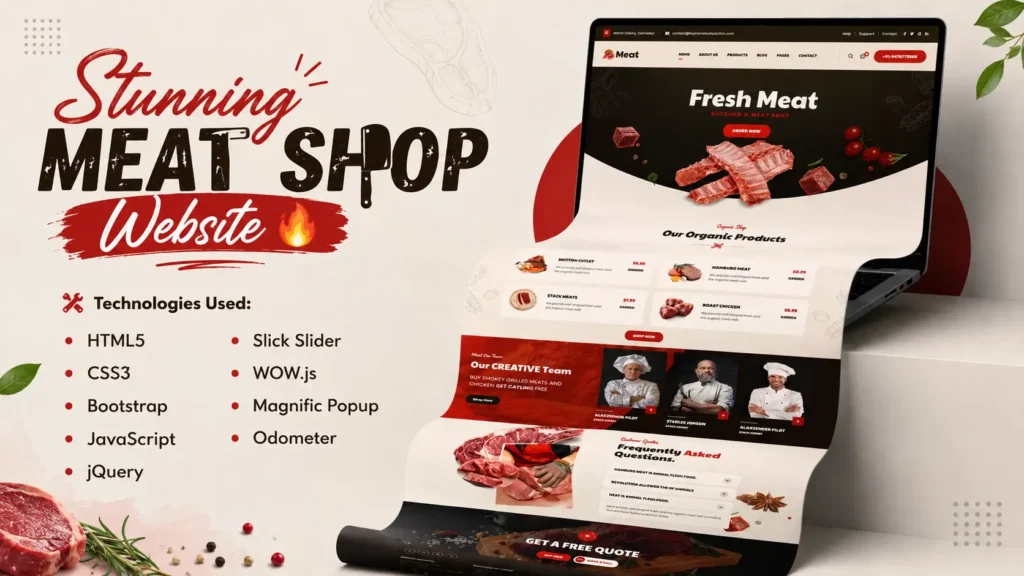
Building a professional business website is one of the best ways to improve frontend development skills while creating something visually impressive. Recently, I built a stunning Meat Shop Website using HTML, CSS, Bootstrap, JavaScript, jQuery, Slick Slider, WOW.js, Magnific Popup, and Odometer animations.
The goal of this project was simple: create a modern, responsive, and user-friendly website design that could be used as inspiration for butcher shops, meat delivery businesses, organic food stores, grocery businesses, and restaurant brands.
According to recent web design studies, more than 57% of users say they would not recommend a business with a poorly designed mobile website. This highlights the importance of responsive design and modern user experience when building business websites.
In this blog, I will walk you through the website structure, features, technologies used, design approach, responsive layout strategy, and why this project can be an excellent learning resource for beginner and intermediate frontend developers.
Project Overview
This Meat Shop Website is a fully responsive frontend project designed with a modern layout and engaging user experience. The website focuses on visual presentation, smooth animations, product showcasing, and easy navigation.
Project Highlights
| Feature | Details |
|---|---|
| Responsive Design | Mobile, Tablet & Desktop Compatible |
| Framework | Bootstrap |
| Frontend Technologies | HTML5, CSS3, JavaScript |
| Animations | WOW.js & Animate.css |
| Image Gallery | Magnific Popup |
| Product Slider | Slick Slider |
| Counter Animation | Odometer |
| User Experience | Clean & Modern UI |
The project follows modern frontend development practices and demonstrates how multiple libraries can work together to create an engaging website.
Why Build a Meat Shop Website Project?
Many beginner developers focus only on generic landing pages. However, niche-based business websites help developers understand real-world design requirements.
A Meat Shop Website project allows developers to learn:
- Business-focused UI design
- Product showcase layouts
- Responsive navigation systems
- Customer trust-building sections
- Conversion-focused design elements
- Modern animation implementation
- Mobile-first development practices
These skills are directly applicable to client projects and professional web development work.
Technologies Used in This Project
A major strength of this website is the combination of proven frontend technologies.
HTML5
HTML5 provides the structure of the website.
It is used for:
- Semantic page structure
- Accessibility improvements
- SEO-friendly content hierarchy
- Better browser compatibility
CSS3
CSS3 handles the visual styling and layout customization.
Key CSS features include:
- Custom typography
- Responsive spacing
- Hover effects
- Smooth transitions
- Modern UI elements
Bootstrap Framework
Bootstrap significantly accelerates frontend development.
Benefits include:
- Grid system
- Responsive layout
- Reusable components
- Cross-browser compatibility
- Faster development workflow
JavaScript & jQuery
JavaScript and jQuery enhance user interaction.
They help implement:
- Interactive menus
- Dynamic effects
- Smooth scrolling
- User engagement features
Slick Slider
The website uses Slick Slider to create attractive content carousels.
Advantages include:
- Mobile-friendly sliders
- Touch support
- Performance optimization
- Easy customization
WOW.js and Animate.css
Animations improve visual engagement and make sections appear more dynamic.
Examples include:
- Fade-in effects
- Slide animations
- Scroll-triggered transitions
Magnific Popup
Magnific Popup creates professional image gallery experiences.
Benefits:
- Lightweight
- Responsive
- Mobile optimized
- Easy implementation
Odometer Animation
Odometer is used to display animated counters for statistics and achievements.
These counters increase engagement and improve visual storytelling.
Website Structure Breakdown
A well-structured website improves both user experience and SEO performance.
1. Hero Section
The hero section acts as the first impression of the website.
Key elements include:
- Attractive banner image
- Strong headline
- Call-to-action button
- Modern typography
This section immediately communicates the website purpose and encourages user engagement.
2. Features Section
The features section highlights the business advantages.
Examples:
- Quality products
- Fresh ingredients
- Fast delivery
- Professional service
This section helps establish credibility and trust.
3. Product Showcase Section
The product area displays featured items using modern card layouts.
Benefits:
- Better product visibility
- Organized presentation
- Improved user interaction
4. Gallery Section
Visual content plays an important role in business websites.
The gallery section showcases:
- Product images
- Store environment
- Brand presentation
5. Team Section
Adding team information humanizes the business and builds trust.
This section includes:
- Team profiles
- Professional photos
- Design consistency
6. FAQ Section
FAQs improve user experience and support SEO.
They address common visitor questions while increasing topical relevance.
7. Blog Section
A blog section adds long-term SEO value.
Benefits include:
- More indexed pages
- Improved keyword targeting
- Better organic traffic potential
- Enhanced EEAT signals
8. Footer Section
The footer provides:
- Contact information
- Navigation links
- Social media integration
- Additional trust signals
Responsive Design Strategy
Modern users browse websites from multiple devices.
Research shows that mobile traffic accounts for more than 60% of global website visits.
Because of this, the website was built using a mobile-first responsive approach.
Mobile Optimization Features
- Flexible Bootstrap grid
- Responsive typography
- Optimized image scaling
- Mobile navigation menu
- Touch-friendly interactions
This ensures a consistent experience across smartphones, tablets, laptops, and desktops.
Design Principles Used
Several UI/UX principles were applied during development.
Visual Hierarchy
Important content receives more attention through:
- Font sizing
- Color contrast
- Strategic spacing
White Space Usage
Proper spacing improves readability and creates a premium design appearance.
Consistent Branding
Consistent typography, buttons, colors, and layout patterns improve user experience and brand perception.
Performance Optimization
The website is designed with performance in mind.
Optimization techniques include:
- Lightweight assets
- Optimized images
- Efficient CSS structure
- Minimized JavaScript usage
What Developers Can Learn from This Project
This project is valuable because it combines multiple frontend concepts into one practical example.
Developers can learn:
- Bootstrap layout development
- Responsive website creation
- Interactive frontend elements
- Modern UI design practices
- Animation integration
- Business website structure
- SEO-friendly page organization
These skills are highly relevant for freelance projects, agency work, and portfolio development.
Source Code and Template Benefits
The source code provides an excellent opportunity to explore how professional frontend projects are structured.
Benefits include:
- Clean project organization
- Reusable components
- Modern UI patterns
- Responsive framework implementation
- Practical learning experience
Developers can study the codebase, customize sections, and adapt the template for various business niches.
Conclusion
Building this Meat Shop Website using HTML, CSS, Bootstrap, JavaScript, jQuery, Slick Slider, WOW.js, Magnific Popup, and Odometer was a great opportunity to combine modern design principles with practical frontend development techniques.
The project demonstrates how responsive layouts, engaging animations, clean UI design, and structured content can create a professional business website experience.
Whether you are a beginner learning frontend development or an experienced developer seeking website inspiration, this project offers valuable insights into building modern business websites that are visually appealing, responsive, and user-focused.
Frequently Asked Questions
What technologies were used to build this Meat Shop Website?
The website was built using HTML5, CSS3, Bootstrap, JavaScript, jQuery, Slick Slider, WOW.js, Magnific Popup, and Odometer.
Is this Meat Shop Website responsive?
Yes. The design is fully responsive and optimized for mobile, tablet, and desktop devices.
Can developers customize the source code?
Yes. The project structure is easy to understand and can be customized for different business niches and website requirements.
Why is Bootstrap used in this project?
Bootstrap helps create responsive layouts faster and provides a reliable framework for modern frontend development.
Is this project suitable for frontend development learning?
Absolutely. It combines multiple frontend technologies and demonstrates real-world website design practices.
What type of businesses can use this website template?
The design can be adapted for meat shops, butcher stores, food businesses, grocery stores, organic food brands, restaurants, and delivery services.
Related Website Templates You Should Explore
Admin Dashboard Template HTML CSS JavaScript – Modern Multipurpose Admin Dashboard UI
Create Responsive Autoplay Carousel using HTML CSS and JavaScript
7 people bought this
Grab it Now for Just 499 ₹999


