
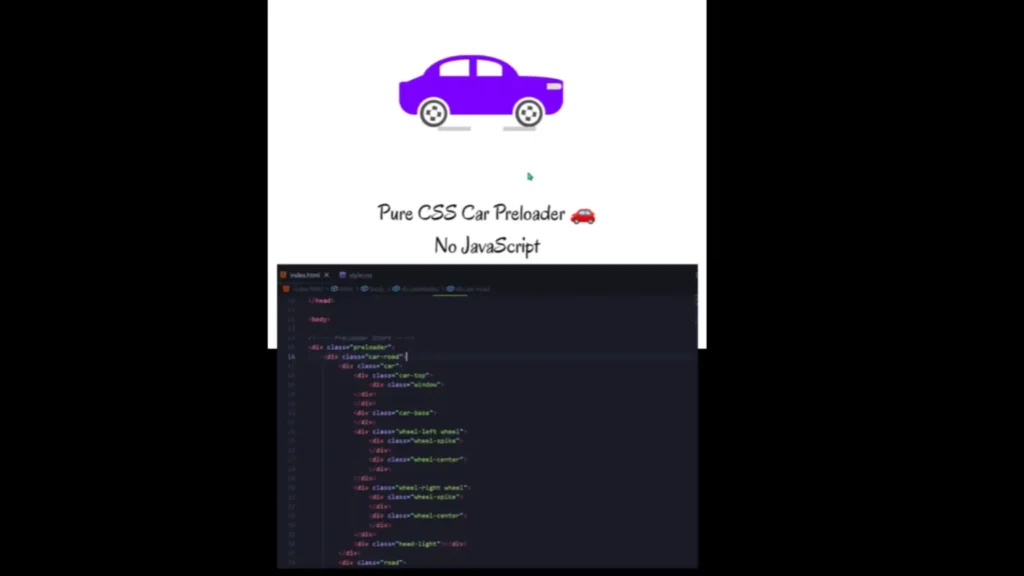
Creating a smooth loading experience is one of the easiest ways to improve the overall feel of a website. When visitors land on a page, a well-designed preloader can keep them engaged while content, images, and resources finish loading. Among the many loading animation styles available today, a Pure CSS Car Preloader Animation stands out because it is visually appealing, lightweight, and does not rely on JavaScript.
Modern users expect websites to load quickly and provide a polished experience. According to research from Google, users are more likely to abandon a website when loading times increase significantly. This makes loading indicators an important part of user experience design.
A car-themed preloader adds movement, creativity, and professionalism to web projects while maintaining excellent performance. Since it is built entirely with HTML and CSS, it reduces dependencies and keeps your project lightweight.
In this guide, you’ll learn everything about the Pure CSS Car Preloader Animation Source Code, including its features, benefits, implementation process, customization ideas, SEO considerations, and practical use cases.
What Is a Pure CSS Car Preloader Animation?
A Pure CSS Car Preloader Animation is a loading screen that visually displays a moving car animation while a webpage loads. The animation is created using only:
- HTML
- CSS
- CSS Keyframes
- CSS Transforms
- CSS Animations
No JavaScript libraries or external frameworks are required.
The animation typically includes:
- Animated car body
- Rotating wheels
- Moving road effect
- Headlights or visual details
- Smooth looping motion
Because everything is handled by CSS, the animation remains lightweight and easy to integrate into almost any website.
Why Use a CSS-Based Preloader Instead of JavaScript?
Many developers prefer CSS preloaders because they offer a better balance between performance and visual appeal.
Key Advantages
| Feature | Pure CSS Preloader | JavaScript-Based Preloader |
|---|---|---|
| Performance | Excellent | Moderate |
| Loading Speed | Fast | Depends on Scripts |
| Maintenance | Easy | More Complex |
| Browser Support | Strong | Varies |
| Dependencies | None | Often Required |
| SEO Friendly | Better | Can Affect Rendering |
A CSS-only approach reduces unnecessary code execution and helps maintain cleaner project architecture.
Features of This Pure CSS Car Preloader Animation
This project includes several visual and performance-focused features.
Lightweight Design
The animation uses only HTML and CSS, making the overall file size extremely small.
Smooth Wheel Rotation
The wheels continuously rotate using CSS keyframe animations, creating a realistic driving effect.
Moving Road Animation
A dynamic road effect gives the illusion that the car is traveling forward.
Modern UI Design
The design follows modern animation principles and works well with contemporary websites.
Responsive Layout
The structure can be adapted for desktop, tablet, and mobile devices.
Easy Customization
Developers can quickly change:
- Car colors
- Wheel styles
- Background colors
- Animation speed
- Loader dimensions
No External Libraries
The project works independently without requiring:
- jQuery
- Bootstrap
- GSAP
- JavaScript plugins
Project Structure Overview
A typical Pure CSS Car Preloader project consists of two files:
HTML File
The HTML structure defines:
- Car body
- Car roof
- Wheels
- Road section
- Container elements
CSS File
The CSS handles:
- Styling
- Positioning
- Colors
- Animations
- Responsive behavior
This separation keeps the project organized and easy to maintain.
How the Car Animation Works
Understanding how the animation functions helps developers customize it more effectively.
Step 1: Create the Car Body
The car body is built using HTML div elements styled with CSS.
Step 2: Design the Wheels
Circular shapes are created using:
border-radius: 50%;Step 3: Rotate the Wheels
A CSS keyframe animation continuously rotates the wheels.
@keyframes rotateWheel {
  from {
    transform: rotate(0deg);
  }
  to {
    transform: rotate(360deg);
  }
}
Step 4: Create Road Movement
A moving road effect is generated using CSS positioning and repeating patterns.
Step 5: Loop the Animation
The animation repeats infinitely until the page finishes loading.
Benefits of Using a Car-Themed Loader
Many developers use generic spinners, but themed preloaders often create stronger user engagement.
Improves User Experience
Visitors receive visual feedback that the website is actively loading.
Reduces Perceived Wait Time
Research shows users perceive loading times as shorter when animations are present.
Enhances Brand Personality
Creative loaders help websites appear more memorable and professional.
Increases Visual Appeal
A moving car animation immediately captures attention.
Creates Better First Impressions
The first few seconds on a website are critical. A polished loading animation can contribute positively to the user’s perception.
Best Use Cases for a Car Preloader Animation
This template can be used across multiple project categories.
Automotive Websites
Perfect for:
- Car dealerships
- Vehicle rental businesses
- Auto service centers
Portfolio Websites
Developers and designers can showcase creativity through unique loading animations.
Landing Pages
A stylish loader can improve visual consistency during page transitions.
Startup Websites
Modern animations create a premium feel without affecting performance.
Educational Projects
Students learning CSS animation can study and modify the project for practice.
Front-End Development Portfolios
This project demonstrates understanding of:
- CSS animations
- UI design
- Responsive layouts
- Visual effects
Customization Ideas for Developers
One advantage competitors rarely discuss is how preloaders can be customized to match specific branding requirements.
Change Car Colors
You can align the vehicle color with brand identity.
Examples:
- Blue for technology brands
- Red for automotive projects
- Green for eco-friendly businesses
Add Gradient Backgrounds
Modern gradient backgrounds can significantly improve visual appeal.
Create Day and Night Modes
Use CSS variables to switch between themes.
Add Smoke Effects
Small CSS-generated smoke particles can increase realism.
Include Loading Percentage
You can combine the animation with a loading progress indicator.
Add Brand Logo
Place your company logo above the animation for stronger branding.
Performance Advantages of Pure CSS Animations
Website performance directly impacts user satisfaction and search rankings.
According to industry studies, even small delays in page loading can negatively affect user engagement and conversions.
Why CSS Animations Perform Well
CSS animations:
- Utilize GPU acceleration
- Require fewer resources
- Reduce scripting overhead
- Improve rendering efficiency
This makes them an excellent choice for modern websites.
Responsive Design Considerations
A preloader should look good on every device.
Mobile Optimization
Ensure:
- Proper scaling
- Smaller dimensions
- Faster animation rendering
Tablet Compatibility
Maintain spacing and alignment across medium-sized screens.
Desktop Experience
Use larger visual elements without overwhelming the page.
Recommended Responsive Practices
- Use relative units
- Avoid fixed widths
- Test multiple screen sizes
- Use CSS media queries
SEO Considerations for Website Templates
Although preloaders primarily improve user experience, they can indirectly support SEO goals.
Better User Engagement
Engaged visitors are more likely to stay on a website.
Improved Visual Experience
A smooth experience can contribute to lower bounce rates.
Lightweight Performance
CSS-only animations help maintain faster loading performance compared to heavy script-based solutions.
Clean Code Structure
Search engines favor websites with efficient and organized code architecture.
Common Mistakes to Avoid
Many beginners make several mistakes when implementing preloaders.
Overcomplicated Animations
Complex animations can hurt performance.
Excessive Animation Duration
Users should not wait unnecessarily.
Lack of Mobile Testing
Always verify responsiveness before deployment.
Heavy External Dependencies
Avoid adding large libraries for simple animation effects.
Poor Accessibility
Consider users who prefer reduced motion settings.
How to Integrate This Car Loader Into Your Website
Implementation is straightforward.
Step 1
Download the source code files.
Step 2
Upload:
- index.html
- style.css
to your project directory.
Step 3
Place the preloader container near the beginning of the page structure.
Step 4
Adjust colors, sizes, and animation speed as required.
Step 5
Test across multiple browsers and devices.
Why This Project Is Ideal for Beginners
Many animation projects are difficult for new developers to understand.
This project offers:
- Clean code structure
- Simple CSS animations
- Easy customization
- Practical learning experience
- Real-world application
Beginners can quickly learn:
- CSS transforms
- Keyframes
- Responsive design
- Animation timing functions
- Visual UI development
Advanced Enhancement Ideas
If you want to expand the project further, consider:
Multi-Car Animation
Display multiple vehicles moving at different speeds.
Traffic Theme
Create a complete road environment.
Infinite Highway Effect
Extend the road animation for a more immersive experience.
Weather Effects
Add:
- Rain
- Snow
- Clouds
- Fog
Interactive Controls
Allow users to switch themes or adjust animation speed.
These additions can transform a simple preloader into an impressive front-end showcase project.
Conclusion
The Pure CSS Car Preloader Animation 🚗 | No JavaScript project is an excellent example of how powerful CSS animations can be. It combines performance, creativity, and simplicity into a lightweight UI component that enhances user experience without adding unnecessary dependencies.
Whether you’re building a portfolio, automotive website, landing page, educational project, or modern business website, this source code template provides a professional loading animation that is easy to implement and customize. With responsive design, smooth wheel rotation, moving road effects, and clean code architecture, it serves as both a practical website component and a valuable learning resource for front-end developers.
If you’re looking for a visually appealing CSS animation project that demonstrates modern web design techniques, this car preloader template is a strong addition to your development toolkit.
94 people downloaded this
Get It FREE Now


