
Introduction
A professional website is one of the most important assets for modern sports clubs, golf courses, country clubs, academies, and recreational businesses. Research shows that over 59% of global web traffic now comes from mobile devices, making responsive web design essential for user engagement and conversions. At the same time, studies indicate that users form an opinion about a website within seconds of landing on it, highlighting the importance of visual design, usability, and performance.
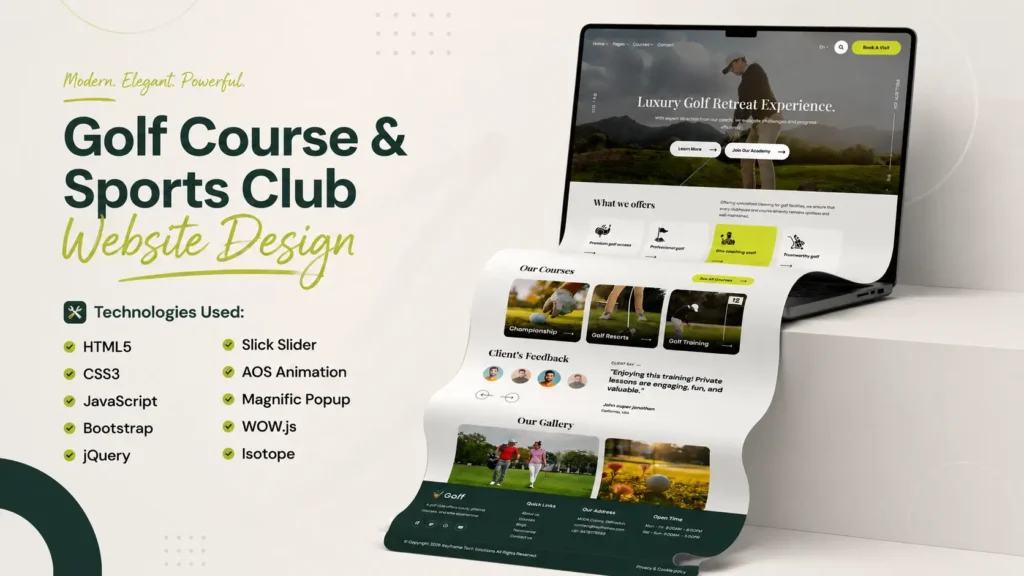
This Golf Course & Sports Club Website Design in HTML CSS Bootstrap JavaScript demonstrates how modern frontend technologies can be combined to create a visually engaging, mobile-friendly, and performance-focused website. The project features a responsive layout, animated sections, interactive sliders, pricing tables, testimonial carousels, gallery filters, and modern UI components that deliver a premium browsing experience across devices.
Built using HTML5, CSS3, JavaScript, Bootstrap, jQuery, Slick Slider, AOS Animation, WOW.js, Magnific Popup, and Isotope, this responsive frontend project serves as an excellent reference for web developers, UI designers, and students looking to learn modern website development techniques.
Website Video Preview
Watch the complete project walkthrough below to explore the homepage design, responsive layouts, animations, interactive elements, and frontend implementation.
What Is a Golf Course & Sports Club Website?
A golf course and sports club website is a digital platform designed to showcase facilities, training programs, memberships, events, coaching services, and club amenities. Such websites help organizations establish credibility while providing visitors with easy access to essential information.
Modern sports club websites focus on:
- Responsive user experiences
- Mobile-friendly navigation
- Visual storytelling
- Membership promotion
- Event management
- Facility showcases
- Interactive galleries
- Online engagement
The goal is to create a seamless experience that encourages visitors to explore services and connect with the organization.
Why Responsive Website Design Matters for Sports Clubs
Responsive design ensures that a website automatically adapts to different screen sizes, including desktops, tablets, laptops, and smartphones.
Benefits of Responsive Sports Club Website Design
Improved Mobile Experience
With mobile traffic continuing to grow, responsive websites provide consistent experiences across all devices.
Better User Engagement
Users are more likely to stay on websites that load properly and offer smooth navigation.
Enhanced Accessibility
Responsive layouts improve readability and accessibility for a wider audience.
Improved Search Visibility
Search engines prioritize mobile-friendly websites because they provide better user experiences.
Increased Visitor Retention
Visitors are more likely to browse multiple pages when the interface remains consistent and easy to use.
Technologies Used in This Golf Course Website Project
Modern frontend development relies on multiple technologies working together to deliver performance and functionality.
HTML5 for Website Structure
HTML5 forms the foundation of the project by organizing content using semantic elements that improve accessibility and maintainability.
Advantages of HTML5
Semantic Structure
Semantic tags help search engines and users understand content hierarchy.
Improved Accessibility
Screen readers and assistive technologies benefit from structured markup.
Better Content Organization
Sections remain easier to manage and maintain.
CSS3 for Modern Styling
CSS3 controls the visual appearance of the website, including typography, layouts, animations, spacing, and responsive behavior.
CSS Features Used
Responsive Layout Design
Media queries ensure compatibility across devices.
Hover Effects and Transitions
Interactive effects improve user engagement.
Modern Typography
Balanced typography enhances readability and visual hierarchy.
JavaScript for Interactive Functionality
JavaScript introduces dynamic behavior and user interactions throughout the website.
JavaScript Features
Dynamic UI Interactions
Elements respond smoothly to user actions.
Improved User Experience
Interactive features create a more engaging browsing environment.
Enhanced Navigation
JavaScript improves menu functionality and content presentation.
Bootstrap Framework for Responsive Development
Bootstrap provides a flexible grid system and reusable UI components that simplify responsive web development.
Bootstrap Benefits
Faster Development
Pre-built components reduce development time.
Responsive Grid System
Layouts adapt efficiently across screen sizes.
Consistent Design Patterns
Visual consistency improves user experience.
Homepage Design Overview
The homepage acts as the central hub of the website and creates the first impression for visitors.
Homepage Layout Structure
Hero Banner Section
The hero section immediately captures attention through large imagery, impactful headlines, and clear call-to-action elements.
Features of the Hero Banner
- Full-width slider
- Responsive layout
- Call-to-action buttons
- Visual storytelling
- Smooth transitions
About Us Section
The About section introduces visitors to the organization while highlighting experience, facilities, and club values.
Key Components
- Organization overview
- Brand messaging
- Facility introduction
- Experience highlights
Services Section
The services area presents available offerings in a structured and visually appealing format.
Examples of Services
- Golf coaching
- Sports training
- Membership programs
- Facility access
- Events and tournaments
Golf Training Programs Section
Training programs represent an important aspect of sports club websites.
Why Training Sections Improve User Experience
Visitors often want detailed information about available coaching opportunities before contacting a club.
Important Elements
Course Descriptions
Clear explanations help visitors understand available programs.
Instructor Highlights
Professional coaching information increases trust.
Learning Path Information
Structured learning journeys encourage participation.
Statistics and Achievement Counters
Data-driven sections increase credibility and trust.
According to UX research, visual metrics and achievement indicators often help users evaluate expertise and reliability more quickly.
Examples of Statistics
- Years of experience
- Active members
- Coaching sessions completed
- Tournament participation
- Facility usage metrics
Animated counters make these statistics more engaging and visually appealing.
Course Showcase Section
The course showcase highlights featured golf courses and facilities.
Benefits of Course Showcases
Improved Visual Engagement
High-quality imagery helps users visualize facilities.
Better Information Presentation
Visitors can quickly understand available amenities.
Enhanced User Navigation
Structured content improves discoverability.
Testimonials and Social Proof Section
Testimonials help establish trust and demonstrate user satisfaction.
Why Testimonials Matter
Positive feedback often influences visitor decisions.
Benefits
Increased Credibility
Reviews provide real-world validation.
Stronger Brand Trust
Authentic experiences strengthen confidence.
Improved User Confidence
Potential visitors feel more comfortable engaging with the organization.
Interactive Gallery Design Using Isotope
The gallery section allows users to explore images through an organized and filterable layout.
Features of the Interactive Gallery
Category Filtering
Users can browse content efficiently.
Responsive Image Layouts
Images remain attractive across devices.
Smooth Animations
Transitions improve visual quality.
Improved User Engagement
Interactive elements encourage exploration.
Membership and Pricing Section
The pricing area presents membership plans using modern card-based layouts.
Characteristics of Effective Pricing Design
Clear Information Hierarchy
Users can compare options easily.
Mobile-Friendly Cards
Layouts remain accessible across screen sizes.
Balanced Content Presentation
Visitors can quickly evaluate available plans.
Blog Integration and Content Strategy
Content marketing remains one of the most effective ways to attract and engage visitors.
Research consistently shows that websites publishing helpful content generate significantly more organic traffic than websites with limited content strategies.
Benefits of Blog Integration
Improved Search Visibility
Regular content helps search engines discover and index new pages.
Increased User Engagement
Visitors spend more time exploring useful information.
Better Industry Authority
Educational content strengthens expertise and trust.
Enhanced Community Building
Content helps maintain ongoing audience engagement.
Performance Optimization Techniques
Website performance directly impacts usability and visitor satisfaction.
Optimization Strategies Used
Optimized Frontend Structure
Clean code improves maintainability.
Lightweight Animations
Animations remain smooth without affecting performance.
Responsive Media Handling
Images adapt efficiently to different devices.
Efficient Plugin Integration
External libraries are organized for better performance.
What Developers Can Learn From This Frontend Project
This project provides practical insights into real-world frontend development.
Skills Demonstrated
Responsive Web Design
Learn how layouts adapt across devices.
Bootstrap Development
Understand grid systems and reusable components.
Slider Integration
Implement dynamic content carousels.
Animation Effects
Create engaging visual interactions.
Gallery Filtering
Build interactive image galleries using Isotope.
UI/UX Design Principles
Improve content hierarchy and user flow.
Frontend Architecture
Organize files for scalability and maintainability.
Download Source Code
Developers interested in exploring the project architecture can review the complete source files to understand how the website has been structured and implemented.
The project package includes:
- HTML files
- CSS stylesheets
- JavaScript files
- Bootstrap framework assets
- jQuery integrations
- Slick Slider components
- AOS Animation resources
- WOW.js assets
- Magnific Popup implementation
- Isotope gallery functionality
- Image resources
- Supporting frontend files
Conclusion
This Golf Course & Sports Club Website Design in HTML CSS Bootstrap JavaScript showcases how modern frontend technologies can be combined to create a professional, responsive, and visually engaging website. From the hero slider and training programs to interactive galleries, testimonials, membership sections, and responsive layouts, every component contributes to a polished user experience.
For developers seeking frontend inspiration, responsive web design examples, Bootstrap implementation techniques, or modern UI development practices, this project offers valuable insights into creating high-quality websites that perform effectively across all devices.
Related Website Templates You Should Explore
Admin Dashboard Template HTML CSS JavaScript – Modern Multipurpose Admin Dashboard UI
Create Responsive Autoplay Carousel using HTML CSS and JavaScript
6 people bought this
Grab it Now for Just 249 ₹499


