
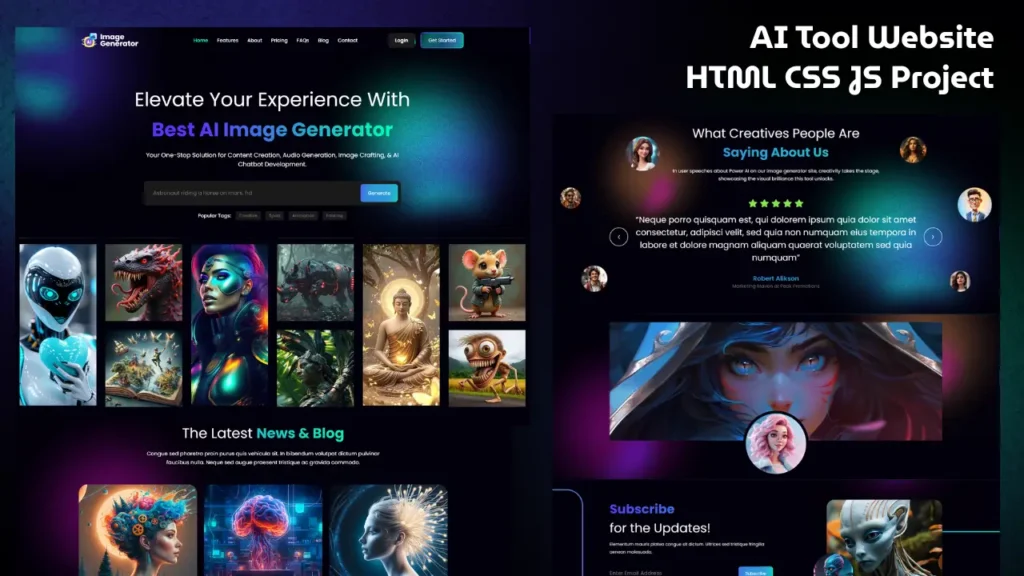
Artificial Intelligence websites are becoming one of the biggest trends in modern web development. From AI image tools to AI-powered SaaS platforms, businesses and developers are creating futuristic website interfaces that look modern, responsive, and visually engaging.
If you want to improve your frontend development skills, building an AI Image Generator website is an excellent project. It helps you learn responsive layouts, animations, UI design, and interactive frontend development using HTML, CSS, and JavaScript.
In this tutorial guide, you will learn how a modern AI Image Generator website frontend is designed using Bootstrap, GSAP animations, and clean responsive layouts.
Introduction to AI Website Design
Modern AI websites are designed to create a futuristic and interactive user experience. These websites usually include animated sections, clean layouts, responsive designs, pricing tables, FAQs, and smooth transitions.
AI website interfaces are becoming popular because they improve user engagement and create a premium digital experience.
A professional AI Image Generator website typically includes:
- Hero banner section
- Responsive navigation menu
- Smooth animations
- AI-themed UI design
- Pricing cards
- FAQ section
- Contact form
- Interactive frontend effects
This project combines all these modern design elements into a single responsive frontend website.
Video Preview of the Project
Technologies Used in This Project
This AI Image Generator website is built using multiple frontend technologies.
HTML5
HTML is used to structure the complete webpage and organize all sections properly.
CSS3
CSS helps create modern layouts, gradients, hover effects, animations, and responsive styling.
JavaScript
JavaScript adds interactivity and frontend functionality to the website.
Bootstrap
Bootstrap helps create a fully responsive website layout for desktop, tablet, and mobile devices.
GSAP Animation Library
GSAP is used for creating smooth animations and modern motion effects.
Features of the AI Image Generator Website
This frontend project includes several modern UI features.
Fully Responsive Design
The website works smoothly across all screen sizes.
Modern Hero Section
The hero section contains large headings, animated content, and call-to-action buttons.
Smooth Scroll Animations
Animations improve the user experience and make the website look more professional.
Interactive Pricing Section
Pricing cards are designed with modern layouts and hover effects.
FAQ Section
The FAQ area helps users quickly find answers to common questions.
Modern AI UI Design
The project uses futuristic colors, gradients, and modern typography.
Clean Folder Structure
The code structure is organized for easy understanding and customization.
Project Folder Structure
The project follows a clean and organized structure.
AI Image Generator/
│
├── index.html
│
├── assets/
│   ├── css/
│   │   ├── style.css
│   │   ├── media_query.css
│   │   └── bootstrap.min.css
│   │
│   ├── javascript/
│   │   ├── script.js
│   │   ├── gsap.js
│   │   └── jquery.js
│   │
│   ├── images/
│   └── video/
This structure helps developers manage styles, scripts, and assets more efficiently.
Hero Section Design
The hero section is one of the most important parts of any AI website. It creates the first impression for visitors.
A professional AI hero section should include:
- Attractive heading
- Supporting description
- Call-to-action buttons
- Animated visuals
- Responsive layout
Example HTML structure:
<section class="hero-section">
   <div class="container">
      <h1>AI Image Generator</h1>
      <p>Create modern AI-inspired artwork instantly.</p>
      <a href="#" class="btn">Get Started</a>
   </div>
</section>
This section helps improve user engagement and website appearance.
Responsive Frontend Development
Responsive design is essential for modern websites because users access websites from different devices.
This project uses Bootstrap grids and CSS media queries for responsiveness.
Responsive improvements include:
- Flexible layouts
- Mobile-friendly navigation
- Adaptive typography
- Responsive spacing
- Optimized images
A responsive frontend improves both user experience and SEO performance.
Smooth GSAP Animations
Animations help websites feel interactive and modern. Instead of heavy animation libraries, this project uses GSAP for high-performance frontend animations.
GSAP is used for:
- Fade animations
- Scroll effects
- Section reveals
- Button hover effects
- Smooth transitions
Example animation code:
gsap.from(".hero-section h1", {
   y: 50,
   opacity: 0,
   duration: 1
});
These subtle animations create a premium website experience.
SEO Benefits of Modern Website Design
Modern frontend design improves both user engagement and search engine optimization.
SEO advantages include:
- Fast loading speed
- Mobile responsiveness
- Proper heading structure
- Better user experience
- Clean HTML structure
- Improved engagement signals
Search engines prefer websites that provide smooth performance and responsive layouts.
Customization Ideas
You can further improve this AI Image Generator website with additional features.
Popular customization ideas include:
- Dark mode toggle
- AI image generation API
- User dashboard
- Login system
- Image preview functionality
- Advanced animations
These improvements can transform the project into a complete AI platform.
Performance Optimization Tips
Website performance is important for both SEO and user experience.
To improve website speed:
- Compress large images
- Minify CSS and JavaScript
- Optimize animations
- Reduce unused libraries
- Use lazy loading for images
A faster website improves search rankings and user satisfaction.
Frequently Asked Questions
How do I create an AI Image Generator website using HTML CSS and JavaScript?
You can create an AI website by designing a responsive frontend using HTML, CSS, JavaScript, Bootstrap, and animation libraries like GSAP.
Is this AI website project responsive?
Yes, the website is fully responsive and works smoothly on desktop, tablet, and mobile devices.
Which animation library is used in this project?
This project uses GSAP animation library for smooth and professional frontend animations.
Can beginners build this AI website project?
Yes, beginners with basic knowledge of HTML, CSS, and JavaScript can easily understand and customize this project.
Why are AI website designs trending?
AI website designs are popular because they create futuristic user experiences with modern layouts, animations, and interactive UI elements.
Final Thoughts
Building a modern AI Image Generator website using HTML, CSS, and JavaScript is a great way to improve frontend development skills. This project helps developers understand responsive design, animation effects, modern UI layouts, and professional website structure.
With technologies like Bootstrap and GSAP, developers can create visually engaging AI-themed websites that look modern across all devices.
Whether you are learning frontend development or building portfolio projects, AI website designs are excellent for improving practical coding skills and UI creativity.
Related Website Templates You Should Explore
Admin Dashboard Template HTML CSS JavaScript – Modern Multipurpose Admin Dashboard UI
Create Responsive Autoplay Carousel using HTML CSS and JavaScript
51 people bought this
Grab it Now for Just 199 ₹499


