
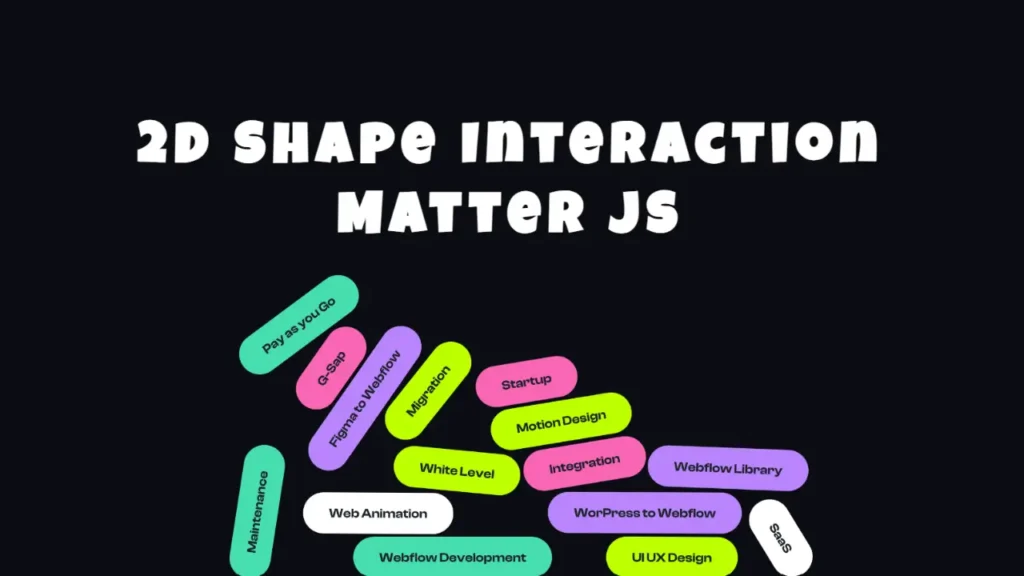
Modern websites are becoming more interactive and visually engaging than ever before. Instead of static designs and simple hover effects, developers now use advanced frontend animations to create immersive user experiences. One of the most creative ways to make a website stand out is by adding physics-based draggable animations.
In this tutorial-style project, we build an amazing draggable 2D shapes animation website using HTML, CSS, JavaScript, and Matter.js. The website features floating SVG elements, realistic physics movement, smooth dragging interaction, and a modern responsive design that looks perfect for portfolios, agency websites, and creative landing pages.
If you are searching for a modern JavaScript animation project or an interactive frontend website idea, this Matter.js project is a perfect example.
What is Matter.js?
Matter.js is a powerful JavaScript physics engine used for creating realistic 2D physics simulations inside web browsers. Developers use it to build interactive animations, games, draggable objects, collision effects, and immersive frontend experiences.
Matter.js makes it easy to create:
- Draggable objects
- Physics-based movement
- Gravity effects
- Collision detection
- Interactive website animations
- Modern frontend UI effects
Because of its lightweight structure and easy implementation, Matter.js has become extremely popular among frontend developers and creative coders.
Features of This Interactive Animation Website
This project includes several modern frontend animation features that improve the overall user experience and make the landing page visually impressive.
Interactive Draggable Elements
The SVG shapes can be dragged around the screen using mouse interaction. Every element responds naturally, creating a smooth interactive effect.
Physics-Based Animation
The project uses Matter.js physics simulation to create realistic movement, collisions, and bouncing effects between objects.
Modern Responsive Design
The website layout adjusts properly across desktops, tablets, and mobile devices for a consistent user experience.
Floating SVG Shapes
Custom SVG graphics float dynamically inside the canvas area, giving the website a modern and creative appearance.
Smooth Frontend Experience
The animation runs smoothly and creates an engaging UI that instantly attracts user attention.
Technologies Used in This Project
This draggable 2D animation website is built using modern frontend development technologies.
HTML5
HTML creates the structure of the webpage and defines the containers used in the animation layout.
CSS3
CSS is used for styling, dark theme design, responsive layout, typography, and overall visual appearance.
JavaScript
JavaScript controls the animation logic, rendering system, mouse interaction, and dynamic frontend behavior.
Matter.js Physics Engine
Matter.js powers the entire physics system including movement, dragging, collision, and object interaction.
How the Matter.js Animation Works
The animation system works by creating physics bodies inside a rendering canvas. Each SVG object is converted into a draggable physics element using Matter.js.
The physics engine continuously calculates:
- Object movement
- Collision detection
- Boundary interaction
- Mouse dragging behavior
- Realistic bounce effects
This creates a highly interactive frontend animation experience.
Below is a simple example of Matter.js engine initialization:
const engine = Matter.Engine.create();
const world = engine.world;
The engine controls all physics calculations happening inside the animation scene.
Creating Draggable Objects in JavaScript
One of the best features of this project is the draggable interaction. Users can click and move floating objects naturally around the screen.
Matter.js provides built-in mouse constraints that make draggable functionality extremely easy to implement.
Example:
const mouseConstraint = Matter.MouseConstraint.create(engine);This creates interactive mouse behavior and allows users to drag elements smoothly.
Video Preview of the Project
Below is the complete video preview of this interactive Matter.js animation website project where you can see the frontend animation, draggable elements, responsive design, and code overview.
Why Interactive Frontend Animations Are Important
Interactive animations improve website engagement and make the user experience more enjoyable. Modern users prefer websites that feel dynamic instead of static.
Benefits of frontend animation include:
- Better visual engagement
- Improved user interaction
- Higher session duration
- Modern website appearance
- Improved branding experience
- Creative UI presentation
This is why many modern portfolio websites and creative agencies use interactive animations in their landing pages.
Best Use Cases for This Matter.js Project
This draggable animation website can be used in many creative frontend projects.
Portfolio Websites
Frontend developers can use this animation as a hero section for personal portfolios.
Creative Agency Websites
Digital agencies can use floating interactive elements to showcase services creatively.
SaaS Landing Pages
Modern SaaS websites often use interactive UI animations to increase engagement.
JavaScript Learning Projects
This project is also excellent for learning frontend animation and JavaScript physics engines.
Responsive Frontend Design
The project is designed to work properly across different screen sizes. Responsive frontend design is important because users access websites using multiple devices.
The layout automatically adapts for:
- Desktop screens
- Laptop displays
- Tablets
- Mobile devices
This ensures smooth interaction and better usability everywhere.
Performance Optimization Tips
Even though physics-based animations look advanced, the project performs smoothly because Matter.js is optimized for browser rendering.
To improve performance further, developers can:
- Optimize SVG assets
- Reduce unnecessary objects
- Compress images
- Minimize JavaScript execution
- Use lightweight frontend assets
Performance optimization helps maintain smooth animations on all devices.
Why Developers Love Matter.js
Matter.js is popular among frontend developers because it simplifies complex physics animation systems.
Some major advantages include:
- Easy implementation
- Lightweight performance
- Realistic object movement
- Smooth dragging support
- Responsive interaction
- Modern frontend capabilities
Because of these features, Matter.js is widely used in creative web development projects and interactive website design.
Frequently Asked Questions
What is Matter.js used for?
Matter.js is used for creating 2D physics-based animations, draggable objects, collision systems, and interactive frontend experiences using JavaScript.
Is Matter.js good for frontend animation?
Yes, Matter.js is one of the best JavaScript libraries for creating realistic frontend physics animations and interactive website effects.
Can beginners learn Matter.js?
Yes, beginners can easily start learning Matter.js because it has simple documentation and beginner-friendly implementation.
Can I use Matter.js in portfolio websites?
Absolutely. Matter.js is perfect for portfolio websites, creative landing pages, and interactive UI projects.
Final Thoughts
Building interactive frontend animations is one of the best ways to create visually engaging websites in modern web development. This draggable 2D shapes animation website using Matter.js combines creativity, JavaScript interaction, and modern UI design into one impressive project.
The combination of HTML, CSS, JavaScript, and Matter.js creates a smooth interactive experience that feels modern and professional. Whether you are learning frontend development or building a creative portfolio website, this project is an excellent source of inspiration.
If you want to improve your frontend skills and create more engaging websites, learning Matter.js and physics-based web animation is definitely worth exploring.
Related Website Templates You Should Explore
Admin Dashboard Template HTML CSS JavaScript – Modern Multipurpose Admin Dashboard UI
Create Responsive Autoplay Carousel using HTML CSS and JavaScript
Download Source Code
You can access the complete source code of this interactive draggable 2D shapes animation website below. The source code includes all HTML, CSS, JavaScript, Matter.js implementation files, and SVG assets used in the project.
204 people bought this
Grab it Now for Just 99 ₹499


