
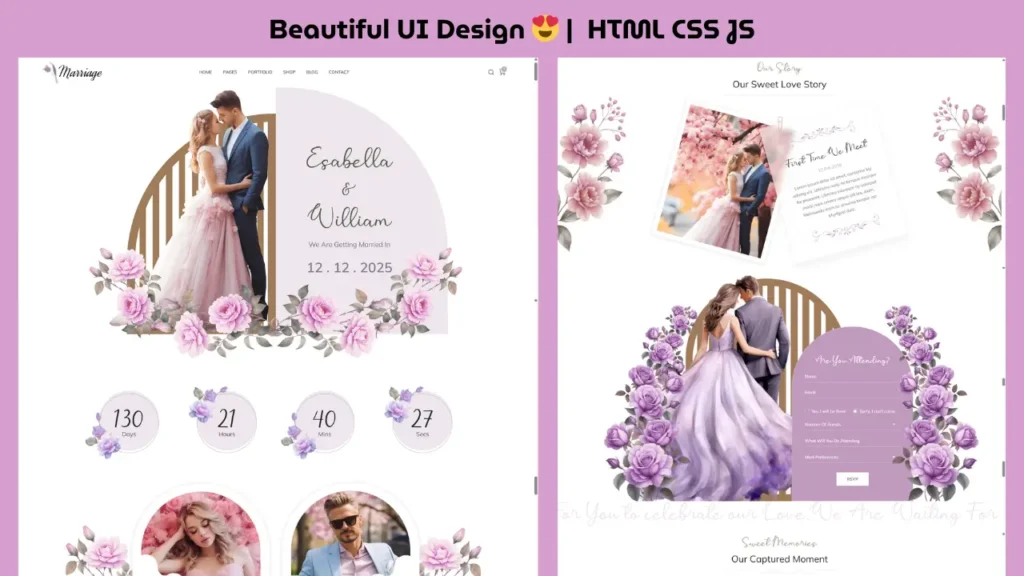
If you are looking for a modern frontend project, this wedding website design using HTML, CSS, and JavaScript is a perfect example of clean UI, smooth animations, and responsive layout.
This guide not only shows you the design but also explains how to build and customize it step-by-step, making it ideal for beginners and developers who want to improve their frontend skills.
Table of Contents
- What is a Wedding Website Design
- Live Preview
- Features
- Project Structure
- Step-by-Step Guide
- UI Design Breakdown
- Customization Ideas
- SEO Tips
- FAQ
What is a Wedding Website Design?
A wedding website is a multi-section website designed to present event details in a visually appealing way. It usually includes couple information, event schedule, gallery, and contact sections.
This type of project is widely used as a frontend portfolio project because it combines design, layout, and interactivity.
Live Preview (Watch Full Design + Code)
👉 Watch full video tutorial below
This preview demonstrates the homepage layout, animation effects, and a quick code walkthrough.
Key Features of This Project
- Clean and modern UI design
- Fully responsive layout
- Smooth scrolling and animations
- Image gallery with effects
- Well-structured and readable code
- Easy to customize for any event
Project Structure (Clean Folder Setup)
project-folder/
│── index.html
│── assets/
│ ├── css/
│ ├── js/
│ ├── images/
│ └── fonts/
This structure helps maintain scalability and clean code management.
How to Create This Wedding Website (Step-by-Step)
Step 1: Build HTML Layout
Start by creating semantic sections:
- Header
- Hero section
- About section
- Event details
- Gallery
- Contact
Step 2: Design Using CSS
Apply:
- Colors and typography
- Spacing and alignment
- Animations and hover effects
Step 3: Add JavaScript Functionality
Use JavaScript for:
- Sliders
- Scroll animations
- Interactive UI elements
Step 4: Make It Responsive
Use media queries to ensure compatibility across devices.
UI Design Breakdown
Hero Section
- Eye-catching background
- Couple names and tagline
- Smooth entry animation
About Section
- Storytelling layout
- Balanced text and images
Event Section
- Clean date and time display
- Easy readability
Gallery Section
- Grid or slider layout
- Hover and transition effects
Responsive Design Best Practices
- Use Flexbox or Grid
- Optimize images
- Avoid fixed widths
- Test on multiple devices
Customization Ideas
You can enhance this project by adding:
- Countdown timer
- RSVP form integration
- Background music
- Additional animation effects
- Theme color switcher
SEO Tips for Better Ranking
To improve search visibility:
- Use target keywords naturally
- Optimize headings (H1, H2, H3)
- Add image ALT tags
- Improve loading speed
- Embed video (already added ✔)
FAQ
1. Is this wedding website project beginner-friendly?
Yes, it is designed for beginners with basic knowledge of HTML, CSS, and JavaScript.
2. Can I use this project in my portfolio?
Yes, it is perfect for showcasing frontend skills.
3. Is the design responsive?
Yes, it works on mobile, tablet, and desktop devices.
4. Can I customize this website?
You can easily modify colors, images, and content.
5. What makes this project useful?
It combines real-world design, UI/UX, and frontend development concepts.
Final Thoughts
This wedding website design using HTML, CSS, and JavaScript is a powerful frontend project that helps you understand real-world website structure and design principles.
By working on this project, you not only improve your coding skills but also learn how to create visually appealing and user-friendly websites.
Related Website Templates You Should Explore
Admin Dashboard Template HTML CSS JavaScript – Modern Multipurpose Admin Dashboard UI
Create Responsive Autoplay Carousel using HTML CSS and JavaScript
Download Source Code
To explore the complete project and understand how everything works, you can access the full source code below.
108 people bought this
Grab it Now for Just 199 ₹499


