
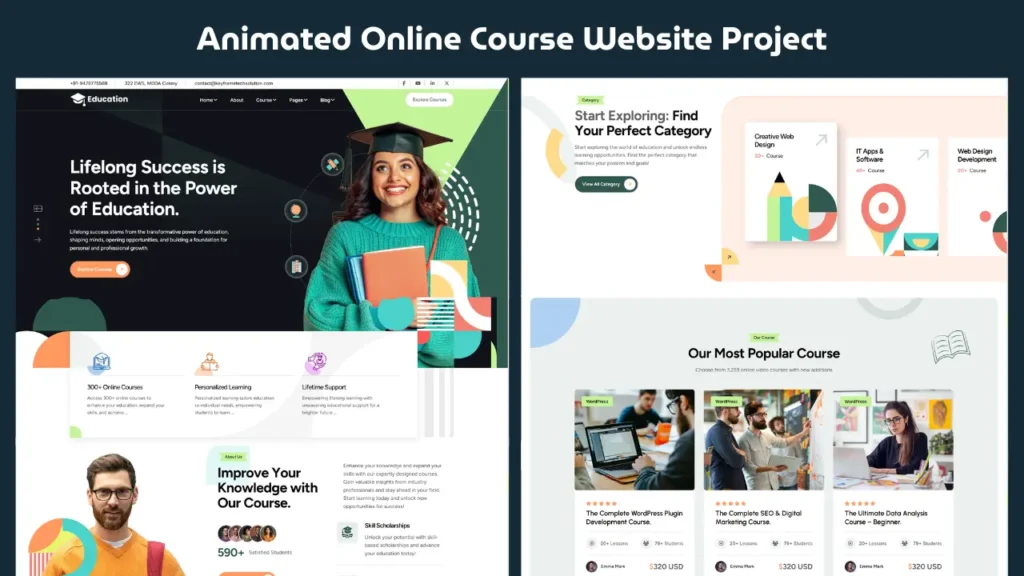
Creating a modern landing page using HTML, CSS, and JavaScript is one of the most essential skills for any frontend developer. Whether you are a beginner or someone looking to improve your UI design skills, building a real-world project like an online course website can significantly boost your portfolio.
In this guide, you will learn how a responsive and animated landing page works, what technologies are used, and how you can implement similar designs in your own projects.
Why Landing Page Projects Are Important
Landing pages are everywhere — from product websites to course platforms and business pages. They are designed to capture attention, deliver value, and guide users toward a specific action.
When you build a landing page project using HTML, CSS, and JavaScript, you learn:
- How to structure a webpage properly
- How to create responsive layouts
- How to add animations and interactivity
- How to improve user experience with modern UI design
This project focuses on an online course website layout, which is highly relevant in today’s digital world.
Project Overview: Online Course Website
This landing page is designed as a modern online course platform. It includes:
- A clean and engaging hero section
- Course highlights and features
- Call-to-action buttons
- Smooth scrolling and animations
- Responsive design for all devices
The goal is to create a visually appealing and functional design using only frontend technologies.
Watch the Project Demo
Below is the complete video where you can see the landing page design and a quick preview of the code structure.
Technologies Used
1. HTML (Structure)
HTML is used to create the foundation of the website. It defines all the sections such as:
- Header
- Hero section
- Course details
- Footer
Using semantic HTML tags helps improve readability and SEO.
CSS (Styling & Layout)
CSS is responsible for making the website visually appealing. In this project, CSS is used for:
- Layout design using Flexbox or Grid
- Colors, fonts, and spacing
- Responsive design using media queries
- Animations and transitions
Modern UI design heavily depends on clean and organized CSS.
JavaScript (Interactivity)
JavaScript adds life to the website. It is used for:
- Interactive elements
- Smooth scrolling
- Dynamic effects
- Basic animations
Even simple JavaScript can significantly enhance user experience.
Key Features of This Landing Page
✅ Responsive Design
The website adjusts perfectly across devices like mobile, tablet, and desktop. This ensures a consistent experience for all users.
✅ Modern UI Design
The layout follows modern design principles such as:
- Clean typography
- Proper spacing
- Balanced color scheme
- Minimalistic design
✅ Smooth Animations
Animations make the website feel dynamic and engaging. Subtle transitions and hover effects improve user interaction.
✅ Clean Code Structure
The project follows a well-organized code structure, making it easy to understand and modify.
How to Build This Landing Page
Step 1: Create the HTML Structure
Start by defining the basic layout:
- Navigation bar
- Hero section
- Content sections
- Footer
Use semantic tags like <header>, <section>, and <footer>.
Step 2: Add CSS Styling
Design the layout using CSS:
- Use Flexbox or Grid for alignment
- Add colors and fonts
- Ensure responsiveness with media queries
Step 3: Add Animations
Use CSS animations or JavaScript to create smooth effects:
- Hover effects
- Scroll animations
- Button transitions
Step 4: Add JavaScript Functionality
Enhance the user experience with JavaScript:
- Navigation toggle (for mobile)
- Smooth scrolling
- Interactive elements
Making It Fully Responsive
Responsive design is a must for modern websites. Use:
- Media queries
- Flexible layouts
- Scalable images
This ensures your landing page looks great on all screen sizes.
Tips for Better UI Design
- Keep the design simple and clean
- Use consistent colors and fonts
- Focus on user experience
- Avoid clutter
- Maintain proper spacing
A good UI design improves engagement and usability.
Why This Project Is Great for Your Portfolio
This landing page project demonstrates:
- Frontend development skills
- UI/UX understanding
- Real-world project experience
Adding this type of project to your portfolio can help you stand out.
Related Website Templates You Should Explore
Admin Dashboard Template HTML CSS JavaScript – Modern Multipurpose Admin Dashboard UI
Create Responsive Autoplay Carousel using HTML CSS and JavaScript
Download Source Code
If you want to explore the complete code and understand how everything works, you can get the full source code below.
1092 people bought this
Grab it Now for Just 199 ₹499


