
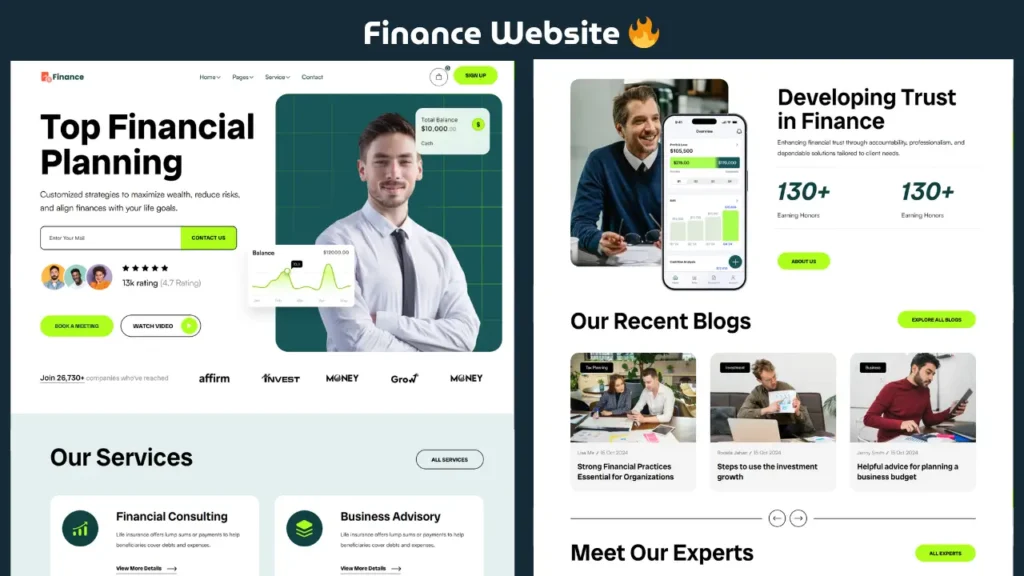
In today’s digital world, having a modern and responsive finance website is essential for businesses, developers, and learners who want to build professional web projects. Whether you are a beginner or an experienced frontend developer, creating a finance website using HTML, CSS, and JavaScript is one of the best ways to improve your UI design and coding skills.
In this guide, we will explore a clean and modern banking-style website layout, its design structure, and how you can create a similar project step by step.
Why Build a Finance Website?
A finance website is not just about design — it represents trust, security, and professionalism. That’s why banking and financial platforms follow clean layouts, structured sections, and minimal design elements.
Here are some reasons why this project is valuable:
- Helps you understand real-world UI structure
- Improves HTML and CSS layout skills
- Builds a strong frontend portfolio
- Teaches modern website design principles
If you are planning to become a frontend developer, this type of project is highly recommended.
Live Preview of Finance Website
Below is a quick preview of the finance website design. You can see how the layout, colors, and sections work together to create a professional UI.
Key Features of This Finance Website
This project is designed to look like a modern banking or financial service platform. Let’s take a look at its main features:
✔ Modern UI Design
The design is clean, minimal, and focused on user experience. It uses proper spacing, typography, and color balance to create a professional look.
✔ Responsive Layout
The website is fully responsive and works smoothly on mobile, tablet, and desktop devices.
✔ Structured Sections
The layout includes:
- Navigation bar
- Hero section
- Services or features section
- Cards for financial services
- Informational content sections
- Footer
Each section is designed to improve readability and user engagement.
✔ Beginner Friendly Code
The code structure is simple and easy to understand, making it perfect for beginners.
Technologies Used
This finance website is built using basic frontend technologies:
- HTML5 for structure
- CSS3 for styling and layout
- JavaScript for interactivity
These technologies are enough to create a powerful and modern UI without using complex frameworks.
Understanding the Website Structure
Let’s break down how this finance website works from a development perspective.
1. HTML Structure
HTML is used to create the layout of the website. It defines sections like header, content blocks, and footer.
2. CSS Styling
CSS is responsible for the visual design. It controls:
- Colors
- Fonts
- Layout spacing
- Responsiveness
Modern CSS techniques like flexbox and grid are used to create a clean layout.
3. JavaScript Functionality
JavaScript adds interactivity to the website such as:
- Menu toggle
- Animations
- Dynamic behavior
How This Project Helps You
This project is not just a design — it is a complete learning experience.
Here’s how it helps:
- Understand real-world website layout
- Improve frontend development skills
- Learn UI/UX design basics
- Build a portfolio-ready project
If you are preparing for jobs or freelance projects, this type of website can showcase your skills effectively.
SEO & Design Importance
A finance website must follow both design and SEO principles.
Design Factors:
- Clean layout
- Professional color scheme
- Easy navigation
SEO Factors:
- Proper heading structure
- Fast loading speed
- Mobile responsiveness
Combining both ensures better performance and user engagement.
Who Should Use This Project?
This finance website project is ideal for:
- Beginners learning web development
- Students working on projects
- Frontend developers building portfolios
- Anyone interested in UI design
Customization Ideas
You can improve this project further by adding:
- Login or signup page
- Dashboard UI
- API integration
- Dark mode design
- Advanced animations
These additions can make your project even more powerful.
Related Website Templates You Should Explore
Admin Dashboard Template HTML CSS JavaScript – Modern Multipurpose Admin Dashboard UI
Create Responsive Autoplay Carousel using HTML CSS and JavaScript
Download Source Code
If you want to explore the complete structure and code of this finance website, you can access the full source files below. Study the code, modify it, and use it to create your own unique design.
Conclusion
Building a finance website using HTML, CSS, and JavaScript is a great way to learn modern web design and frontend development. This project helps you understand how professional websites are structured and how UI elements work together to create a smooth user experience.
If you continue practicing similar projects, you will be able to create advanced and production-level websites in the future.
18 people bought this
Grab it Now for Just 199 ₹499


