
Introduction
The demand for digital travel solutions continues to grow as users prefer quick and simple online reservations. A well-structured air ticket booking website template helps travel agencies, developers, and startups present flight search information in a clean and responsive layout.
This guide explains everything about a modern flight ticket HTML template, including layout structure, booking form design, UI components, and airline website HTML code implementation. You will also understand how an air ticket booking system HTML5 template works from the frontend perspective.
Whether you are learning frontend development or building a travel platform, this detailed walkthrough will help you understand the full structure of a professional air ticket booking website template.
Demo Preview of the Flight Booking Website
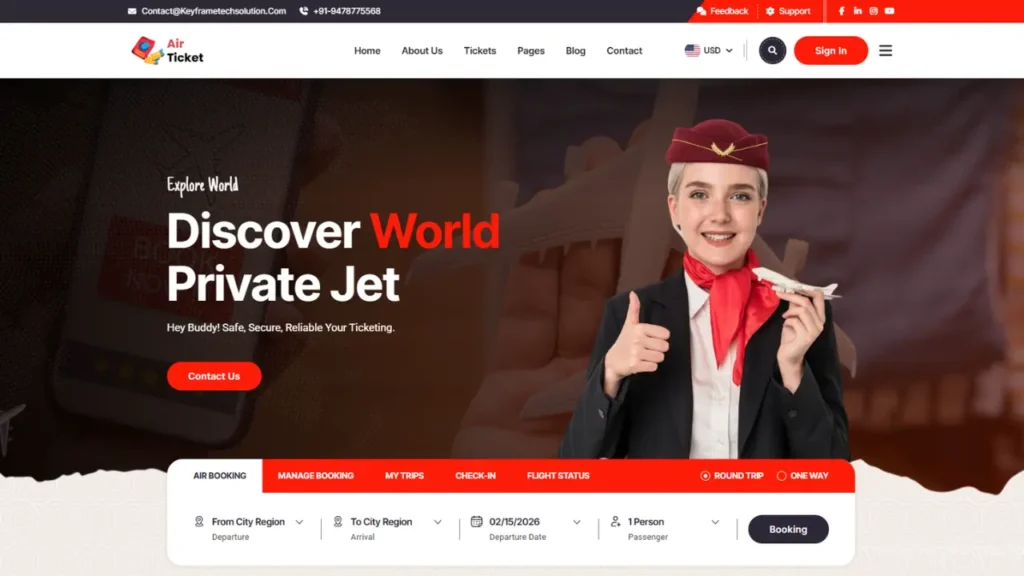
Below is the visual preview of the complete flight booking website design with homepage banner, search section, destination cards, and responsive layout.
This preview demonstrates:
-
Homepage hero section
-
Air ticket booking form
-
Destination showcase
-
Responsive mobile layout
-
Smooth animation effects
Understanding the Structure of an Air Ticket Booking Website
A professional air ticket booking website template is usually divided into multiple UI sections that together create a seamless booking experience.
1. Header and Navigation
The header contains:
-
Logo and branding
-
Menu links for destinations, booking, and contact
-
Call-to-action button for ticket search
A clean navigation system improves usability and helps users quickly reach the air ticket booking form.
2. Hero Section with Flight Search Form
The hero banner is the most important visual component of a flight booking website template.
It usually includes:
-
Background travel imagery
-
Trip type selection
-
Departure and destination fields
-
Travel date picker
-
Passenger selection
This section acts as the primary air ticket booking request form where users begin their journey.
3. Flight Search and Booking Interface
The booking interface in an air ticket booking system HTML5 template focuses on clarity and usability.
Common elements include:
-
Route selection
-
Travel class dropdown
-
Price display cards
-
Airline information blocks
Even though this is a frontend design, the UI is structured to integrate easily with real booking APIs.
4. Destination and Offer Sections
Many travel website templates highlight popular destinations using:
-
Grid-based image cards
-
Short descriptions
-
Quick navigation buttons
This improves engagement and supports marketing campaigns inside the air ticket booking website template.
5. Testimonials and Trust Elements
To increase credibility, modern airline website HTML code often includes:
-
Customer testimonials
-
Rating indicators
-
Partner airline logos
These trust signals are important for conversion optimization in any flight booking website design.
6. Footer with Contact and Links
The footer usually contains:
-
Contact details
-
Social media links
-
Quick navigation
-
Newsletter form
A structured footer improves both usability and on-page SEO for the air ticket booking website.
Key Features of a Modern Flight Ticket HTML Template
A high-quality flight ticket HTML CSS design focuses on performance, responsiveness, and clarity.
Responsive Layout
The template adapts to:
-
Mobile screens
-
Tablets
-
Desktop devices
This ensures the air ticket booking website template works smoothly across all devices.
Clean UI and Animation
Modern flight booking UI design uses:
-
Smooth scrolling
-
Subtle hover effects
-
Section transitions
These elements create a premium user experience without affecting performance.
Structured Booking Form Design
A properly designed air ticket booking form improves usability by:
-
Reducing input errors
-
Highlighting important fields
-
Guiding users step-by-step
This structure is essential in any air ticket booking system HTML5 template.
Difference Between Template Design and Real Booking System
It is important to understand that a flight ticket booking website template represents the visual frontend only.
Template Includes
-
Layout design
-
UI components
-
Booking form structure
-
Responsive styling
Real System Requires
-
Flight data API
-
User authentication
-
Payment processing
-
Booking database
This separation helps developers convert an air ticket booking website template into a complete airline reservation platform.
Use Cases of an Airline Booking Website Template
A professional airline website HTML template can be used for:
-
Travel agency websites
-
Demo frontend projects
-
UI/UX portfolio presentations
-
Learning responsive web design
-
Prototype booking systems
Because of its flexible structure, the air ticket booking website template fits multiple digital travel scenarios.
SEO Importance of a Flight Booking Website Design
Search visibility plays a major role in travel platforms.
Optimizing content around keywords like:
-
air ticket booking website template
-
flight ticket HTML template
-
airline website HTML code
-
air ticket booking form
-
air ticket itinerary template
helps improve discoverability in search engines.
Well-structured headings, fast loading speed, and mobile responsiveness further strengthen SEO performance.
Best Practices for Customizing the Template
To enhance a flight booking website template, consider:
-
Updating brand colors and typography
-
Connecting real flight search APIs
-
Adding login and dashboard pages
-
Improving accessibility and speed
-
Structuring schema markup for travel content
These improvements transform a simple air ticket booking system HTML5 template into a production-ready travel website.
Future Scope of Online Flight Booking Interfaces
Digital travel platforms continue evolving with:
-
AI-based fare prediction
-
Smart itinerary generation
-
Voice-enabled search
-
Personalized recommendations
Modern air ticket booking website templates are designed to support these future integrations through scalable UI architecture.
You may also like:
Animated Portfolio Website Template
Car Website Using HTML CSS and JavaScript
Gym Website Design using HTML CSS JavaScript
Download Source Code
You can explore the complete structure of this air ticket booking website template including HTML layout, CSS styling, JavaScript interactions, and responsive booking form design.
Use the download button below to access the full source code package and review how each section of the flight booking website design is organized for real-world implementation.
17 people bought this
Grab it Now for Just 199 ₹499


