
Introduction
Modern web applications require a powerful backend interface to manage data, users, analytics, and system settings. This is where an admin dashboard template becomes an essential component for developers and designers.
An admin dashboard acts as the control center of any web application. Whether you are building a SaaS platform, eCommerce store, analytics platform, CRM system, or project management tool, a well-structured admin dashboard UI allows administrators to monitor and control the system efficiently.
Today, developers prefer ready-to-use admin dashboard templates built with technologies like HTML, CSS, JavaScript, and Bootstrap 5. These templates provide structured layouts, reusable UI components, responsive design, and professional interface elements that significantly reduce development time.
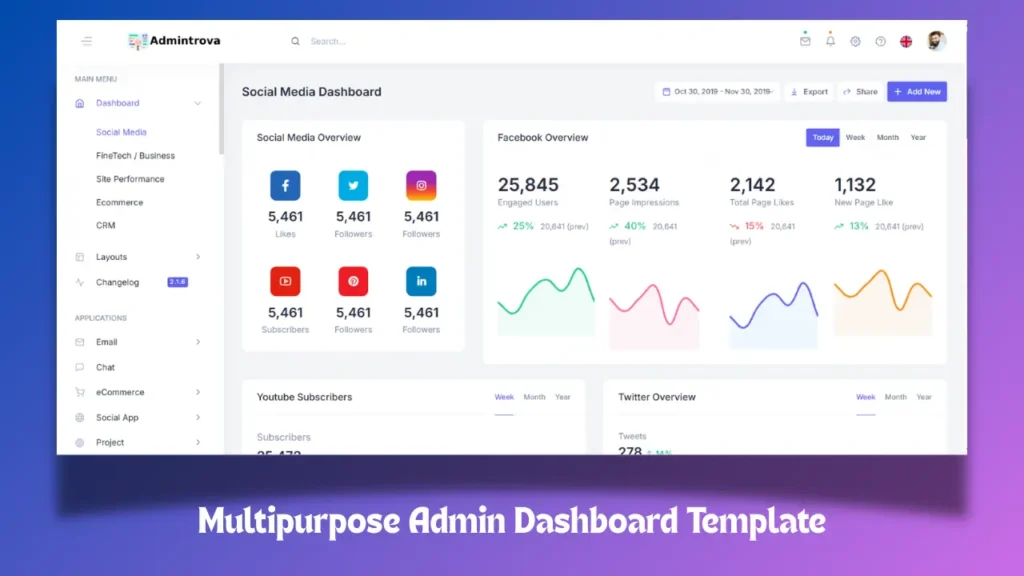
In this article, we will explore a multipurpose admin dashboard template designed for modern web applications. We will also look at its dashboard HTML CSS structure, UI design elements, responsive layout, and how developers can integrate it into real projects.
What is an Admin Dashboard Template?
An admin dashboard template is a pre-designed interface used to create backend panels for web applications. It contains a collection of UI components, layouts, widgets, and pages that help developers quickly build administrative interfaces.
A typical admin dashboard HTML template includes:
-
Sidebar navigation
-
Data tables
-
Forms and input fields
-
Charts and analytics widgets
-
User management panels
-
Authentication pages such as admin dashboard login
-
Notifications and alerts
These components work together to create a centralized interface where administrators can manage the application.
Developers commonly use admin dashboard HTML CSS JavaScript templates to build dashboards for:
-
SaaS platforms
-
CRM systems
-
eCommerce dashboards
-
Project management systems
-
Analytics dashboards
-
CMS control panels
Instead of building the UI from scratch, developers can use a multipurpose admin dashboard template to accelerate the development process.
Modern Admin Dashboard UI Design
A successful admin dashboard UI design focuses on clarity, usability, and accessibility. The goal is to make complex data easy to understand and manage.
Modern dashboards follow several key UI principles:
1. Clean Layout Structure
The interface is typically divided into:
-
Left sidebar navigation
-
Top header bar
-
Main content area
-
Widgets and charts
This structure ensures that users can navigate easily within the dashboard.
2. Data Visualization
Dashboards often display large amounts of information. Charts and graphs help administrators analyze data quickly.
Common elements include:
-
Sales charts
-
User analytics
-
Activity logs
-
Performance indicators
These visual components transform raw data into meaningful insights.
3. Responsive Dashboard UI
A modern dashboard HTML CSS template must be responsive. This ensures the dashboard works smoothly on:
-
Desktop screens
-
Tablets
-
Mobile devices
Responsive layouts are typically built using Bootstrap 5 grid systems or flexible CSS frameworks.
Admin Dashboard HTML CSS JavaScript Architecture
Most modern dashboards are built using standard frontend technologies.
HTML Structure
The admin dashboard HTML template defines the overall layout. It organizes the page into components like:
-
Sidebar
-
Header
-
Content sections
-
Footer
Each component is structured with reusable HTML blocks.
CSS Styling
The visual design is controlled using CSS and Bootstrap. CSS defines:
-
Color themes
-
Typography
-
Layout spacing
-
Grid systems
-
UI components
This ensures the dashboard maintains a consistent design across pages.
JavaScript Interactions
JavaScript adds interactivity to the dashboard. It powers features such as:
-
Sidebar toggle navigation
-
Dropdown menus
-
Dynamic charts
-
Data tables
-
Notifications
With JavaScript and plugins, the admin dashboard becomes interactive and user-friendly.
Multipurpose Admin Dashboard Template
A multipurpose admin dashboard template is designed to support various types of web applications.
Instead of focusing on a single use case, it includes flexible components that can be adapted for different industries.
Examples include:
-
analytics dashboards
-
product management panels
-
customer management systems
-
financial tracking dashboards
This flexibility allows developers to reuse the same admin panel template across multiple projects.
Some advanced multipurpose dashboards include additional pages such as:
-
authentication pages
-
profile pages
-
activity logs
-
notifications panel
-
settings panel
These additional pages provide a complete ecosystem for backend management.
Bootstrap 5 Admin Dashboard Template
Many developers prefer admin dashboard template Bootstrap 5 because Bootstrap provides a powerful responsive framework.
Bootstrap offers:
-
responsive grid system
-
pre-built UI components
-
typography utilities
-
spacing utilities
-
navigation components
Using Bootstrap 5, developers can create consistent dashboard layouts without writing complex CSS from scratch.
A Bootstrap admin dashboard template typically includes:
-
responsive sidebar
-
responsive cards
-
responsive tables
-
modal dialogs
-
form components
This framework ensures that dashboards remain consistent across all devices and screen sizes.
Dashboard HTML CSS Template Components
A modern dashboard HTML CSS template usually contains a wide range of UI components.
Sidebar Navigation
The sidebar acts as the main navigation system. It contains links to various sections such as:
-
dashboard overview
-
analytics
-
user management
-
settings
-
reports
A collapsible sidebar improves usability on smaller screens.
Dashboard Cards
Dashboard cards display key statistics such as:
-
total users
-
monthly revenue
-
system performance
-
recent activity
These cards provide quick insights into system performance.
Data Tables
Tables are commonly used for displaying large datasets such as:
-
customer lists
-
product inventory
-
transaction records
Interactive tables allow sorting, filtering, and pagination.
Forms and Inputs
Forms are used for creating or updating system data. Examples include:
-
user registration forms
-
product creation forms
-
configuration settings
Form components are essential for any admin dashboard template.
Admin Dashboard Login Interface
Another important component is the admin dashboard login page.
Authentication pages ensure that only authorized users can access the dashboard. These pages typically include:
-
login forms
-
password recovery options
-
user verification
Security is a critical factor in dashboard design, and authentication pages help protect sensitive data.
Admin Dashboard HTML Template for Developers
Developers often choose an admin dashboard HTML template because it is easy to integrate with backend frameworks.
For example, developers can integrate the dashboard with:
-
Node.js applications
-
Laravel projects
-
Django platforms
-
PHP applications
-
API-based systems
The dashboard acts as the frontend layer while the backend handles data processing and storage.
Because the template is built with HTML CSS JavaScript, it can easily connect to any backend technology.
Benefits of Using an Admin Dashboard Template
Using a professional admin dashboard template offers several advantages.
Faster Development
Developers do not need to design the interface from scratch. Pre-built UI components accelerate development.
Consistent User Experience
A structured dashboard ensures consistency across different pages and features.
Scalable Design
A multipurpose admin dashboard template can scale as the application grows.
Developer Friendly Architecture
Templates built with HTML CSS JavaScript and Bootstrap are easy to customize.
Developers can modify:
-
layouts
-
color themes
-
components
-
widgets
to match the branding of their application.
Dashboard HTML CSS Template for Web Applications
Many modern web applications rely on dashboard HTML CSS templates for their backend interface.
Examples include:
-
SaaS analytics dashboards
-
inventory management systems
-
CRM dashboards
-
marketing analytics panels
These dashboards allow administrators to monitor application performance, manage users, and analyze data from a single interface.
Future of Admin Dashboard UI
The design of admin dashboard UI continues to evolve with new technologies.
Some emerging trends include:
-
AI powered analytics dashboards
-
real-time data visualization
-
dark mode UI dashboards
-
customizable widgets
-
interactive data analytics
Modern dashboards focus on delivering insights quickly while maintaining a clean and minimal interface.
As web applications become more complex, the demand for well-structured admin dashboard templates will continue to grow.
Related Website Templates You Should Explore
Wedding Planner Website
Animated Portfolio Website Template
Car Website Using HTML CSS and JavaScript
Gym Website Design using HTML CSS JavaScript
Download Source Code
If you are a developer looking to explore the structure of a multipurpose admin dashboard template built with HTML CSS JavaScript and Bootstrap, you can access the source code below.
This template includes a complete admin dashboard HTML layout, responsive components, UI widgets, and multiple pages that demonstrate how a professional dashboard interface is structured.
1 people bought this
Grab it Now for Just 199 ₹499


