
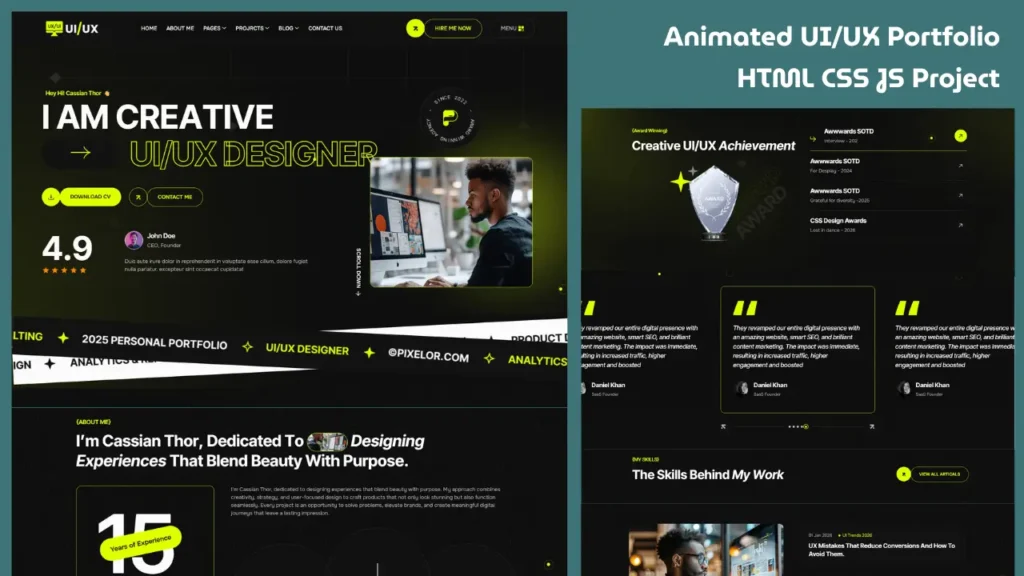
Creating a modern portfolio website using HTML CSS JavaScript is one of the best frontend projects for developers, designers, and freelancers. A well-designed portfolio helps showcase skills, projects, and creativity while building a strong online presence.
Whether you want a personal portfolio website, developer showcase, or UX/UI designer portfolio, this project combines responsive design, smooth animations, and interactive sections to create a professional website.
In this guide, you’ll learn the essential structure, features, and steps needed to build a stunning portfolio website from scratch.
Why Build a Portfolio Website?
A portfolio website is more than an online profile. It helps you:
- Showcase your best work
- Highlight your skills
- Build credibility
- Attract clients or job opportunities
- Create your personal brand
A modern portfolio website can often make a stronger first impression than a traditional resume.
Features of a Modern Portfolio Website
A professional portfolio website usually includes:
1. Hero Section
The hero section introduces you with:
- Name and title
- Short introduction
- Call-to-action buttons
- Professional visuals
Strong hero sections improve engagement immediately.
2. About Section
The about section tells visitors who you are and what you do.
Include:
- Skills
- Experience
- Design tools
- Work process
This section helps build trust.
3. Services Section
Showcase what you offer such as:
- UI/UX Design
- Web Design
- Frontend Development
- Branding
Service cards with hover effects make this section visually appealing.
4. Portfolio Projects Showcase
This is the most important part of a portfolio website.
Include:
- Project thumbnails
- Case studies
- Live previews
- Interactive project cards
- Hover animations
A strong project section can significantly improve your portfolio.
5. Testimonials Section
Client feedback or testimonials add credibility and professionalism.
6. Contact Section
A simple contact form and social links help visitors connect easily.
Technologies Used
HTML
HTML creates the website structure including:
- Header
- Sections
- Portfolio cards
- Forms
- Footer
CSS
CSS styles the website with:
- Modern layouts
- Typography
- Hover effects
- Animations
- Responsive design
Flexbox, Grid and media queries are useful here.
JavaScript
JavaScript powers interactions like:
- Mobile menu toggle
- Sticky header
- Sliders
- Scroll animations
- Portfolio filtering
- Dynamic effects
Together these create an engaging user experience.
How to Create a Portfolio Website Step by Step
Follow these steps:
Step 1: Create Basic HTML Structure
Build sections like:
- Hero
- About
- Services
- Projects
- Contact
Start with semantic HTML.
Step 2: Style with CSS
Add:
- Colors
- Typography
- Layout spacing
- Buttons
- Cards
- Responsive styling
Use a modern design approach.
Step 3: Add JavaScript Effects
Enhance user experience with:
- Smooth scrolling
- Sliders
- Animation effects
- Interactive navigation
These make the portfolio feel professional.
Step 4: Make It Responsive
Optimize for:
- Desktop
- Tablet
- Mobile
Responsive portfolios improve usability and SEO.
Modern Portfolio Website Design Elements
This project includes trending UI features like:
- Dark theme inspired layouts
- Neon accent colors
- Animated counters
- Parallax backgrounds
- Smooth transitions
- Custom cursor effects
- Interactive cards
These elements give the website a premium look.
Portfolio Website Project Structure Explained
A typical project structure looks like:
- index.html
- style.css
- main.js
- images folder
- assets folder
Organizing files properly makes customization easier.
How to Customize This Portfolio Template
You can personalize:
- Color scheme
- Fonts
- Project sections
- About content
- Contact details
- Social profiles
- Layout blocks
This makes the portfolio unique to your personal brand.
Common Mistakes to Avoid
Avoid these mistakes when building a portfolio website:
Too Much Clutter
Keep design clean and simple.
Slow Loading Pages
Optimize images and scripts.
Poor Mobile Experience
Always test responsiveness.
Weak Project Showcase
Highlight your best work only.
Difficult Navigation
Use clear menus and structure.
Why This Portfolio Project Is Great for Beginners
This project helps practice:
- HTML structure
- CSS layouts
- JavaScript interactions
- Responsive design
- UI/UX principles
It is an excellent frontend development project.
Tips to Make Your Portfolio Website Stand Out
To improve your portfolio:
- Use quality project mockups
- Add smooth animations
- Focus on user experience
- Show results in projects
- Keep the interface modern
- Optimize website speed
Small details create big impact.
Frequently Asked Questions
How do I build a portfolio website using HTML CSS JavaScript?
Start with HTML for structure, CSS for styling and JavaScript for interactive features.
What sections should a portfolio website include?
Hero, about, services, projects, testimonials and contact section.
Why is responsive design important for portfolio websites?
Responsive design improves usability across devices and helps with search rankings.
Is a portfolio website good for frontend practice?
Yes, it is one of the best real-world frontend projects.
Final Thoughts
Building a modern portfolio website using HTML CSS JavaScript is an excellent project for improving frontend skills while creating a professional online presence.
With responsive layouts, interactive effects, project showcases and modern UI design, this portfolio website can help developers and designers stand out online.
If you want inspiration for your next frontend project, this is a great project to explore.
Related Website Templates You Should Explore
Admin Dashboard Template HTML CSS JavaScript – Modern Multipurpose Admin Dashboard UI
Create Responsive Autoplay Carousel using HTML CSS and JavaScript
Source Code
Want to explore the complete source code of this modern portfolio website project?
Access the project files below to study the code structure, customize the design, and use it for learning or personal portfolio development.
Use the source code button below to access the project files.
101 people bought this
Grab it Now for Just 199 ₹499


