
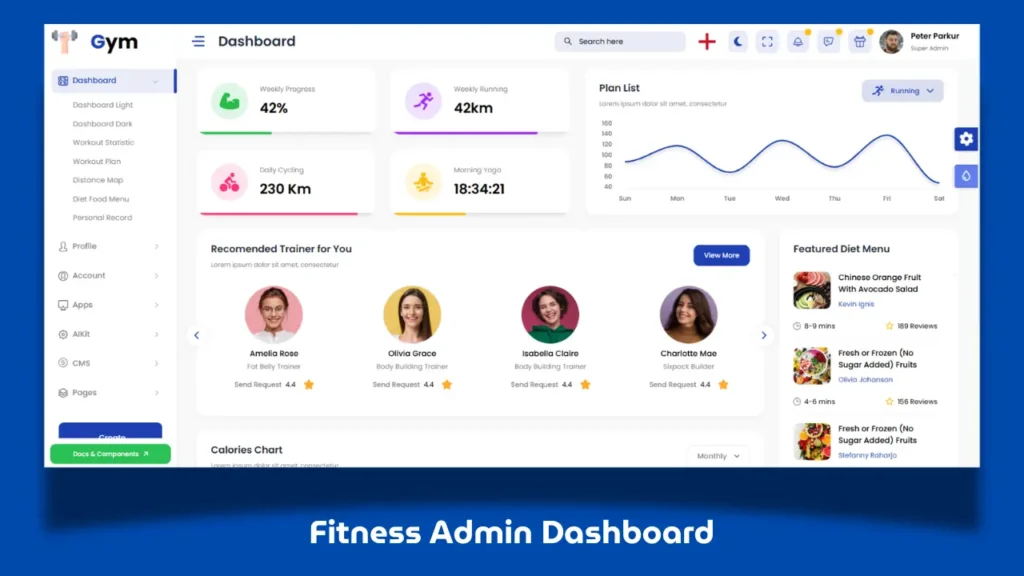
Modern web applications rely heavily on dashboards to manage data, improve workflows, and create better user experiences. In the fitness industry, admin dashboards are useful for managing memberships, workout plans, nutrition tracking, analytics, and user activity in one centralized panel.
In this guide, we explore a Clean Fitness Admin Dashboard built using HTML, CSS, JavaScript, and Bootstrap, including its features, layout structure, and how developers can use similar techniques to build professional admin panel projects.
Whether you are a beginner learning frontend development or an experienced developer looking for dashboard UI inspiration, this project offers practical value and modern design ideas.
What Is a Fitness Admin Dashboard?
A fitness admin dashboard is a control panel designed to manage gym or fitness-related operations through an organized interface.
Common modules often include:
- Workout tracking
- Member management
- Progress monitoring
- Nutrition sections
- Account management
- Billing dashboards
- Reports and analytics
Unlike simple website layouts, dashboards focus on usability, organization, and data-driven interfaces.
Why Build a Fitness Dashboard Using HTML CSS JavaScript?
Using core frontend technologies helps developers understand the foundation behind modern dashboard interfaces.
HTML for Structure
HTML creates the layout for cards, tables, sidebars, forms, and navigation components.
CSS for Dashboard Styling
CSS helps build a polished interface using:
- Responsive layouts
- Dashboard cards
- Spacing systems
- Typography
- Hover effects
- Visual hierarchy
JavaScript for Interactivity
JavaScript adds interactive dashboard behavior like:
- Dynamic components
- Charts
- Menus
- Notifications
- Data interactions
Bootstrap for Responsive Design
Bootstrap makes building scalable dashboard layouts faster and cleaner.
Its grid system and reusable components are ideal for admin panels.
Key Features of This Clean Fitness Admin Dashboard
This project includes several modern UI sections.
1. Modern Dashboard Homepage
The homepage works as a control center showing:
- Activity overview
- Fitness statistics
- Performance widgets
- Progress cards
- Summary sections
A clean homepage layout improves usability and gives dashboards a professional look.
2. Workout Management Interface
Fitness dashboards often include workout modules where users or admins can manage:
- Workout routines
- Exercise plans
- Progress records
- Training schedules
These sections make dashboard projects feel practical and real-world ready.
3. User Profile and Account Sections
Profile modules are often part of admin panel projects and can include:
- Account settings
- Activity tracking
- Security settings
- User management
These sections make the project more complete.
4. Nutrition and Food Dashboard Components
Many fitness dashboards include food and nutrition sections for:
- Meal tracking
- Food plans
- Calorie monitoring
- Nutrition management
This adds another layer of functionality to the UI.
5. Analytics and Dashboard Widgets
One major strength of admin panel projects is data visualization.
Dashboard widgets may include:
- Progress charts
- Reports
- Statistics cards
- Graph components
- Activity insights
These elements make the interface look premium and dynamic.
Watch the Fitness Dashboard in Action
A visual walkthrough helps understand the layout, responsiveness, and code structure much better.
How to Build a Fitness Admin Dashboard Step by Step
Step 1: Create the Dashboard Layout
Start with the core structure:
- Sidebar navigation
- Header section
- Main dashboard content
- Card layouts
- Widgets and data sections
A structured layout is the foundation of any admin panel.
Step 2: Design Responsive UI Components
Build reusable components like:
- Cards
- Tables
- Forms
- Charts
- Buttons
- Navigation menus
Reusable components make dashboard projects scalable.
Step 3: Add Bootstrap Grid System
Use Bootstrap rows and columns to organize:
- Dashboard widgets
- Stats sections
- User panels
- Content modules
This keeps layouts responsive across devices.
Step 4: Add Interactive Features with JavaScript
Use JavaScript for:
- Menu interactions
- Dynamic elements
- UI behaviors
- Dashboard widgets
Even simple interactions improve user experience.
Step 5: Organize Your Code Structure
Keep files organized:
- HTML pages
- CSS styles
- JavaScript files
- Components
- Assets folders
Clean structure makes projects easier to maintain and customize.
Why This Dashboard Project Is Great for Frontend Developers
Projects like this help improve multiple skills:
Learn Real Dashboard UI Design
You practice layouts similar to modern SaaS interfaces.
Strengthen Your Portfolio
Dashboard projects often stand out in frontend portfolios.
Improve Bootstrap Skills
Admin interfaces are excellent Bootstrap practice.
Understand Large UI Structures
Multi-page dashboard projects teach scalable frontend organization.
For developers, this is more than a design showcase — it is a practical learning project.
Fitness Dashboard Use Cases
This type of admin panel can inspire projects for:
- Gym Management Systems
- Personal Trainer Platforms
- Wellness Applications
- Membership Dashboards
- Health Tracking Panels
- Fitness Analytics Systems
Its modular design can be adapted to many industries.
Why Dashboard UI Projects Are Popular
Dashboard design projects perform well because they combine:
- Modern UI aesthetics
- Practical development concepts
- Portfolio inspiration
- Code curiosity
- Tutorial potential
That is why admin dashboard content often performs well among developers and learners.
Frequently Asked Questions
What technologies are used in this fitness admin dashboard?
This project uses HTML, CSS, JavaScript and Bootstrap for layout, styling, responsiveness and interactivity.
Is Bootstrap good for admin dashboard projects?
Yes, Bootstrap is widely used for responsive dashboard interfaces and admin panel layouts.
Can beginners build dashboard projects?
Yes. Dashboard projects are excellent for improving frontend development skills.
Why are admin dashboard projects good for portfolios?
They demonstrate layout skills, UI design, responsiveness and practical coding ability.
Download Source Code
If you want to study the complete project structure or customize the dashboard for your own frontend project, you can access the source code below.
The project includes:
- Dashboard pages
- Responsive layouts
- Fitness UI components
- Bootstrap structure
- JavaScript functionality
- Admin panel modules
Use the button below to get the source code and explore the project.
Related Website Templates You Should Explore
Gym Website Design using HTML CSS JavaScript
Final Thoughts
Building a Clean Fitness Admin Dashboard using HTML CSS JavaScript is a great way to learn frontend development while creating a professional UI project.
From responsive layouts to dashboard widgets and admin components, this project shows how modern interfaces can be built using core web technologies.
If you enjoy dashboard UI design, admin panel projects, and frontend development inspiration, this project is a strong example worth exploring.
11 people bought this
Grab it Now for Just 499 ₹999


